命令系统解析:Slash Commands 是怎么工作的
2026/7/31 17:12:51 · 更新于 2026/7/31 17:15:39
Slack-style commands serve as explicit user interfaces for controlling AI systems, providing direct access to system configuration and functionality separate from model-driven tool execution.
本文解析 Claude Code 中的 命令系统(Slash Commands),明确其作为用户显式控制入口与模型自动调用工具系统的本质区别。通过剖析聚合中心 commands.ts 的架构定位与设计初衷,揭示为何成熟的 AI 工程助手必须同时具备强大的“智能自动化”与明确的“人工接管/管理面”。
命令系统与工具系统:两套截然不同的机制
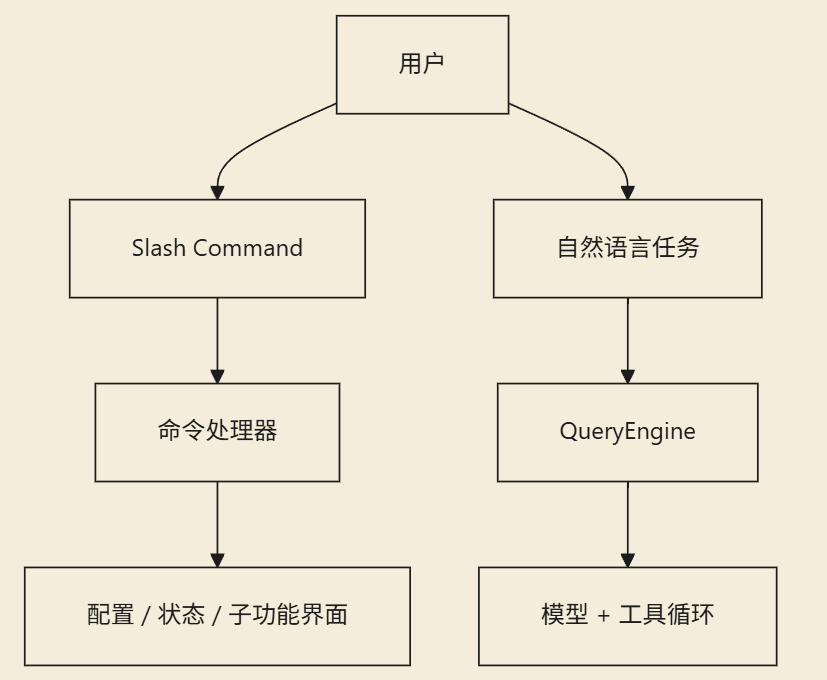
在 Claude Code 中,有两套极易混淆的运行机制:
- 工具系统(Tool System):面向模型,供其在主循环中自动调用的能力集。
- 命令系统(Command System):面向用户,需要用户显式输入以触发控制流程的接口。
诸如 /config、/mcp、/review、/plugin 等 Slash Commands,并非设计给模型在主循环中随意调用的。它们是留给用户的直接干预入口和面板控制点。

commands.ts:命令聚合中心与功能地图
commands.ts 文件之所以体量庞大,是因为它承担了将系统内所有操作指令汇聚一堂的职能。
从导入列表中即可一目了然地看出 Claude Code 命令覆盖面的广度,涵盖了几乎所有关键的管理维度:
- 配置与环境管理
- 登录与会话控制
- 审查与 Diff 对比
- MCP 接入与插件开发
- 模型切换、用量统计 (usage)、余额查询与状态监控 (status, cost)
- 计划编排 (plan)、权限管理、钩子配置、文件操作
- 远程模式、移动端、Chrome 集成、分支管理与 Skills
import config from './commands/config/index.js'
import { context, contextNonInteractive } from './commands/context/index.js'
import diff from './commands/diff/index.js'
import mcp from './commands/mcp/index.js'
import review, { ultrareview } from './commands/review.js'
import skills from './commands/skills/index.js'
import status from './commands/status/index.js'
import tasks from './commands/tasks/index.js'
import plugin from './commands/plugin/index.js'
import plan from './commands/plan/index.js'
import files from './commands/files/index.js'
这段代码直观地揭示了:Claude Code 的命令系统并非几行修补性质的辅助脚本,而是已经构建为一套极其完整的产品控制平面(Control Plane)。
为什么成熟产品必须保留独立的“命令面”
如果一切行为完全交给模型自动推演决策,系统固然会显得极度智能,但用户将丧失明确的干预和控制权。命令系统的核心价值正是在于此:保障确定性。
哪些场景适合显式命令?
很多操作天然不适合依赖自然语言模糊表达或靠算法去猜,必须由人直接触发或明确指定:
- 切换底层模型
- 查看实时系统状态
- 管理外部插件市场
- 进入代码审查、全量分析等特殊模式
控制任务的本质定位
成熟产品的命令面通常承载以下非推理型任务:
- 开启或暂停某种运作模式
- 查看特定的统计面板与数据
- 配置权限边界与运行钩子
这些动作的目标本就不是“激发模型进行逻辑推理”,而是强制系统进入某种精确的状态。将控制权剥离给命令层,能极大降低自然语言指令解析带来的不可控风险。
架构层面的意义:一种高效的“能力组织方式”
从工程架构来看,命令系统解决了另一层问题:庞杂能力的主题分类与归口管理。这也是为什么你在 commands.ts 中不仅能看到基础指令,也能看到大量通过 Feature-gate(功能门控)隔离的高级指令。命名空间本身就是产品的能力地图和功能清单,极大地降低了后续迭代的维护认知成本。
深入理解:命令系统与工具系统的协同关系
要理顺两者的关系,只需明确“使用者”这一核心差异:
- 命令系统 (Commands):人直接操作系统的入口。
- 工具系统 (Tools):模型代替人去操作系统的自动化通道。
尽管使用者不同,两者却运行于同一逻辑底座之上,共享以下底层特征:
- 皆受全局配置项 (Config) 管控
- 皆可被 Feature Gating 限制或赋予权限
- 均参与读取或改写运行时的
AppState状态机 - 均会与内部服务网络及外部 API 集成发生深度交互
二者互为补充:工具系统负责释放 AI 的自动化生产力,而显式命令系统则构成了系统的防御底线与透明化掌控层。
小结 Claude Code 并未局限于“全智能自动化”的单一路径。
commands.ts的存在证明了一套完整的工程助手架构应当遵循核心原则:优秀的智能辅助不仅在于它能自动完成多少任务,更在于它总能让用户随时明确地接管、切换并管理整个运行环境。
Key takeaways
- 定位区隔:工具面向模型的自动化调用,命令面向用户的显式控制。Slash Commands 属于后者,旨在提供确定性的干预入口。
- 架构中心:
commands.ts不仅是执行汇总层,更是功能地图与控制平面的载体,体现了对高复杂度功能的有效组织与解耦。 - 确定性需求:成熟系统必须剥离非推理类任务(如状态查看、权限配置)给命令面,以降低自然语言交互中的模糊性与不可控风险。
- 底层同源:两套系统虽使用者不同,但共享同一套全局配置、权限门控与底层服务接口,确保控制逻辑的一致性。
- 工程哲学:强大的 AI 助手不能仅有“黑盒式”的自动执行,必须保留清晰、透明的显式接管(Explicit Takeover)通道以维持人的主体控制权。
学习地图
Understanding Slash Command Systems
Foundational Concepts
-
What is a command system?
- Learn the distinction between command systems (user-facing controls) and tool systems (model-accessible APIs)
- Understand when to use commands versus natural language modeling
-
Command architecture fundamentals
- Study how slash characters (
/) trigger specific system functions - Explore the relationship between command definitions and implementation layers in your framework of choice
- Study how slash characters (
Implementation Basics
-
Creating simple commands
- Setup a basic command structure in your environment (if applicable)
- Define one simple command with clear purpose and parameters
-
Command configuration patterns
- Learn to organize commands by functionality into logical groups
- Understand how configurations affect command availability and behavior
动手实践——分步指南
- Create a document titled 'My First Commands' in your knowledge base
- Describe what makes slash-commands different from regular model API calls, using the key distinctions mentioned in the article.
- Write three examples of Slash commands that could be useful for an AI assistant like Claude Code: a) One for system configuration b) One for status checking c) One for managing features/plugins
- Explain when you would use such a command instead of asking the model to do something through natural language.
三大推荐资源
- 1Discord API Slash Commands Guide
Official Discord documentation on implementing and using slash commands in applications.
https://discord.com/developers/docs/interactions/application-commands/slash-commands
- 2Visual Studio Code Keyboard Shortcuts Documentation
Visual Studio Code's official guide to keyboard shortcuts, which serve as an important command-pattern alternative.
https://code.visualstudio.com/docs/getstarted/keybindings
- 3Building Command-line Interfaces with Python Click
Python library for creating elegant CLI tools that demonstrate command-based interaction patterns similar to slash commands.
https://click.palletsprojects.com/
链接由 AI 推荐——使用前建议快速核实。