Write an AI Agent from Scratch: Understand Agent Principles with Python
7/18/2026, 11:44:56 PM · updated 7/18/2026, 11:46:47 PM · Source
This article introduces the underlying mechanism of AI Agents (LLM + Tools + Loop) and uses Python to demonstrate how to implement a minimum viable agent with a closed loop of "tool calling-execution-result feedback-decision making" without relying on any frameworks.
Many people's first contact with Agents often begins with heavy frameworks like LangChain, CrewAI, and AutoGen. The array of abstract concepts in these frameworks' documentation—such as Chains, Tools, Memory, and Planners—can easily make people feel that Agents are extremely complex and have a very high barrier to entry. In fact, stripping away the outer shell of these frameworks, the underlying logic of an Agent comes down to just three things: the LLM is responsible for thinking, tools are responsible for action, and the loop is responsible for continuous advancement.
You could say that Agent = LLM + Tools + Loop. Understanding this formula is more important than memorizing the API of any framework. Because frameworks will change, but the underlying operating mechanism will not. Below, we will use minimal Python code to guide you through running this loop yourself.
1. What Exactly Is an Agent?
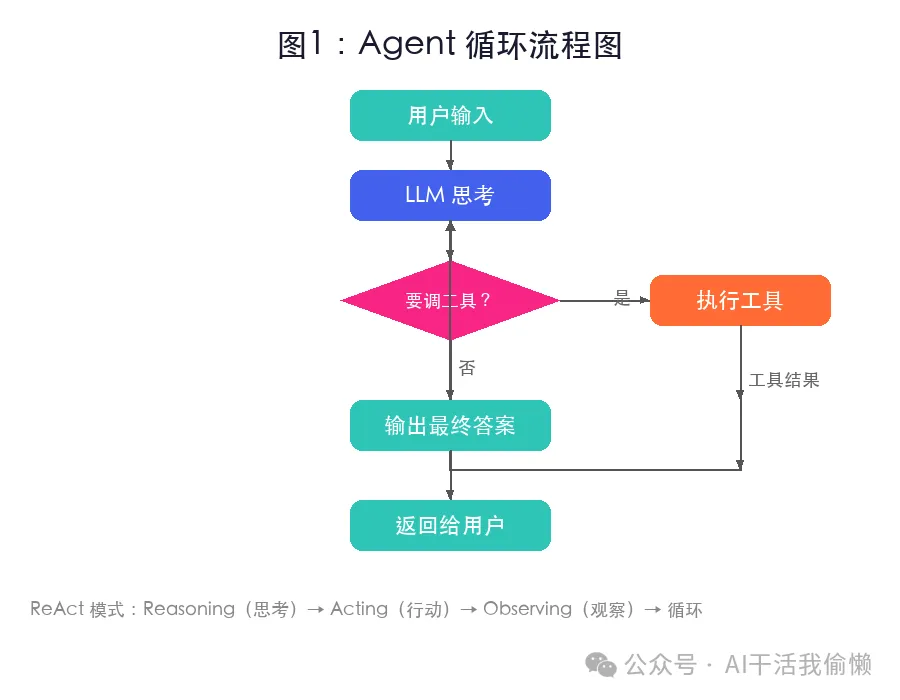
Regular LLM calls are one-off: the user asks a question, the model answers, and the interaction ends. An Agent, however, introduces an "Action Loop" on top of this:
- The LLM reads the user's question and the current state.
- The LLM judges whether it needs to call an external tool.
- If needed, the program executes the tool and returns the execution result to the LLM.
- The LLM continues to judge based on the new result.
- Until the model believes the task is complete and outputs the final answer.
This pattern is commonly referred to in both academia and industry as the ReAct (Reasoning + Acting) pattern: reason first, then act, observe the result, and continue reasoning until the goal is achieved.
 Agent 循环流程图
Figure 1: Agent loop flowchart—user input goes to the LLM, which either answers directly or calls a tool; the tool's result is passed back to the LLM for further reasoning, until the final answer is output
Agent 循环流程图
Figure 1: Agent loop flowchart—user input goes to the LLM, which either answers directly or calls a tool; the tool's result is passed back to the LLM for further reasoning, until the final answer is output
When do you need an Agent? An Agent is the best choice when a task requires "multi-step judgment + external action" (such as looking up information, doing calculations, calling APIs, reading/writing files). If it's just pure text rewriting, summarization, or classification, a standard LLM call is sufficient, and there is no need to introduce complex Agent mechanisms.
2. Writing a Minimal Agent in Python
This example is implemented using the tool_use feature of the Anthropic Claude API. OpenAI's Function Calling shares the exact same design philosophy: define the tool the model selects the tool the program executes the tool the result is returned to the model.
First, install the dependency libraries and set your API Key via environment variables (never hardcode the Key directly in your code):
pip install anthropic
export ANTHROPIC_API_KEY="你的_API_Key"
2.1 Defining Tools
A tool is not the code function itself, but rather a "capability specification sheet" for the model to read. It tells the LLM what the tool is called, what problems it can solve, and what format of parameters need to be passed in.
import re
import anthropic

client = anthropic.Anthropic()

tools = [{
    "name": "calculator",
    "description": "计算简单数学表达式,只支持数字、加减乘除和括号。",
    "input_schema": {
        "type": "object",
        "properties": {
            "expression": {
                "type": "string",
                "description": "数学表达式,例如 123 * 456 + 789"
            }
        },
        "required": ["expression"]
    }
}]
Note: The clearer the description of the tool, the less likely the model is to choose the wrong one. Here we only include a calculator tool to make it easier to see the overall chain.
2.2 Executing Tools
The large model itself does not actually run the code; it only suggests a decision: "I need to call calculator with the parameter x." The one actually responsible for executing this code is your main Python program.
def run_tool(name: str, args: dict) -> str:
    if name != "calculator":
        return "未知工具"

    expr = args["expression"]
    # 使用正则表达式进行简单的白名单过滤,确保安全
    if not re.fullmatch(r"[0-9+\-*/(). ]+", expr):
        return "表达式包含不允许的字符"

    try:
        # 在受限环境中执行计算
        return str(eval(expr, {"__builtins__": {}}, {}))
    except Exception as e:
        return f"计算失败:{e}"
Security Tip: In production environments, it is recommended to use a dedicated mathematical parsing library (such as
sympy) to avoid letting model-generated inputs directly enter high-privilege execution environments likeeval().
2.3 Building the Agent Core Loop
The core of an Agent is a for loop: request the model check if a tool call is needed execute the tool append the result back to the history request the model again.
def agent(user_input: str, max_steps: int = 5) -> str:
    messages = [{"role": "user", "content": user_input}]

    for _ in range(max_steps):
        response = client.messages.create(
            model="claude-opus-4-8",
            max_tokens=1024,
            tools=tools,
            messages=messages,
        )

        # 将模型的思考/回答记录到对话历史中
        messages.append({"role": "assistant", "content": response.content})

        # 如果模型不需要再调用工具,说明已经得出结论,直接返回
        if response.stop_reason != "tool_use":
            return "".join(
                block.text for block in response.content
                if block.type == "text"
            )

        # 否则,处理工具调用
        tool_results = []
        for block in response.content:
            if block.type == "tool_use":
                result = run_tool(block.name, block.input)
                tool_results.append({
                    "type": "tool_result",
                    "tool_use_id": block.id,
                    "content": result,
                })

        # 将工具执行结果作为用户视角的信息反馈给模型
        messages.append({"role": "user", "content": tool_results})

    return "达到最大循环次数,Agent 停止。"

# 测试运行
print(agent("123 乘以 456 再加上 789 等于多少?"))
Typical Execution Trace
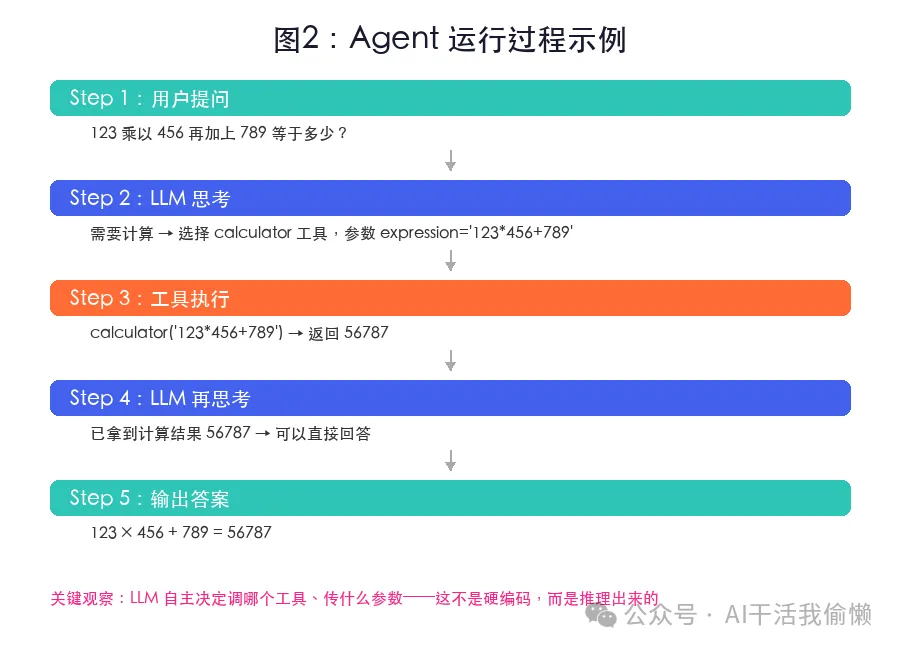
- User asks:
123 乘以 456 再加上 789 等于多少? - LLM Thinking: Decides that mental math is prone to errors and a calculator is needed. Generates a tool call request:
calculator({"expression":"123*456+789"}). - Python Execution: Receives the request, runs
run_tool, and calculates56877. - Result Returned: Sends
56877back to the LLM. - LLM Summarization: Combining the calculation results, structures the language to output the final answer: "123 multiplied by 456 plus 789 equals 56877."
 Agent 运行过程
Figure 2: Agent execution process—LLM reasons "needs calculator" calls calculator tool returns 56877 LLM organizes the final answer
Agent 运行过程
Figure 2: Agent execution process—LLM reasons "needs calculator" calls calculator tool returns 56877 LLM organizes the final answer
Note: The values in the diagram are for illustration purposes only; if you change the mathematical expression, the calculation result will depend on the program's actual output.
When should you use this minimal version? When you want to quickly learn the principles, validate the feasibility of custom tools, or develop non-critical internal utilities. This version is not suitable for direct production deployment—it still lacks access control, structured logging, retry mechanisms, fine-grained context management, and human-in-the-loop validation.
3. Deconstructing the 4 Key Mechanisms of an Agent
Mechanism 1: Tool Definition
Tool definition is the LLM's "tool menu." The model relies entirely on the name, description, and parameter schema you provide to judge "whether it can be used," "whether it should be used," and "how to pass parameters."
- Pitfall Guide: Descriptions that are too broad can lead to incorrect selection by the model. For example, "data processing" is not as precise as "calculate mathematical expressions and return results." The more tools there are, the clearer the descriptive boundaries between them must be.
- Applicable Scenarios: Whenever the model needs to interact with the external world (accessing databases, reading/writing files, calling external APIs, web searching, complex calculations), tools must be defined for it.
Mechanism 2: Model Decision
The essence of an Agent is that it is not a hard-coded workflow (such as "call interface A first, then call interface B"). The LLM dynamically and autonomously decides what to do next based on the real-time context and the list of tools.
- Applicable Scenarios: Use an Agent when the business path is not fixed, has branches, and contains uncertainty. If the workflow is highly fixed, chaining and orchestrating with traditional programming code will be more stable and less expensive.
Mechanism 3: Tool Execution
In this architecture, the LLM is only responsible for "decision-making," while the main program is responsible for "execution." This boundary of responsibility is crucial: tool execution permissions, input validation, and exception handling should all be tightly controlled within the Python code you write.
- Security Rule: At no point should you allow the model to directly execute arbitrary shell scripts, unfiltered SQL statements, or high-privilege system APIs.
Mechanism 4: Loop Termination
When stop_reason != "tool_use", it means the model believes it has gathered enough information and is ready to output the final answer. In addition, you must hardcode max_steps (maximum number of loop steps) in the code to prevent the large model from falling into infinite logical loops.
- Applicable Scenarios: All Agent systems must have a mandatory loop limit; otherwise, once encountering model "hallucination" or infinite loops, token consumption and call costs will spiral completely out of control.
4. From Prototype to Production: Three Essential Capabilities of a Practical Agent
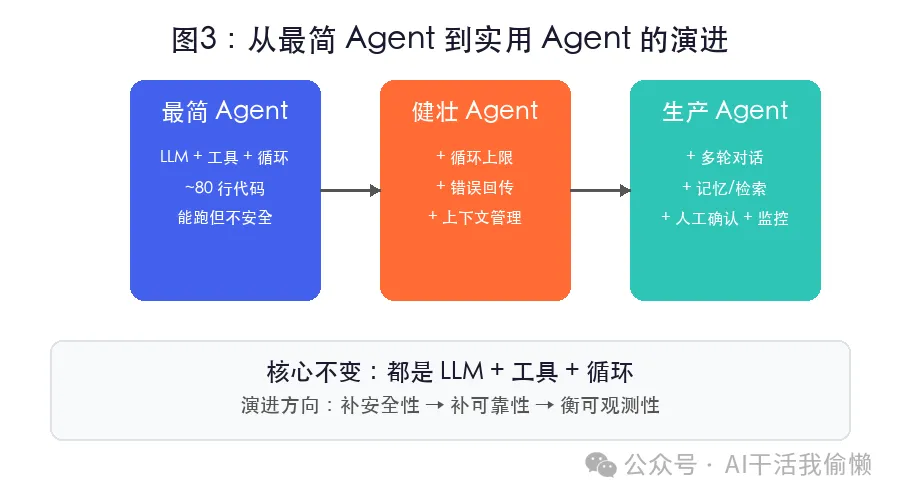
The educational Agent helps us quickly grasp the core principles, but to move toward real-world business applications, we must complement it with the following three layers of capabilities:
 从最简 Agent 到实用 Agent 的演进
Figure 3: Evolution from minimal Agent to practical Agent—adding loop limits, adding error propagation, and adding context management
从最简 Agent 到实用 Agent 的演进
Figure 3: Evolution from minimal Agent to practical Agent—adding loop limits, adding error propagation, and adding context management
- Strict Loop Limits: You must strictly limit the maximum number of execution rounds using
max_stepsto avoid the model spinning infinitely in unproductive paths like "search summary fail search again." - Graceful Error Propagation: When an external tool fails to execute (e.g., network timeout, parameter error), do not choose to crash by throwing an exception directly or conceal the error. Instead, return the detailed error message back to the LLM as a
tool_result. After seeing messages like "invalid parameter format" or "database connection timeout," the model can often self-correct, try alternative strategies, or reformat the parameters. - Context Management: Along with each round of tool calls, the conversation history (Messages) grows exponentially. For short tasks, keeping the full history is fine; for complex, long tasks, you must introduce history truncation, rolling summarization, or external vector memory, otherwise you will quickly exceed the model's maximum token limit or cause API call costs to skyrocket.
5. Framework Selection: Native Development vs. Popular Frameworks
| Approach | Suitable Scenarios | Pros | Cons / Pitfalls |
|---|---|---|---|
| Native API + Loop | Learning principles, simple tools, highly customized needs | Extremely transparent, easy to debug, no third-party package black boxes | All infrastructure (retries, logging, state) must be written from scratch |
| LangChain | Rapid prototyping, classic RAG applications | Huge ecosystem, many out-of-the-box components | Too many layers of abstraction, frequent API changes, hard to troubleshoot |
| CrewAI | Clear multi-role collaborative tasks | Clear task and role organization, easy to program multi-Agent collaboration | Easy to over-engineer simple tasks, increasing system complexity |
| AutoGen | Complex multi-Agent open-ended conversations | Suitable for academic research, highly flexible collaborative mode development | Extremely long debugging path, run behavior is hard to predict |
Strongly Recommended Learning Path: Write a native Agent first, and understand the flow details of LLM + Tool + Loop through the native API; only then should you learn and choose a framework. Otherwise, when a framework throws an error, it will be very difficult for you to distinguish whether the model failed to select the tool, the JSON Schema was written incorrectly, the tool failed during execution, or there is a bug in the framework's encapsulation layer itself.
6. Advanced Practice and Reflection
If you want to continue deepening your understanding of Agents, we suggest trying the following three classic hands-on exercises:
- Add a File Reading Tool: Write a
read_filetool to enable the Agent to read and analyze local.txtor.csvfiles based on user instructions. - Add a Web Search Tool: Integrate a simple search API (such as Tavily or DuckDuckGo) to let the Agent query real-time external information.
- Persist Conversation History: Save the
messageshistory to a local JSON file or SQLite database to implement an Agent with "persistent memory."
After completing these three exercises, you will have a much deeper understanding of the core essence of an Agent: the model is responsible for decisions, tools are responsible for action, the loop is responsible for advancement, and boundaries are responsible for security.
7. References
Key Takeaways
- The Minimalist Formula of an Agent:
$ ext{Agent} = ext{LLM} + ext{Tools} + ext{Loop}$. The large model acts as the decision-making brain, while the Python program acts as the executing limbs. - ReAct Execution Pattern: The essence of an Agent is an alternating cycle of "Reasoning" and "Acting," where the model continuously corrects and advances the task based on the results returned by tools.
- Security and Control Boundaries: The large model is only responsible for generating the "intent to call a tool." The permission control, security validation, and code execution of specific tools must be strictly supervised by the host program.
- Three Essentials for Production: A practical, deployable Agent must possess loop limit control, self-correction via tool error propagation, and fine-grained context and memory management.
Learning map
Phase 1: Principles and Concept Building
- Understand the Core Formula: Master the core of Agent = LLM + Tools + Loop, and clarify the difference between an agent and a single large language model call.
- ReAct Paradigm: Learn the Reasoning + Acting mechanism, and understand the "Thought-Action-Observation" loop.
Phase 2: Native Tool Calling Practice
- Tool Definition (Schema): Learn to use JSON Schema to describe functions, which is the only interface for the model to understand tools.
- Model Decision Parsing: Learn how to extract tool_use decision-making information from API responses.
Phase 3: Building the Agent Closed-Loop
- State Maintenance: Maintain chat history (messages) and continuously feed tool execution results as new context to the model.
- Security and Termination Control: Set the maximum number of loops (max_steps) and verify permissions for tool execution to prevent runaway infinite loops.
Phase 4: Engineering Evolution
- Error Return Mechanism: Learn to format and feed errors back to the LLM when tool execution fails, enabling self-correction capabilities.
- Production Framework Evaluation: After understanding the underlying principles, integrate high-level frameworks like LangChain or CrewAI as needed to improve development efficiency.
Get hands-on — step by step
- Initialize the development environment: Install the Anthropic SDK and configure the environment variables:
pip install anthropic
export ANTHROPIC_API_KEY='your_api_key_here'
- Define tool description (Schema): Define the calculator tool in Python, using the standard JSON Schema structure to describe input parameters:
tools = [{
    'name': 'calculator',
    'description': '计算简单数学表达式,只支持数字、加减乘除和括号。',
    'input_schema': {
        'type': 'object',
        'properties': {
            'expression': {
                'type': 'string',
                'description': '例如 123 * 456'
            }
        },
        'required': ['expression']
    }
}]
- Implement the tool executor: Write the actual calculation logic, restricting characters in the expression input by the model for safety, to prevent remote code injection:
import re
def run_tool(name: str, args: dict) -> str:
    if name != 'calculator': return '未知工具'
    expr = args['expression']
    if not re.fullmatch(r'[0-9+\-*/(). ]+', expr):
        return '错误:存在不合法字符'
    try:
        return str(eval(expr, {'__builtins__': {}}, {}))
    except Exception as e:
        return f'计算失败: {e}'
- Write the core loop controller: Implement an agent function that drives multi-turn conversations using a for loop. If the model returns stop_reason == 'tool_use', execute the tool, append the result to the message history, and request again; otherwise, return the final natural language answer directly:
def agent(user_input: str, max_steps: int = 5):
    messages = [{'role': 'user', 'content': user_input}]
    for _ in range(max_steps):
        response = client.messages.create(model='claude-3-5-sonnet-20241022', max_tokens=1024, tools=tools, messages=messages)
        messages.append({'role': 'assistant', 'content': response.content})
        if response.stop_reason != 'tool_use':
            return response.content[0].text
        # 解析工具调用并执行
        for block in response.content:
            if block.type == 'tool_use':
                result = run_tool(block.name, block.input)
                messages.append({'role': 'user', 'content': [{
                    'type': 'tool_result',
                    'tool_use_id': block.id,
                    'content': result
                }]})
- Run and Test:
Instantiate the client and call
agent('123 乘以 456 再加上 789 等于多少?'), observe the console output, and verify the complete tool-use loop.
Top 3 sources
- 1Anthropic Tool Use Documentation
Anthropic 官方关于工具调用(Tool Use)的完整指南,详细解释了模型如何决定使用工具及如何处理返回结果。
https://docs.anthropic.com/en/docs/build-with-claude/tool-use
- 2OpenAI Function Calling Guide
OpenAI 官方提供的函数调用开发指南,是行业通用的智能体工具调用标准实现方案。
https://platform.openai.com/docs/guides/function-calling
- 3ReAct: Synergizing Reasoning and Acting in Language Models
介绍 ReAct 框架的经典学术论文,阐述了将推理(Reasoning)和行动(Acting)结合的核心原理,是现代 Agent 架构的理论基石。
https://arxiv.org/abs/2210.03629
Links are AI-suggested — worth a quick sanity check before diving in.