Mac Studio 24/7 AI Workhorse Manual Revised
8/2/2026, 10:46:52 PM · updated 8/2/2026, 10:49:10 PM
A practical playbook for turning a Mac Studio M3 Ultra into a reliable 24/7 private AI service using smart model routing, admission control, durable job queues, and scheduled observability to produce real outputs without constant GPU activity.
Mac_Studio_24x7_AI_Workhorse_Concise_Guide
Mac Studio 24/7 AI Workhorse — Concise Guide
Platform: Mac Studio M3 Ultra, 96 GB unified memory, 2 TB AI_DATA volume
Goal: Operate a dependable private AI service that runs useful scheduled work with minimal attention.
Core principle: Keep the control plane available; load expensive models only when a task requires them.
1. Target Operating Model
This system should become more than a local chatbot. It should:
- Serve trusted users and applications.
- Run scheduled jobs and monitor selected sources.
- Maintain searchable knowledge collections.
- Extract, classify, summarize, and reconcile information.
- Route simple work to small models and difficult work to larger models.
- Record jobs, changes, failures, outputs, and required human decisions.
The machine becomes a workhorse when it produces validated outputs while unattended—not when it merely keeps models loaded.
Daily success pattern
Core services recover after reboot; health checks run continuously; approved data and documents synchronize and index; models are routed by task complexity; and a morning brief reports outputs, failures, insights, and decisions. Heavy work runs only after policy, capacity, and approval checks.
2. Architecture and Access

| Layer | Component | Role | Normal state |
|---|---|---|---|
| Private access | Tailscale | Trusted-device network | Always on |
| Public ingress | Tailscale Funnel | Controlled public path | Only when required |
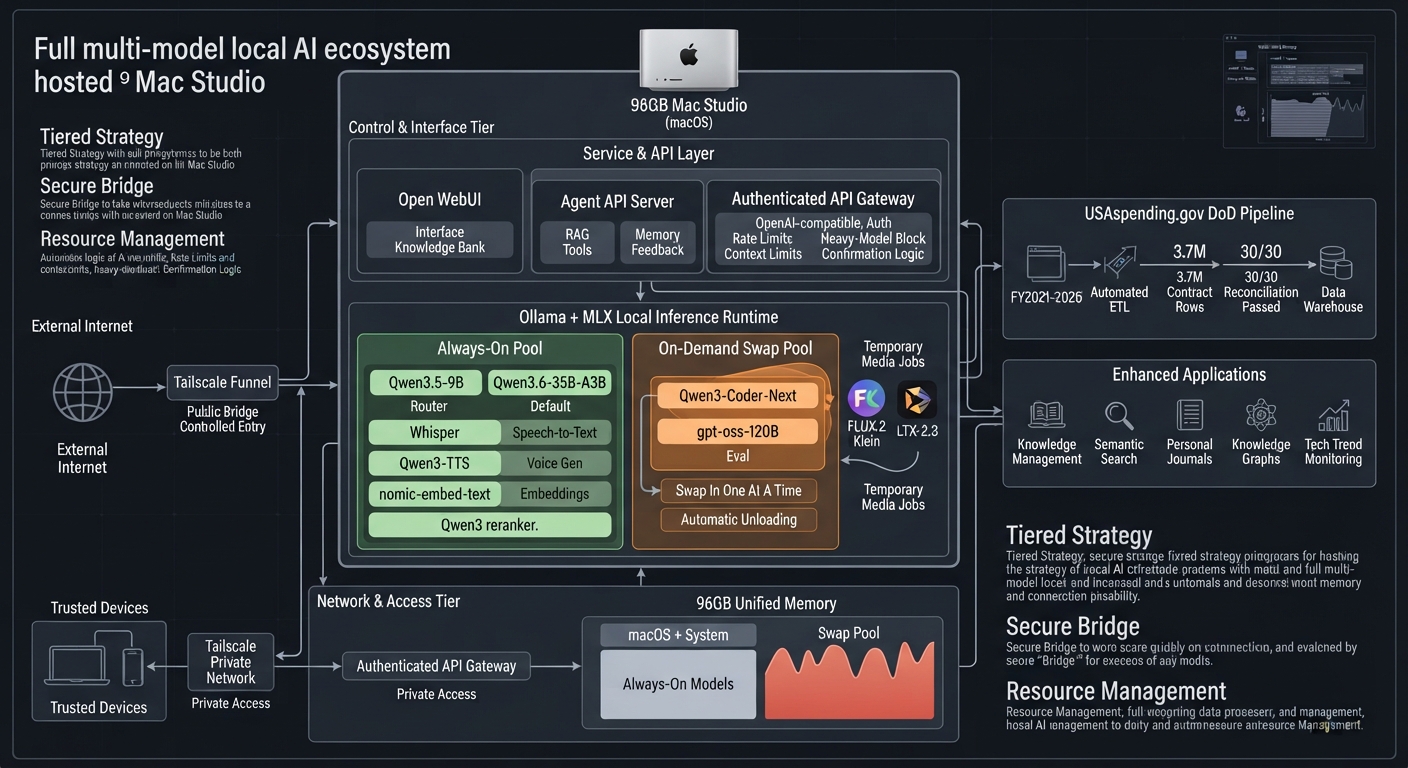
| API control | Gateway :8787 | Keys, authorization, rate limits, routing, heavy gate | Always on |
| Model runtime | Ollama :11434 | Default and heavy local models | Available; selective loading |
| Apple runtime | MLX | Fast, speech, reranking, and media workloads | Workers on demand |
| Interface | Open WebUI :8080 | Chat and knowledge-bank UI | On if regularly used |
| Agent runtime | FastAPI :8788 | RAG, tools, memory, feedback, multi-step work | Always on after stabilization |
| Scheduling | launchd, GitHub Actions, Inngest | Recurring and event-driven jobs | By job ownership |
| Data | AI_DATA and knowledge bank | Models, sources, indexes, logs, outputs | Mounted and monitored |
Public-access rule
Application → Funnel → authenticated gateway → router → approved service
Do not expose Ollama, MLX, Open WebUI, databases, or the agent server directly to the public internet. Funnel supplies reachability; the gateway supplies identity, authorization, workload policy, and rate control.
Existing control systems
ai-stack: Ollama, Open WebUI, gateway, and Funnel.agent-server: FastAPI retrieval, tools, memory, and agent harness.AI Local Server: gateway, keys, routing, and heavy-model policy only.
Observe all three in one dashboard, but keep their restart controls independent.
3. Model Portfolio and Routing
| Function | Model | Decision | Operating policy |
|---|---|---|---|
| Fast | Qwen3.5-9B | Added and tested | Routing, tagging, extraction, short answers, background volume |
| Default | Qwen3.6-35B-A3B | Kept | Daily chat, analysis, vision, agent reasoning, most coding |
| Heavy coding | Qwen3-Coder-Next | Added; test pending | Load after unloading conflicts; promote only after regression tests |
| Heavy reasoning | gpt-oss-120B | Kept | Exclusive mode; explicit confirmation required |
| Heavy candidate | Qwen3.5-122B-A10B | Added; bake-off pending | Replace gpt-oss only if repeatable tests show better value |
| Vision | Qwen3-VL-30B | Temporary | Retire only after default-model vision parity testing |
| Speech | Whisper large-v3-turbo / Qwen3-TTS | Kept / added | Transcription and voice output on demand |
| RAG | nomic-embed-text / Qwen3 Reranker | Kept / added | Index documents and refine retrieved passages |
| Media | FLUX.2 Klein / LTX-2.3 | Added | On-demand image and exclusive/scheduled video generation |
Routing policy
Use scripts for exact work; 9B for classification and extraction; 35B for synthesis, RAG, and most coding; and heavy models only when a quality test or human request justifies them. Require sources for analytical claims and approval for external actions.
4. Preventing Resource Overrun
The 96 GB memory pool is shared by macOS, model weights, KV cache, applications, and file processing. Protect it at several levels.
Existing safeguards
- GPU wired-memory limit is approximately 88 GB, while preserving an OS reserve.
- Ollama limits simultaneously loaded models and unloads inactive models through keep-alive settings.
- Heavy requests require
X-Confirm-Heavy: yes; otherwise the gateway returns HTTP428 Precondition Required. - Large coding, reasoning, and media models load only when needed.
- Heavy-model context should remain at or below 32K until measurements support more.
Add next
- Admission control: Check memory, swap, loaded models, queue, active sessions, disk, UPS state, and temperature before heavy work.
- Durable queue: Permit only one
heavy-exclusivejob at a time. - Timeouts: Give every job a deadline, retry ceiling, and cancellation path.
- Concurrency classes: Separate limits for light, default, embedding, speech, image, video, and heavy work.
- Circuit breaker: Pause a repeatedly failing model or data source.
- Backpressure: Queue or return HTTP
429rather than accept unsafe concurrency. - Disk watermarks: Warn at 20% free and stop nonessential downloads/generation at 10%.
| Mode | Services and workloads |
|---|---|
| Normal | Gateway, UI, agent server, retrieval, and default model as needed |
| Batch | Controlled ingestion, embeddings, transcription, and reports |
| Heavy exclusive | Minimum control services plus one 120B, heavy-code, or video job |
| Maintenance | Monitoring, backups, upgrades, index repair, and model tests |
5. High-Value 24/7 Work
Financial data
Synchronize USAspending; consolidate Files A, B, and C; reconcile row counts and dollars; and flag expiring funds, pacing risks, missing relationships, and source changes.
Knowledge operations
Watch approved directories; extract text and metadata; manage duplicates and versions; update embeddings and indexes; and report failed ingestion, stale locks, and unindexed files.
Technology monitoring
Monitor relevant AI labs, GitHub, Hugging Face, and local runtimes. Use 9B to classify relevance and 35B to explain material impact in a focused brief.
Document and software work
Extract decisions, risks, actions, and contradictions; retrieve evidence; draft briefings; run repository tests and dependency reviews; and keep external actions behind approval.
Personal learning
Convert notes into linked concepts, identify contradictions, generate review prompts, and summarize how understanding changed.
6. Recommended Job Schedule
| Frequency | Job | Worker | Output |
|---|---|---|---|
| 5 minutes | Service and port health | Script | Health and incident state |
| 15 minutes | Memory, swap, disk, queue, thermal, power | Script | Capacity status |
| File change | Approved knowledge ingestion | Embedding pipeline | Updated index and log |
| Daily 06:00 | USAspending synchronization | Script | New files and status |
| After arrival | Consolidation and reconciliation | Python pipeline | Validated datasets |
| Daily 07:00 | AI and repository monitoring | Fast model | Relevant changes |
| Daily 07:30 | Operations brief | Default model | Jobs, failures, changes, decisions |
| Nightly | Backup and integrity check | Script | Backup exceptions |
| Weekly | Knowledge quality audit | Fast/default | Duplicates, stale items, weak metadata |
| Weekly | Model regression suite | Selected models | Quality, latency, memory, errors |
| On demand | 120B reasoning or video | Heavy-exclusive worker | Approved high-compute output |
7. Practical 30-Day Build Plan
Days 1–7 — Stabilize
- Create a machine-readable service registry: name, port, commands, health URL, logs, dependencies, owner, and restart policy.
- Add
launchdrestart controls and wait for AI_DATA and networking before startup. - Verify graceful shutdown and reboot recovery.
- Fix the wiki-ingest stale lock, rerun the failed FY2026 synchronization, and quarantine obsolete scripts.
Exit: Core services recover automatically, avoid restart loops, and record useful failure reasons.
Days 8–14 — Observe
Build a lightweight status API and SQLite-backed dashboard. Show overall state; services and errors; loaded models, memory, requests, and latency; job status; memory, swap, disk, CPU/GPU, and temperature; data freshness and reconciliation; and authentication, rate-limit, Funnel, and heavy-gate events.
Days 15–21 — Orchestrate
Add a durable job record containing ID, type, priority, resource class, model, input reference, timestamps, timeout, retries, status, structured error, output location, approval flag, and idempotency key.
Use resource classes: light, default, embedding, speech, image, video, and heavy-exclusive.
Days 22–30 — Produce
Generate a Daily AI Operations Brief covering overnight health, job outcomes, USAspending reconciliation, relevant AI releases, knowledge changes, anomalies, and recommended actions.
This brief is the proof of productivity. Running all night without producing decision support is not success.
8. Standard Job Flow
9. Security, Reliability, and Power
- Bind backends to localhost or the private Tailnet; expose only the gateway through Funnel.
- Use separate application keys, model permissions, and rate limits; rotate keys and never log secrets.
- Disable Funnel when public access is unnecessary.
- Separate public, personal, work-sensitive, and restricted knowledge collections.
- Allow-list ingestion paths and record source, time, hash, and version.
- Use least-privilege tools, timeouts, retry limits, and output-size limits for every job.
- Preserve source files and transformation logs; treat generated output as draft unless validated.
- Evaluate model upgrades before changing defaults.
- Encrypt backups and test restoration.
- Connect the Mac Studio and storage to the UPS; test safe shutdown and recovery.
- Delay heavy jobs until network, storage, memory, thermal, and power checks pass.
Local hosting improves control but does not by itself establish compliance for organizational or restricted data.
Initial reliability targets
| Measure | Target |
|---|---|
| Gateway availability | 99% monthly |
| Recovery after reboot | Within 10 minutes |
| Scheduled-job success | At least 95% |
| Failed-job visibility | Within 5 minutes |
| Heavy-job concurrency | Exactly one |
| Disk warning / critical | 20% / 10% free |
| Backup | Daily incremental; weekly restore sample |
| Financial output | 100% reconciliation before release |
| Default-model change | Regression test and documented decision |
10. Terminology Index
| Term | Meaning |
|---|---|
| Admission controller | Checks capacity and policy before a job starts |
| API gateway | Authenticates, limits, and routes requests to internal services |
| Backpressure | Queues or rejects work when capacity is full |
| Circuit breaker | Stops calls to a repeatedly failing dependency |
| Context window | Tokens a model can consider in one request |
| Embedding | Vector representation used for semantic retrieval |
| Funnel | Tailscale feature that exposes a selected endpoint publicly |
| Idempotent | Safe to repeat without duplicate effects |
| Inference | Running a trained model to generate output |
| Job queue | Durable record of waiting and running work |
| KV cache | Runtime attention memory that grows with context and concurrency |
| Observability | Logs, metrics, events, and alerts that explain system behavior |
| Quantization | Lower-precision weights that reduce memory use |
| RAG | Retrieves evidence before generating an answer |
| Reconciliation | Verifies transformed totals and counts against sources |
| Reranker | Reorders retrieved passages by relevance |
| Resident model | Model currently loaded in memory |
| Resource class | Job label defining memory, concurrency, and approval policy |
| SLO | Measurable reliability objective |
| Tailnet | Private network of authenticated Tailscale devices |
| Unified memory | Apple memory shared by CPU, GPU, and applications |
| Worker | Process that executes a queued job |
11. Immediate Checklist
This week
- Fix the wiki-ingest lock and rerun the FY2026 USAspending job.
- Verify reboot-to-healthy and UPS shutdown/recovery.
- Create the service registry.
- Collect service, memory, swap, disk, queue, and power status.
Next two weeks
- Build the operator dashboard and durable job schema.
- Add admission control and one heavy-exclusive queue.
- Run the Coder-Next test, vision parity test, and 122B bake-off.
- Add backup verification and disk watermarks.
By Day 30
- Generate the Daily AI Operations Brief automatically.
- Measure uptime, failures, latency, model use, and useful outputs for one week.
- Remove models and services without a demonstrated workload.
- Document normal, batch, heavy, maintenance, and recovery procedures.
Final Direction
The machine already has sufficient model capability. The next advantage comes from orchestration: reliable startup, controlled routing, durable queues, trusted data, observability, evaluation, and repeatable outputs.
The objective is not continuous GPU activity. It is a system that remains available, recognizes useful work, selects the smallest capable resource, preserves evidence, escalates safely, and tells its operator what matters.
Source: Mac_Studio_24x7_AI_Workhorse_Concise_Guide.md
Learning map
Staged Roadmap
Phase 1 — Stabilize (Days 1–7)
- Create a machine-readable service registry (name, port, health URL, logs, dependencies)
- Add launchd restart controls with AI_DATA and network readiness checks
- Verify graceful shutdown and reboot recovery
- Quarantine obsolete scripts; fix stale locks
Phase 2 — Observe (Days 8–14)
- Build a lightweight status API backed by SQLite
- Display: overall state, model load count, memory/swap/disk/CPU/GPU/temp, queue depth, job outcomes
- Track data freshness and reconciliation results
Phase 3 — Orchestrate (Days 15–21)
- Implement a durable job schema with idempotency keys
- Add admission control: capacity + policy checks before work starts
- Define resource classes: light / default / embedding / speech / image / video / heavy-exclusive
- Enforce concurrency limits; set timeouts and retry ceilings
Phase 4 — Produce (Days 22–30)
- Generate an automated daily operations brief
- Model routing: small models for classification/extraction, larger models for synthesis/RAG, heavy models only on confirmation
- Implement circuit breakers on failing sources and backpressure via HTTP 429
- Document all modes: normal, batch, heavy, maintenance, recovery
Get hands-on — step by step
-
Create a service registry file (JSON or YAML) listing every component with its port, health-check URL, log path, restart command, and owner.
-
Write launchd plist files for each service with 'RunAtLoad', KeepAlive, EnvironmentVariables for AI_DATA mount detection, and WatchPaths for networking readiness.
-
Create a health-check script that curls every service's /health endpoint, records the results in SQLite with timestamps, and alerts on failures over 5 minutes.
-
Set Ollama keep-alive settings to auto-unload models after 10 minutes of inactivity; verify only the default model (Qwen3.6-35B-A3B) remains loaded during normal operation.
-
Build an admission control function that checks memory usage, swap status, queue depth, disk free space, and thermal readings before accepting a heavy-weight job.
-
Implement a durable job queue table with columns: id (UUID), type, priority, resource_class, model, input_ref, created_at, timeout_seconds, retry_count, max_retries, status, error_json, output_path, requires_approval, idempotency_key.
-
Write the model-routing logic using if/elif chains: classify the request → route to 9B for extraction/tagging, 35B for synthesis/RAG/coding, or require X-Confirm-Heavy header for models above 30B parameters.
-
Add a circuit-breaker that tracks consecutive failures per dependency; after 3 failures in 1 hour, pause that service and schedule a retry with exponential backoff.
-
Schedule daily jobs via launchd at 06:00 (financial sync), 07:00 (AI monitoring), 07:30 (operations brief output), and nightly for backup + integrity verification.
-
Test the full cycle: trigger a job through the API gateway with proper auth key, verify admission control passes, confirm the worker executes, validate and store the result, then check the day's dashboard reflects everything correctly.
Top 3 sources
- 1Ollama Documentation
Official guidance on running local models locally, including model management and API reference for integration.
https://ollama.com/blog
- 2MLX Framework Documentation
Apple's machine-learning framework optimized for Apple Silicon, enabling fast inference and model workflows on Mac.
https://ml-explore.github.io/mlx/
- 3Tailscale Administration Guide
Documentation for setting up a private network with Tailscale Funnel, critical for secure external access to local AI services.
https://tailscale.com/kb/1017/install
Links are AI-suggested — worth a quick sanity check before diving in.