Tool System Analysis: Tool Abstraction & tools Registry
7/31/2026, 3:18:25 PM · updated 7/31/2026, 3:21:21 PM
AI-translated on 7/31/2026, 3:27:17 PM · by Qwen3.6 35B (fast, default)
This article thoroughly examines how Claude Code defines tool protocols through a unified Tool.ts abstraction layer (input schema, runtime context, permission constraints), dynamically manages the full set of callable capabilities via a tools.ts registry, revealing its core architectural differences in shifting from "chat + plugins" to an actionable engineering agent.
Claude Code's strong execution capability relies not only on its underlying model but also on the meticulous design of its external tool system. This article delves deep into the core architecture of this system: the unified abstraction protocol defined through Tool.ts, the rich runtime context provided by ToolUseContext, and the dynamic registration and permission filtering mechanisms implemented in tools.ts, revealing how this system builds a secure, scalable, and highly controllable engineering agent execution layer.
Core Protocol Layer: The Unified Abstraction of Tool.ts
Tool.ts is not the implementation of any specific tool, but rather the system's tool abstraction layer. Its core value lies in two aspects:
- Unified Semantics: Standardizing the input structure, output format, context dependencies, and permission boundaries of tools.
- Solidified Contracts: Providing consistent execution specifications for all tools, ensuring the system can accurately understand and schedule them. This file defines the system's key type interfaces:
ToolInputJSONSchemaToolUseContextToolPermissionContext- Progress tracking and state management types
export type ToolInputJSONSchema = {
  [x: string]: unknown
  type: 'object'
  properties?: {
    [x: string]: unknown
  }
}
While this definition is brief, it establishes the foundational design baseline for the system: tools are not arbitrary text descriptions or prompt hacks, but contract objects with clearly defined input structures, enumerable parameters, and system-level interpretability. This is precisely what fundamentally distinguishes an engineering-grade tool system from mere prompt engineering.
Runtime Support: The Complete Session Context of ToolUseContext
ToolUseContext carries all the runtime resources required for tool execution, demonstrating that tools in the system are not isolated functions, but capability nodes deeply embedded within a complete session ecosystem:
- Capability Routing: Current tool set (
tools), command set (commands), MCP Client/Resource - State Management:
AppStateread/write methods, file reading cache (readFileState) - Interaction Control: Notification capability, interruption logic (
abortController), message history stream (messages) - Metadata Tracking:
attribution/fileHistoryupdaters
export type ToolUseContext = {
  options: {
    commands: Command[]
    debug: boolean
    mainLoopModel: string
    tools: Tools
    verbose: boolean
    thinkingConfig: ThinkingConfig
    mcpClients: MCPServerConnection[]
    mcpResources: Record<string, ServerResource[]>
  }
  abortController: AbortController
  readFileState: FileStateCache
  getAppState(): AppState
  setAppState(f: (prev: AppState) => AppState): void
  messages: Message[]
}
A tool's execution is, in fact, injected into a complete runtime sandbox. It relies not just on parameters, but on the entire Agent session's state, configuration, and lifecycle control.
Capability Registry: The Dynamic Directory of tools.ts
If Tool.ts defines the protocol, tools.ts maintains the actual capability manifest that this instance of the system exposes. Its scope extends far beyond basic CRUD operations, exhibiting highly modular agent workflow characteristics:
| Tool Category | Core Components |
|---|---|
| File Operations | FileReadTool, FileEditTool, FileWriteTool, Notebook |
| Terminal Execution | BashTool, PowerShell (via Command integration) |
| Search & Retrieval | GlobTool, GrepTool, WebFetchTool, WebSearchTool |
| Network & Interaction | WebBrowser, AskUserQuestionTool |
| Tasks & Collaboration | TodoWriteTool, TeamCreate/TeamDelete, AgentTool, SendMessageTool |
| Mode Control | EnteringPlanModeTool, ExitPlanModeV2Tool |
| Protocol Integration | LSPTool, ToolSearchTool, MCP resource read/write tools |
export function getAllBaseTools(): Tools {
  return [
    AgentTool, TaskOutputTool, BashTool,
    ...(hasEmbeddedSearchTools() ? [] : [GlobTool, GrepTool]),
    ExitPlanModeV2Tool, FileReadTool, FileEditTool, FileWriteTool,
    WebFetchTool, TodoWriteTool, WebSearchTool, AskUserQuestionTool,
    SkillTool, EnterPlanModeTool,
    ...(isEnvTruthy(process.env.ENABLE_LSP_TOOL) ? [LSPTool] : []),
    ListMcpResourcesTool, ReadMcpResourceTool,
  ]
}
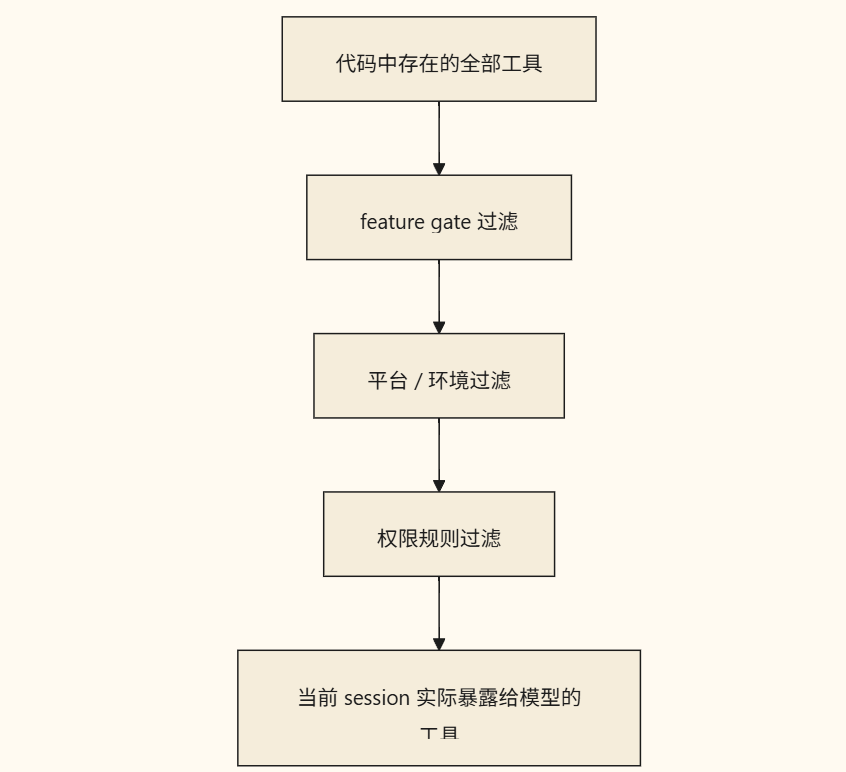
The toolset is not statically hardcoded. The system dynamically determines the final manifest based on environment variables (
process.env), platform characteristics, and feature flags, demonstrating a high degree of build-time configuration capability. Claude Code never exposes all code-level tools directly to the model. Before the model actually schedules them, the toolset undergoes rigorous environment detection and permission filtering:
export function filterToolsByDenyRules<
  T extends {
    name: string
    mcpInfo?: { serverName: string; toolName: string }
  },
>(tools: readonly T[], permissionContext: ToolPermissionContext): T[] {
  return tools.filter(tool => !getDenyRuleForTool(permissionContext, tool))
}
This design embodies two core security and engineering principles:
- Dynamic Minimal Privilege Exposure: The set of tools actually visible to the model ≠ the total number of tools in the codebase. The system trims capability boundaries on demand via a rules engine.
- Front-Loaded Security (Shift-Left Security): Permission control does not rely on runtime interception during execution, but filters directly during the capability mounting phase. Invalid or dangerous tools don't even appear in the model's prompt context, fundamentally reducing the likelihood of unauthorized invocations.
Engineering Philosophy and Design Evolution
The architectural trade-offs in this tool system clearly reveal the core engineering orientation of Claude Code:
- Unified Capability Encapsulation: Abstract protocols and context models are defined first, followed by mounting concrete implementations, decoupling the protocol layer from the business layer.
- Front-Loaded Permissions and Environment-Driven Design: Capability surfaces are controlled through build-time configuration and declarative rules, rather than relying on runtime patch-based security.
- Extension-First: MCP, LSP, Agent collaboration, Worktree, etc., are all connected to the unified protocol as "pluggable" nodes without modifying the core scheduling logic. This also clarifies the system's subsequent evolution path. Once the tool protocol stabilizes, adding new capabilities follows a highly predictable path:
- Implement new tool classes conforming to
ToolInputJSONSchema - Inject standard
ToolUseContextand permission context - Register to
tools.tsand configure activation conditions - Expose to the model as needed
The tool system in Claude Code is, at its core, using a unified Tool protocol to wrap file system, terminal, search, external integration, and agent capabilities into an execution layer that the model can invoke, control, and extend. Understanding this architecture makes it clear that this is not a simple stitching together of "chat model + plugins," but rather a centralized operational hub equipped with comprehensive engineering agent capabilities.
Key takeaways
- Protocol-Driven Execution:
Tool.tstransforms tools from prompt dependencies into system-level schedulable objects through strongly typed input schemas and standard contracts. - Context as Resource:
ToolUseContextprovides a complete session sandbox, enabling tools to operate collaboratively under state awareness, permission control, and interrupt management. - Dynamic Registry:
tools.tscombines environment variables and feature flags to achieve build-time trimming, keeping model-visible capabilities strictly under the control of security rules. - Architectural Evolution Benefits: The unified abstraction layer allows extending new capabilities (MCP/LSP/Agent collaboration) to reuse existing scheduling and security infrastructure, significantly reducing system entropy.


Learning map
Phased Learning Path
Phase One: Building Foundational Understanding
- Understand why AI tool systems need a unified protocol rather than freeform piecemeal composition
- Grasp the four design objectives of
Tool.ts: input Schema, unified context, permission constraints, progress feedback - Understand the full runtime resource picture carried by
ToolUseContext
Phase Two: Source Code Exploration
- Locate
Tool.tsin the Claude Code GitHub repository and analyze its core type definitions - Read the
getAllBaseTools()registration list intools.tsto understand capability classification - Trace the permission filtering chain through
filterToolsByDenyRules()
Phase Three: Comparative & Extended Understanding
- Compare MCP (external tool integration) with built-in tools regarding protocol differences
- Analyze the impact of feature gates and environment flags on tool set trimming/capping
- Map out the complete path for custom tool integration
Phase Four: Practical Application
- Actually invoke different categories of tools within Claude Code to observe capability boundaries
- Configure environment variables such as
ENABLE_LSP_TOOLto verify the dynamic enabling mechanism
Get hands-on — step by step
- Install and initialize Claude Code (the CLI executable at https://github.com/anthropics/claude-code),确认 runs normally).
- Start a session in the terminal and observe the tool list received by the model during initial loading.
- Call three categories of base tools sequentially to verify their capabilities:
- File class: Use
FileReadto read any.tssource file in the repository. - Command class: Use
Bashto executels -laand inspect the current directory structure. - Search class: Use
Grepto search for a keyword (e.g., 'Tool') in the current project.
- File class: Use
- Open the Claude Code source repository's
src/agents/tools/directory and read the following files one by one:Tool.ts— list the core types and their responsibilities side-by-side with the article.tools.ts— trace the tool list returned bygetAllBaseTools().
- In the output of
getAllBaseTools(), try to identify tools controlled by environment variables (look for conditional branches with theENABLE_prefix). - Examine the source code of
filterToolsByDenyRules()to understand whether permission filtering takes effect before or after model invocation. - Consult the MCP documentation (https://modelcontextprotocol.io/docs/concepts/tools),对比其工具定义与) for Claude Code's built-in protocol differences.
- Try adding a minimal Tool implementation in the code: define an input schema, implement the
executemethod, register it in thetoolsarray, and observe how it gets exposed to the model.
Top 3 sources
- 1Claude Code GitHub 仓库
Claude Code 官方开源仓库,包含 Tool.ts、tools.ts 等核心源码,是研究其工具系统架构的第一手资料。
https://github.com/anthropics/claude-code
- 2Model Context Protocol (MCP) 规范
MCP 官方协议文档,定义标准化工具调用接口,可与 Claude Code 内建工具系统对比理解统一协议的设计理念。
https://modelcontextprotocol.io/docs/concepts/tools
- 3TypeScript Handbook — Interfaces and Types
理解 Tool.ts 中 `ToolInputJSONSchema`、`ToolUseContext` 等 TypeScript 类型定义,是解读工具契约源码的基础参考。
https://www.typescriptlang.org/docs/handbook/2/objects.html
Links are AI-suggested — worth a quick sanity check before diving in.