AskUserQuestionTool: Ask the user a question
8/2/2026, 2:54:38 PM · updated 8/2/2026, 2:55:31 PM · Source
AI-translated on 8/2/2026, 2:57:28 PM · by Qwen3.6 35B (fast, default)
AskUserQuestionTool upgrades the requirement clarification process during Agent execution from scattered natural language questions to a formal structured form interaction, supporting multi-select, preview comparison, and uniqueness constraints.
Why This Tool Is More Advanced Than "Just Asking a Question"
Many people see AskUserQuestionTool for the first time and think: Isn't it just "asking the user a question"?
But in Claude Code, it actually solves a much deeper problem:
When the model needs additional information mid-execution, how do we make "asking a question" a formal, structured, interactive system capability instead of just casually typing out natural language. This is particularly important for Agent products because it relates to:
- Requirement clarification
- Multi-choice decision-making
- Solution comparison
- Information supplementation in Plan Mode
First, Let's Look at the Schema in the Source Code
tools/AskUserQuestionTool/AskUserQuestionTool.tsx:
const inputSchema = z.strictObject({
  questions: z.array(questionSchema()).min(1).max(4),
  answers: z.record(z.string(), z.string()).optional(),
  annotations: annotationsSchema(),
  metadata: z.object({ source: z.string().optional() }).optional(),
})
And a single question itself also has a very complete structure:
const questionSchema = z.object({
  question: z.string(),
  header: z.string(),
  options: z.array(questionOptionSchema()).min(2).max(4),
  multiSelect: z.boolean().default(false),
})
This shows that it is not ordinary chat, but a formal form-style interaction tool.
It Even Supports Option Previews
tools/AskUserQuestionTool/prompt.ts specially defines a preview mechanism:
Use the optional `preview` field on options when presenting concrete artifacts that users need to visually compare:
- ASCII mockups of UI layouts or components
- Code snippets showing different implementations
- Diagram variations
This is interesting because it means this tool doesn't just ask multiple-choice questions; it can already support:
- Solution A vs. Solution B comparison
- UI sketch comparison
- Configuration example comparison
- Code implementation comparison In other words, Anthropic has made "interactive clarification" a product-level capability.
Seeing Its Place in the Execution Flow
Ambiguity encountered during model execution > AskUserQuestionTool > Generate structured questions and options > Front-end renders interactive card > User selects/fills in > Structured answers flow back > Model continues execution
Its Relationship with Plan Mode Is Especially Important
The prompt file contains a very critical note:
Plan mode note: In plan mode, use this tool to clarify requirements or choose between approaches BEFORE finalizing your plan.
Do NOT use this tool to ask "Is my plan ready?" or "Should I proceed?" - use ExitPlanMode for plan approval.
Explanation
- In Plan Mode, if you are still missing requirement information, use this tool to fill that in first.
- But if you have already finished writing the plan and want to ask "Is the plan good?", you should no longer use it.
- Instead, hand it over to
ExitPlanModeToolat this point. This prompt is highly representative because it shows:
AskUserQuestionToolisn't just for asking questions—it also handles part of the operational boundaries between tools.
It Strictly Constrains Question Structure
The source code also contains an important uniqueness validation:
const UNIQUENESS_REFINE = {
  message: 'Question texts must be unique, option labels must be unique within each question'
}
This means Claude Code does not allow it to randomly generate duplicate questions or options.
It is completely different from casually outputting a chunk of chat text.
Anthropic clearly treats this type of questioning as "formal user interaction," rather than casual conversational filler.
A Typical Usage Path
For example, when Claude is implementing a feature and finds that two approaches are both valid:
- It should not just guess/make up a decision on its own
- It will use
AskUserQuestionToolto list out the options - After the user selects one, the answer flows back to the main thread
- Claude then continues execution along the chosen direction The biggest difference between this path and ordinary chat is:
- Results can be structured
- Options are explainerable
- Can include previews
Visualizing Its Boundaries with Adjacent Tools
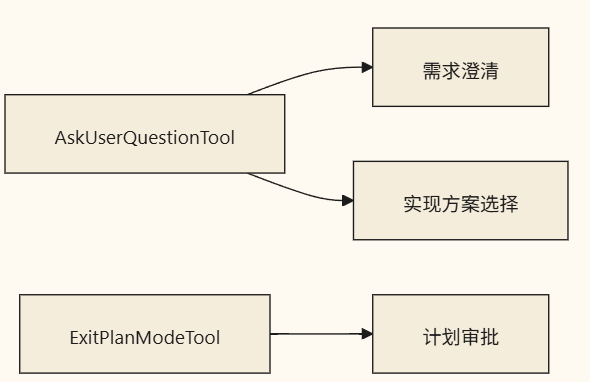 In other words:
AskUserQuestionTool: I'm missing information, need to ask more.ExitPlanModeTool: The plan is complete, please approve it. These two tools cannot be used interchangeably.
Why It Is Particularly Important for Agent Products
Without this tool, the model has only two poor choices when encountering ambiguity:
- Blindly guess on its own
- Casually ask a question in natural language Claude Code's approach takes the third path:
Make questioning a formal interaction protocol. This makes the system significantly more stable in several ways:
- Questions are more concise
- User selections are clearer
- Subsequent execution is more controllable
- Metrics tracking and product iteration are easier
The Most Common Misconceptions
Misconception 1: It's Just a Minor UI Widget
False.
It is actually Claude Code's "user collaboration interface."
Misconception 2: It Should Be Used for Everything That Requires Asking the User
Not exactly.
Plan approval, permission requests, and certain system confirmations have their own dedicated mechanisms.
Misconception 3: It Only Supports Single-Choice Questions
Quite the opposite.
It supports multiple questions, multi-select options, annotations, and previews.
Summary
If you want to grasp its essence, remember this:
AskUserQuestionToolturns "requirement clarification during execution" into a structured product interaction capability—it is not an ordinary chat question, but a formal collaboration interface within Claude Code’s main loop.
Learning map
AskUserQuestionTool Learning Path
📌 Phase 1: Understand Its Design Philosophy
- Recognize the difference between 「asking a direct sentence」 and 「structured form-style questioning」
- Understand why the Agent needs a formal user questioning protocol
📌 Phase 2: Master the Schema Structure
questions(1~4 items),answers,annotations- Single question structure:
question/header/options(2 ~ 4)/multiSelect - Purpose and format of the
previewfield (ASCII mockup / code snippet / configuration example)
📌 Phase 3: Correct Invocation in Plan Mode
- Missing requirement information → use AskUserQuestionTool first
- When the plan is finalized → then use ExitPlanModeTool
- Do not confuse the responsibility boundaries between the two
📌 Phase 4: Understand Constraints and Best Practices
- Validating uniqueness for question text and option labels
- When to use vs. when not to use (approval/permissions ≠ scope of this tool)
- Comprehensive use cases involving multiple questions + multi-select + annotations
Get hands-on — step by step
- Install Claude Code: npm install -g @anthropic-ai/claude
- Initialize the project in your repository's root directory: mkdir demo-agent && cd demo-agent && claude --login
- Create a new prompt file prompt.txt and write your requirements and background information into it
- When Claude encounters ambiguity during the conversation, proactively say "Please list specific options for me to choose from" to trigger AskUserQuestionTool
- Observe the interactive cards rendered in the terminal: check whether each card's question/header/options/multiSelect fields are complete
- Practice using multi-select mode: say "Please list at least two options so I can select multiple at once"
- Request an attached preview: "Provide a preview with code snippets or configuration examples for each option"
- Verify the uniqueness constraint: attempt to propose semantically duplicate options and observe Claude Code's rejection mechanism
- Practice Plan Mode: type /planmode to enter plan mode → use AskUserQuestionTool to fill in missing information → submit for approval via ExitPlanModeTool
- Check the askUserQuestionTimeout configuration (default 60s): modify it to "5m" in settings.json to extend the wait time, and verify timeout behavior
Top 3 sources
- 1Claude Code Tools Reference - AskUserQuestion
官方文档完整工具列表,包含 AskUserQuestion 的描述、权限配置选项与超时设置。
https://docs.anthropic.com/en/docs/claude-code/tools#askuserquestion-tool-behavior
- 2Claude Code GitHub 仓库
Anthropic 官方发布的 Claude Code CLI,包含源码(含 AskUserQuestionTool.tsx/schema 定义)与完整文档。
https://github.com/anthropics/claude-code
- 3Anthropic API Reference - Tool Use
官方 Tool Use 概念指南,解释结构化输入/输出、多轮交互流的设计原则,帮助理解 AskUserQuestionTool 在 Claude 系统中的定位。
https://docs.anthropic.com/en/api/tool-use
Links are AI-suggested — worth a quick sanity check before diving in.