Loop engineering: Getting started with loops
7/18/2026, 10:28:20 PM
An essential guide to transition from simple turn-based prompts to automated, goal-oriented, and proactive loop workflows using Claude Code.
Category: Claude Code
Instead of manually prompting your AI coding agent for every single task, loop engineering allows you to design agentic workflows that run autonomously. This guide from the Claude Code team explains how to define agentic loops and systematically transition from basic turn-based interactions to goal-based, time-based, and proactive automation.
Defining Agentic Loops
On the Claude Code team, we define loops as agents repeating cycles of work until a stop condition is met.
Rather than treating every task with the same level of complexity, we categorize loops based on four specific vectors:
- How they are triggered
- How they are stopped
- Which Claude Code primitive is used
- What type of task is most appropriate
Not all development tasks require complex loops. We recommend starting with the simplest pattern and adopting advanced loops selectively to maintain code quality while managing token usage.
To get started with Claude Code, you can use the following installation command or read the official documentation:
irm https://claude.ai/install.ps1 | iex
Compatible platforms and integrations:
The Four Loop Archetypes
1. Turn-Based Loops
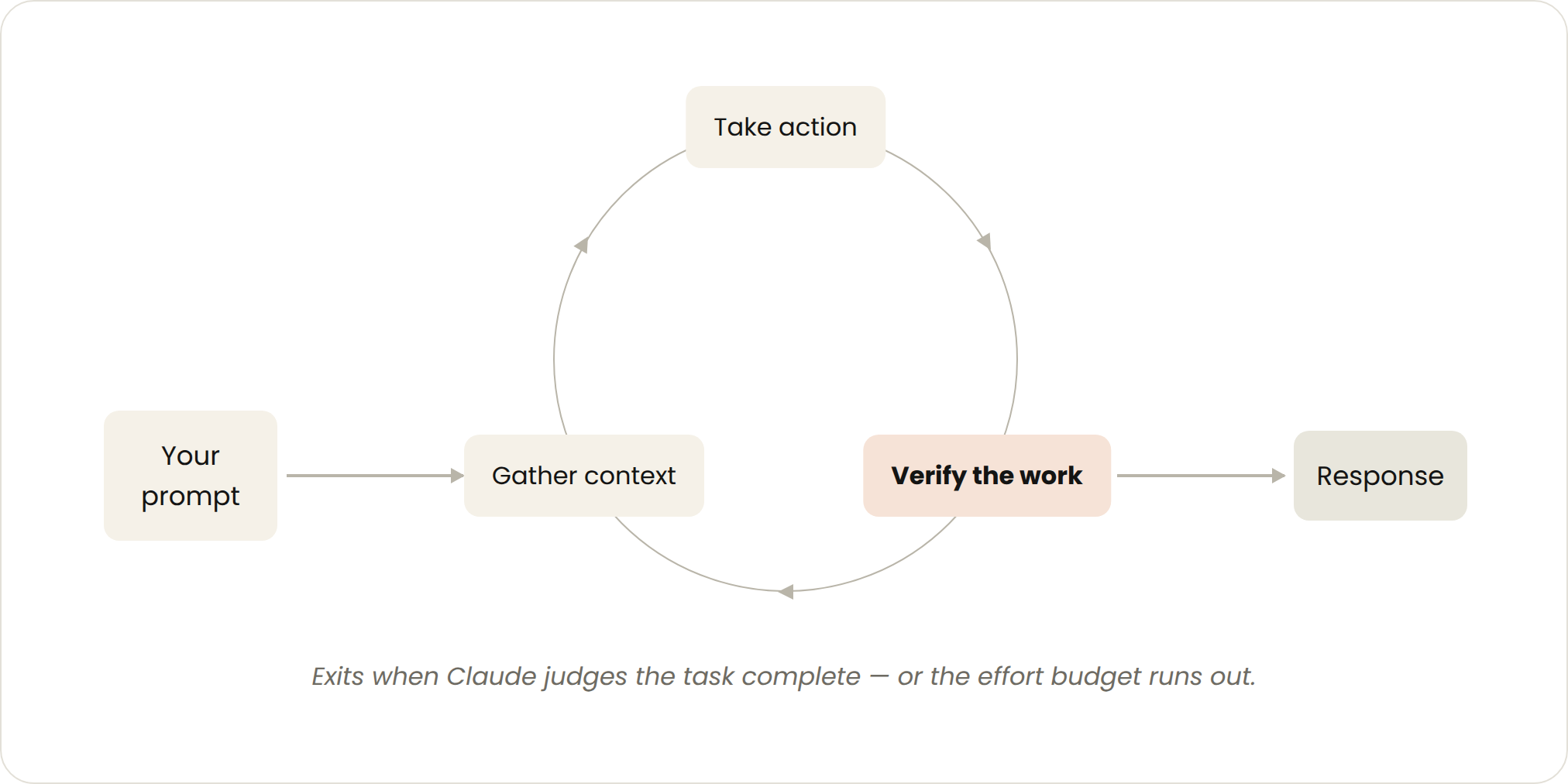 Turn-based loop workflow diagram
- Triggered by: A user prompt.
- Stop criteria: Claude judges it has completed the task or needs additional context.
- Best used for: Shorter tasks that are not part of a regular process or schedule.
- Managed usage by: Writing highly specific prompts and improving verification using skills to reduce the overall number of turns.
Every prompt you send initiates a manual loop where you direct each turn. Claude gathers context, takes action, verifies its work, repeats the process if necessary, and finally hands back control to you.
For example, if you ask Claude to create a like button, it will read your code, make the edit, run the tests, and deliver a result it believes works. You must then check the work and write the next prompt.
To optimize this step, you can encode your manual validation checks into a SKILL.md file. This lets Claude self-verify its work end-to-end using tools or connectors to see, measure, or interact with the result. Quantitative checks yield the most reliable self-verification. (For more details on choosing between automation structures, read our guide to steering Claude Code.)
An example SKILL.md specification:
---
name: verify-frontend-change
description: Verify any UI change end-to-end before declaring it done.
---

# Verifying frontend changes
Never report a UI change as complete based on a successful edit alone. Verify it the way a human reviewer would:

1. Start the dev server and open the edited page in the browser.

2. Interact with the change directly. For a new control (button, input, toggle): click it, confirm the expected state change, and screenshot before/after.

3. Check the browser console: zero new errors or warnings.

4. Use the Chrome Devtools MCP, run a performance trace and audit Core Web Vitals.

If any step fails, fix the issue and rerun from step 1 — do not hand back partially verified work.
2. Goal-Based Loops (/goal)
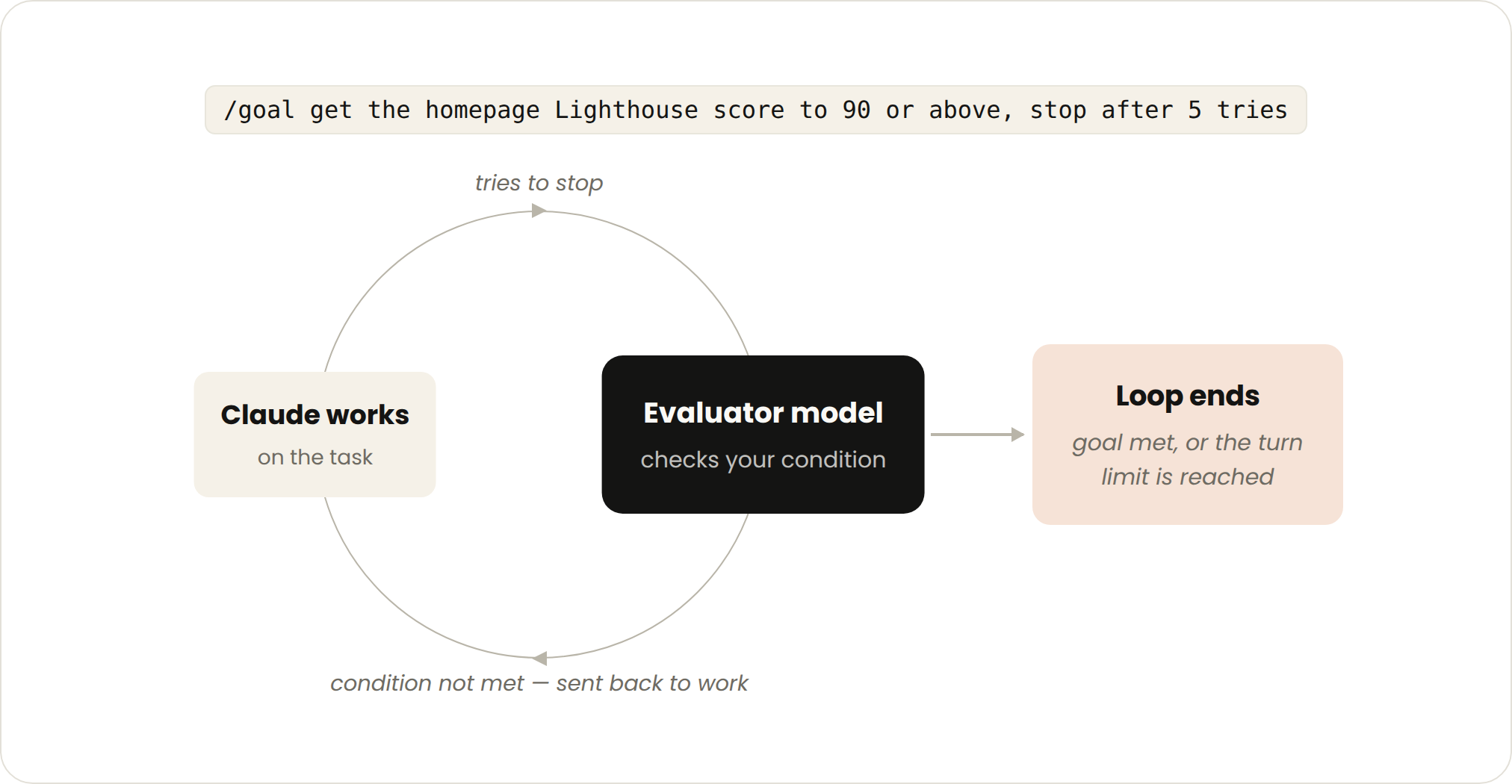 Goal-based loop workflow diagram
- Triggered by: A manual prompt in real-time.
- Stop criteria: Goal achieved OR maximum number of turns reached.
- Best used for: Tasks that have deterministic, verifiable exit criteria.
- Managed usage by: Setting explicit completion criteria and strict turn caps (e.g., "stop after 5 tries").
Complex tasks often require multiple iterations. Instead of forcing Claude to guess whether a result is "good enough," you can define exactly what success looks like using /goal.
When a /goal loop is initiated, an evaluator model checks your conditions each time Claude tries to conclude the task. If the conditions are not met, the evaluator sends the agent back to work until the goal is achieved or the turn limit is reached. Deterministic targets, such as passing a test suite or achieving a performance score, work best.
Example command:
/goal get the homepage Lighthouse score to 90 or above, stop after 5 tries.
3. Time-Based Loops (/loop and /schedule)
- Triggered by: A specified time interval.
- Stop criteria: You cancel it, or the objective is resolved (e.g., a PR merges or a queue empties).
- Best used for: Recurring maintenance tasks, or interfacing with asynchronous external systems.
- Managed usage by: Setting longer polling intervals or switching to event-driven actions.
Some workflows are strictly recurring, where the steps remain constant but the inputs change (e.g., summarizing Slack channels daily). Other workflows monitor external systems that update asynchronously, such as checking for CI pipeline failures or incoming PR reviews.
You can trigger these intervals locally on your machine using /loop:
/loop 5m check my PR, address review comments, and fix failing CI
Because /loop runs locally, it halts when your terminal is closed. To run loops continuously in the cloud, you can turn your prompt into a routine using /schedule.
4. Proactive Loops
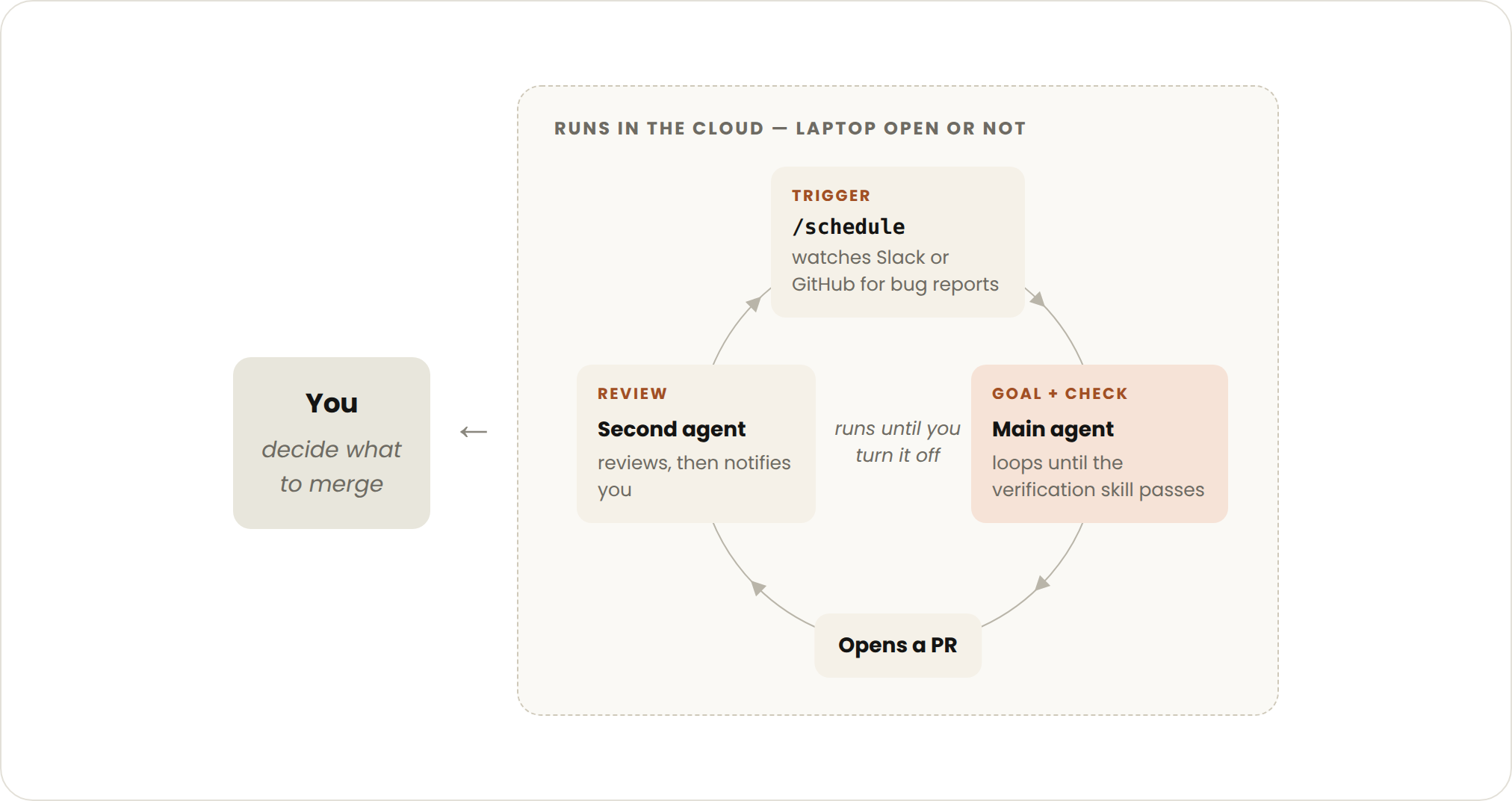 Proactive loop workflow diagram
- Triggered by: An external event or a schedule (no human-in-the-loop required).
- Stop criteria: Individual tasks exit when goals are met; the orchestration routine runs indefinitely until disabled.
- Best used for: Continuous streams of well-defined engineering tasks like triage, security migrations, or dependency upgrades.
- Managed usage by: Routing processing routines to smaller, faster models, while reserving the most capable models for critical judgment decisions.
By composing primitives like /schedule, /goal, auto mode, skills, and dynamic workflows (currently in research preview), you can construct completely autonomous, long-running engineering agents.
An automated pipeline for triage and code repair can chain these elements together:
/schedulechecks for new bug submissions./goaland skills define successful resolution and verification steps.- Dynamic workflows orchestrate subagents to isolate, patch, and verify the issue in parallel.
- Auto mode allows the loop to execute tools and resolve steps without asking for manual permission.
Example unified prompt:
/schedule every hour: check #project-feedback for bug reports. /goal: don't stop until every report found this run is triaged, actioned, and responded to. When fixing a bug, use a workflow to explore three solutions in parallel worktrees and have a judge adversarially review them.
Best Practices for Loop Systems
Maintaining Code Quality
A loop's output is only as strong as the environment it operates within. To optimize performance:
- Keep the codebase clean: AI models write code by matching patterns. If your existing codebase has consistent style and conventions, Claude will follow them.
- Establish self-verification protocols: Document what defines high-quality work for your team using skills.
- Provide accessible documentation: Ensure up-to-date API references and framework docs are easily accessible within the workspace.
- Incorporate a secondary reviewer: Use a separate model instance for code reviews. A reviewer with clean context is less susceptible to confirmation bias. Use the native
/code-reviewskill or configure Code Review for GitHub.
Systemic Improvement: When a loop fails or yields a suboptimal result, don't just manually patch the immediate codebase. Update your
SKILL.mdrules or test scripts to prevent that category of error from happening again.
Managing Token Usage
Running continuous loops can quickly escalate token consumption. Keep your systems highly bounded:
- Choose the right model: Avoid using high-tier models for simple procedural tasks. Route lightweight tasks to faster, cheaper variants.
- Define precise exit criteria: Explicit limits help Claude locate and verify solutions without wasting turns wandering off-path.
- Pilot changes first: Dynamic workflows can spawn hundreds of subagents. Test changes on a isolated branch or a small slice of code before running a massive loop.
- Use deterministic scripts: Whenever possible, use standard scripts for non-generative work. Running a local shell script via an MCP server is vastly cheaper than asking Claude to reason through those calculations turn-by-turn.
- Align schedules with demand: Match polling frequencies to real-world change intervals (e.g., don't poll a nightly build API every 5 minutes).
- Monitor telemetry: Use
/usageto analyze consumption by skills, subagents, and MCP tools. Running/goalwith no arguments displays running token costs, and/workflowsreveals subagent costs with options to terminate them mid-run.
For a deeper dive, review how your choice of model and effort level impacts running costs.
Selection Matrix
| Loop Type | What You Hand Off | When to Use | Key Primitive |
|---|---|---|---|
| Turn-based | The verification step | Exploring concepts, planning, and manual iteration | Custom verification skills |
| Goal-based | The stop condition | Tasks with explicit, objective definitions of "done" | /goal |
| Time-based | The trigger | Processes triggered by schedules or external environments | /loop, /schedule |
| Proactive | The initial prompt | Recurring, standardized, end-to-end pipelines | All primitives + Dynamic workflows |
Key Takeaways
- Loops are cycles of work that run until a target stop condition is reached, moving AI from reactive chatting to automated goal-seeking.
- Deterministic verification (using
SKILL.mdand test suites) is critical to getting reliable results from/goalloops. - Set explicit iteration caps (e.g.,
stop after 5 tries) to prevent runaway loops and run-time token waste. - System design dictates output quality. When an agent makes a mistake, treat it as a bug in your instructions, skills, or validation scripts, and fix the system rather than just the code.
For more details, check out the official docs on running agents in parallel, goals, routines, and dynamic workflows.
This article was written by Delba de Oliveira and Michael Segner.
Learning map
Stage 1: Manual Turn-Based Loops
- Understand Agentic Cycles: Learn how Claude gathers context, takes actions, checks its work, and returns control to you.
- Write Verification Skills: Create
SKILL.mdconfigurations to define custom UI and backend quality checks so Claude can verify its own work.
Stage 2: Goal-Based Automation
- Master the
/goalCommand: Understand how to set deterministic, verifiable success criteria to keep agents on track. - Configure Loop Limits: Implement token-conserving habits by capping iterations with strict "stop after X tries" conditions.
Stage 3: Time-Based and Proactive Loops
- Automate with
/loopand/schedule: Build routines to run checks on intervals, monitor PRs, address failing CI pipelines, or triage backlogs. - Utilize Dynamic Workflows: Coordinate multiple parallel subagents to research solutions, run tests, and conduct adversarial code reviews autonomously.
Get hands-on — step by step
-
Install Claude Code: Open your terminal and run the standard initialization script to set up Claude Code locally:
irm https://claude.ai/install.ps1 | iex(On macOS/Linux, use the corresponding curl installation command as documented in the official setup).
-
Draft a Custom Verification Skill: Create a file named
SKILL.mdin the root of your project directory with standard test-checking instructions:--- name: verify-build description: Verify that the codebase builds with zero console errors before finalizing work. --- # Verification Routine 1. Run npm run build. 2. Confirm there are no compilation errors or linter warnings. -
Run a Goal-Oriented Command: Execute Claude Code inside your repository, and input a goal with a hard limit to trigger iteration:
/goal fix the failing test suites in /tests, stop after 5 tries -
Set Up a Local Automated Monitor: Run a time-based interval loop to check on your progress and fix newly introduced issues in real time:
/loop 5m run tests, analyze output, and fix any new failures
Top 3 sources
- 1Claude Code Official Documentation
The official documentation detailing setup, custom commands, loops, and agent configuration guidelines.
https://code.claude.com/docs/en/overview
- 2Claude Code Skills Guide
Official instructions on how to write custom SKILL.md guidelines to steer agent behaviors and verification checks.
https://code.claude.com/docs/en/skills
- 3Model Context Protocol (MCP) Quickstart
The official GitHub repository for setting up and understanding MCP tools which power external system integration inside agent loops.
https://github.com/modelcontextprotocol/quickstart
Links are AI-suggested — worth a quick sanity check before diving in.