GrepTool: Search content
8/2/2026, 2:08:07 PM · updated 8/2/2026, 2:10:54 PM · Source
AI-translated on 8/2/2026, 2:12:32 PM · by Qwen3.6 35B (fast, default)
This article provides an in-depth analysis of GrepTool's design intent and role within Claude Code, revealing how it encapsulates the underlying ripgrep into a structured code search tool that supports pagination, context control, and multiple output modes, serving as the starting point for debugging and understanding source code.
One of the Most Used "Clue-Finding" Tools in Claude Code
GrepTool is responsible for searching for text or regex patterns within file contents.
In real-world usage, it's often Claude Code's first step for troubleshooting, understanding code, and locating implementations.
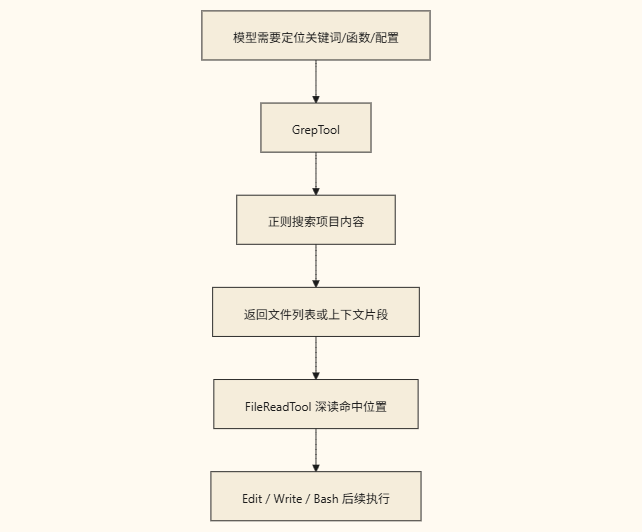
If you break down Claude Code's common actions, you'll find that many rounds of conversation actually follow this pattern:
- First
Grep - Then
Read - Then decide whether to
Edit
So GrepTool is essentially a "clue discoverer" in the main loop.
Its Schema Makes It Clear It's Not Just Simple String Searching
tools/GrepTool/GrepTool.ts:
const inputSchema = z.strictObject({
  pattern: z.string(),
  path: z.string().optional(),
  glob: z.string().optional(),
  output_mode: z.enum(['content', 'files_with_matches', 'count']).optional(),
  '-B': z.number().optional(),
  '-A': z.number().optional(),
  '-C': z.number().optional(),
  '-n': z.boolean().optional(),
  '-i': z.boolean().optional(),
  type: z.string().optional(),
  head_limit: z.number().optional(),
  offset: z.number().optional(),
  multiline: z.boolean().optional(),
})
This shows that GrepTool does more than just "search for a word"; it also supports:
- Filename filtering
- File type filtering
- Viewing only matching files
- Viewing content context
- Viewing match counts
- Pagination and truncation
- Multiline mode
In other words, it's a ripgrep search engine wrapped in a structured interface.
Its Underlying Engine is ripgrep, but It's Not Exposed Raw
The most critical import in the source code is:
import { ripGrep } from '../../utils/ripgrep.js'
Anthropic didn't let the model run rg directly in Bash; instead, it wrapped ripgrep as a formal tool.
The benefits of this approach are direct:
- The permissions system recognizes it as "content search"
- Output modes are more controllable
- Context results are easier to trim
- The UI can render them more reasonably
A Diagram of Its Common Workflow
Its Design Heavily Emphasizes "Controlling Result Volume"
There's a very critical default value in the source code:
const DEFAULT_HEAD_LIMIT = 250
The comment is quite straightforward:
An unlimited grep can easily overwhelm the context.
So GrepTool inherently does two things:
- Limits result volume by default
- Supports
offsetpagination to continue viewing
This is crucial because Claude Code is essentially playing a game with limited context.
If a search tool doesn't help control the volume, it will quickly bog down the conversation.
It Doesn't Just "Return Matching Content," It Also Distinguishes Three Modes
The source code breaks down the output modes into:
contentfiles_with_matchescount
Behind these three modes lie three completely different work goals:
files_with_matches: I first need to know which files are relevantcontent: I want to view the context around the matchescount: I want to know the scope of impact or match volume
This is also what makes Claude Code more advanced than "having an AI run rg and manually read the terminal output."
It doesn't just have one tool; it enables a single tool to support different intents internally.
The Boundary Between It and GlobTool
These two tools are often compared side-by-side:
GlobTool: Search by path/filenameGrepTool: Search by content
You can think of it this way: Knowing what a file looks like -------------> GlobTool
Knowing what keywords are in the content --------> GrepTool
In real tasks, GrepTool is typically used more frequently.
Because most of the time, you know:
- A certain function name
- A certain API path
- A certain error message
- A certain piece of copy/text
rather than an exact filename.
It is Also Read-Only and Concurrent-Safe
Like GlobTool, GrepTool explicitly declares itself as:
isConcurrencySafe() {
  return true
}

isReadOnly() {
  return true
}
This means the main thread can more boldly send out multiple search requests in parallel.
This greatly helps Claude Code's exploration efficiency.
A Real-World Usage Path
For example, if a user says:
After logging in successfully, why does it still redirect back to the login page?
A very typical path for Claude Code would be:
- Use
GrepToolto search forlogin,redirect, and route protection logic - Use
FileReadToolto read a few key matching files - Use
GrepToolagain to search for the state source - Finally locate the root cause
You'll notice that here, GrepTool isn't an auxiliary tool; it's the starting point of the investigation chain.
Most Common Misconceptions
Misconception 1: Just running rg in Bash is enough
Functionally it might suffice, but at the system level, it's different.
GrepTool is more controllable, saves more context, and better supports subsequent reasoning.
Misconception 2: Grep just "searches strings"
That's not right.
It actually supports different output modes, context ranges, pagination, and file filtering.
Misconception 3: Grep is only a preliminary exploration tool
Not entirely.
It's also frequently used for:
- Confirming which areas a change affected
- Checking if a name has been fully removed from the project
- Verifying whether refactoring was applied everywhere
Summary
If you compress Claude Code's search capability into a single sentence:
GrepToolis the most frequently used content-location tool in the main loop, wrappingripgrepinto a formal search capability that supports pagination, trimming, and structured context injection.
Many source code analysis tasks truly begin with GrepTool.
Learning map
Stage 1: Defining the Design Position of GrepTool
- Understand core responsibilities: Clarify that GlobTool is used for "filename/path matching," while GrepTool focuses on "file content search."
- Master output mode differences: Familiarize yourself with the distinctions between
content(displaying hit context),files_with_matches(listing files only), andcount(statistical size), and how they fit different debugging goals.
Stage 2: Understand the Underlying Control Mechanisms
- Parse Schema parameters: Learn how to use regex patterns (
pattern, file type filtering (-i,type) and context line control (-B,-A,-C). - Avoid context overflow: Understand the system's built-in flow-control protection (e.g., default
DEFAULT_HEAD_LIMIT = 250). Useoffsetfor pagination when searching large codebases to prevent the conversation from being flooded with data.
Stage 3: Practical Investigation Path Applications
- Familiarize yourself with the core workflow: Establish a standard habit of 'Grep (locate clues) → Read (view context) → Edit (execute modifications).' Understand how parallel, read-only execution brings high efficiency.
- Comprehensive scenario drill: For real errors or feature requests, string together multi-round search queries to quickly lock onto the root cause code and evaluate the impact scope.
Get hands-on — step by step
- Start the environment: Open your terminal and navigate to your target code repository, then enter
claudeto launch the terminal agent environment. - Execute basic content location: Give Claude commands in the conversation, such as "Find all files in the project containing 'auth_login'". Observe how it calls the search capability and returns a list of results (using GrepTool's
files_with_matcheslogic). - Dive into code context: Enter precise instructions, for example "Show the code snippets containing 'timeout' in
config.ts, displayed with line numbers". At this point Claude will call GrepTool with thecontentflag +-nparameter for extraction. - Verify advanced filtering functionality: Try using compound-condition search, such as "Find all comment lines that start with // @deprecated". Observe how it controls output scale through regex and header pagination in large projects.
- Complete a full debug loop: Simulate troubleshooting a bug by proposing a requirement like "Find all routing logic that redirects to '/'". Combine this with the subsequent source code reading process to fully walk through the entire workflow from search to reasoning to implementation.
Top 3 sources
- 1Ripgrep 官方引擎 (GrepTool 底层)
GrepTool 的底层核心实现引擎。了解 ripgrep 的正则处理机制、多线程搜索逻辑与内存效率,是理解 GrepTool 为何能兼顾速度与安全的关键文献。
https://github.com/BurntSushi/ripgrep
- 2Anthropic Code-to-Agent 技术架构
Anthropic 官方的 Agent 框架文档,详细说明了工具封装、并行调度与多轮交互的设计范式,是掌握 Claude Code 体系下 GrepTool 工作原理的权威来源。
https://docs.anthropic.com/en/docs/build-with-claude/code-to-agent-overview
- 3Model Context Protocol (MCP) 规范
定义 AI 工具参数标准与通信架构的行业协议。阅读此规范有助于深入理解 GrepTool 的 JSON Schema、安全权限声明及与其他 Agent 工具协作的标准化设计思路。
https://modelcontextprotocol.io/introduction
Links are AI-suggested — worth a quick sanity check before diving in.