Why is the 'Claude BASH' tool so critical?
7/31/2026, 5:58:05 PM · updated 7/31/2026, 8:50:40 PM
AI-translated on 7/31/2026, 8:53:01 PM · by Qwen3.6 35B (fast, default)
A deep analysis of Claude Code's built-in BashTool mechanism, revealing how it bridges the critical gap from "static code modification" to "dynamic verification in engineering environments" through semantic classification, security sandboxing, and task scheduling systems.
Claude Code has many tools, but from the perspective of a real-world development workflow, BashTool is arguably one of the most critical execution components. It is not merely a command wrapper, but a complete "command execution subsystem" responsible for upgrading the AI from a passive code editor into a dynamic development environment operation bus. Through strict semantic classification, deep task system integration, and security controls, BashTool completely bridges the engineering loop between "writing code" and "verifying code."
Role Positioning: Development Environment Operation Bus
Without Bash, Claude Code's interaction leans more toward static code modification; only by introducing Bash does it gain the ability to operate a real development environment:
- Run test suites and inspect build outputs
- Query system status and environment information
- Invoke custom scripts within the project
- Seamlessly integrate with Git, package managers, and the complete build chain
Source Code Weight: A Complete Command Execution Subsystem
The import list of BashTool.tsx alone reveals that its architectural complexity far exceeds that of ordinary utility functions. It simultaneously addresses six core dimensions:
import { backgroundExistingForegroundTask, markTaskNotified, registerForeground, spawnShellTask, unregisterForeground } from '../../tasks/LocalShellTask/LocalShellTask.js';
import { parseForSecurity } from '../../utils/bash/ast.js';
import { splitCommand_DEPRECATED, splitCommandWithOperators } from '../../utils/bash/commands.js';
import { exec } from '../../utils/Shell.js';
import { SandboxManager } from '../../utils/sandbox/sandbox-adapter.js';
import { checkReadOnlyConstraints } from './readOnlyValidation.js';
import { shouldUseSandbox } from './shouldUseSandbox.js';
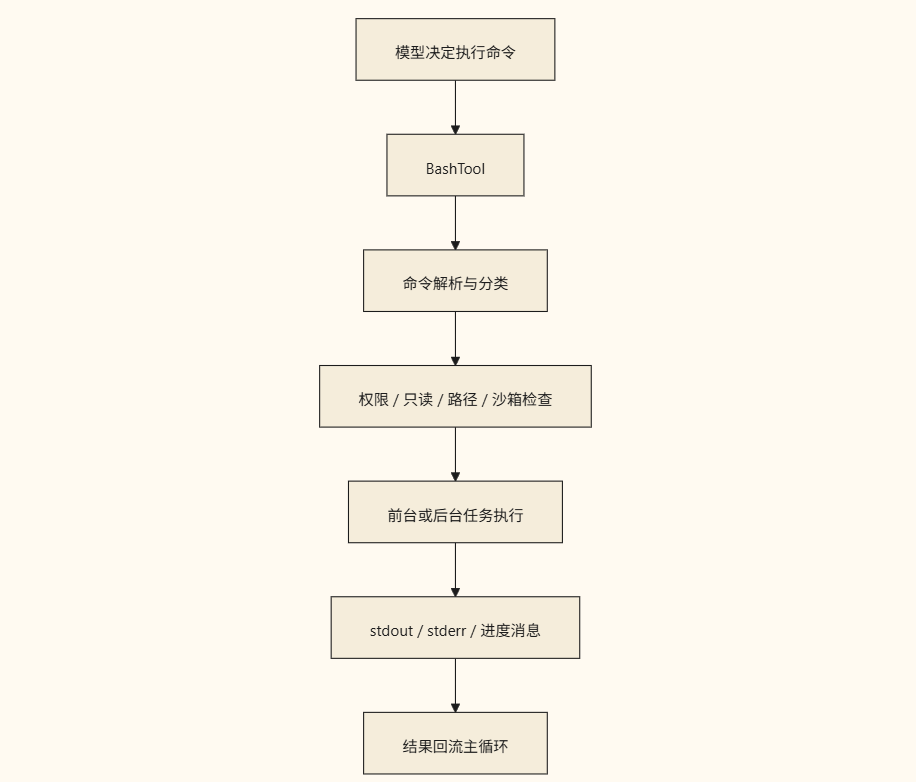
These dependencies clearly reveal BashTool's architectural responsibilities: task foreground/background lifecycle management, Shell command syntax parsing, underlying security AST analysis, actual process execution, sandbox policy routing, and read-only constraint validation. It essentially acts as a bridge, transforming scattered Shell calls into structured engineering capabilities.
Semantic Analysis: Rejecting "Black-Box" Blind Execution
BashTool does not treat externally passed instructions as unparseable black boxes; instead, it incorporates a refined semantic classification mechanism. The core logic resides in the isSearchOrReadBashCommand function:
export function isSearchOrReadBashCommand(command: string): {
  isSearch: boolean;
  isRead: boolean;
  isList: boolean;
} {
  let partsWithOperators: string[];
  try {
    partsWithOperators = splitCommandWithOperators(command);
  } catch {
    return {
      isSearch: false,
      isRead: false,
      isList: false
    };
  }
  ...
}
This "classify first, execute later" design yields significant engineering benefits:
- UI Interaction Optimization: Accurately identify operation types to appropriately display or collapse results.
- Proactive Security Policy Enforcement: Read-only commands can be automatically allowed based on policy, reducing unnecessary interception friction.
- Granular Pipeline Control: Provides explicit contextual basis for subsequent path validation and sandbox routing.
Deep Integration with Task System: Supporting Long-Running Development Commands
As evidenced by its import dependencies, BashTool is deeply coupled with LocalShellTask. This means Shell commands are no longer instantaneous "execute-synchronously-then-dispose" actions, but can fully integrate into Claude Code's task pipeline:
- Support smooth switching between foreground interaction and background silent execution
- Real-time progress tracking and result notification delivery
- Detect interrupt signals and safely restore session state
This design closely aligns with frequently encountered long-running tasks in real development scenarios, such as:
npm run build/pnpm lint(build and static analysis)pytest/cargo test(full test suite execution)

Security & Constraints: Preventing Backlash from Excessive Capability
The underlying permissions of Shell are extremely powerful and, once unchecked, can easily become a security risk vector. Therefore, BashTool has built-in multi-layered safeguards at the architectural level:
Core Principle: Shell execution must be controlled. Every command must undergo type classification, path validity validation, sandbox isolation policy evaluation, and user permission confirmation before entering
exec.
This is also the fundamental reason why BashTool-related code volume and security audit logic are noticeably heavier than ordinary business tools. It must establish a strict balance between granting the AI sufficient operational authority and enforcing a safety net for system security risks.
Engineering Significance: Bridging the Last Mile of AI Programming
Many current AI programming products often remain stuck at the "code generation" stage, lacking true awareness and verification capabilities for the execution environment. The existence of BashTool is precisely the key engine that enables Claude Code to make this leap: it reconstructs isolated command execution into a formal system-level capability featuring semantic classification, permission constraints, task scheduling, UI feedback, and the ability to feed back into the main loop. Through this, AI truly evolves from a mere "code generator" into a closed-loop "engineering executor."
Key Takeaways
- BashTool is not a simple subprocess wrapper, but a complete command execution subsystem encompassing semantic classification, sandbox isolation, and task pipelines.
- By accurately identifying command types (search/read/write, etc.), BashTool enables a more secure automatic allow mechanism and an improved interaction experience.
- Deep integration with
LocalShellTaskallows it to perfectly adapt to long-running development flows like builds and testing, supporting foreground/background switching, progress tracking, and state restoration. - Strict permission validation and read-only policies serve as the foundational safeguard against the risks of unchecked Shell power, establishing an engineering balance between flexibility and security.
- It is the core component in Claude Code for breaking down the isolation wall between "writing code" and "verifying code", marking AI's critical leap toward a complete engineering executor.
Learning map
Phase One: Awareness and Positioning — Why Text-Only Editing Falls Short?
- Static vs. Dynamic Differences: Recognizing the limitations of operating without environmental feedback (performing only text substitutions) and understanding how Bash tools introduce a dynamic closed loop of "running builds, executing tests, and querying system information".
- Evolution of the Engineering Role: Defining the core objective of elevating the AI assistant from a "read-only code generator" to a "true engineering executor", clarifying its role throughout the development environment's operation chain.
Phase Two: Source Code Mechanisms — How the AI Analyzes External Instructions?
- Semantic Recognition and Classification Strategy: Studying core logic such as
isSearchOrReadBashCommandto learn how the system distinguishes command intentions in order to apply different result handling strategies (e.g., collecting search results, safely permitting read-only queries). - Advanced Security Defense: Understanding the AST-based
parseForSecurityand path validation mechanisms to ensure that before the AI executes high-risk instructions, it undergoes a robust "read-only constraint" verification and confirmation process.
Phase Three: Engineering Integration — How Long and Complex Tasks Are Handled?
- Isolation and Sandboxing: Mastering the operational boundaries of the
SandboxManagerand the scheduling mechanism of theshouldUseSandboxstrategy, ensuring that development environment operations remain fully isolated and secure. - End-to-End State Synchronization: Exploring how the BashTool binds to the underlying
LocalShellTask, and understanding how foreground/background switching, progress notifications, and interruption detection collaborate to support long-running operations (such asnpm run build).
Get hands-on — step by step
-
Open the local project directory containing the build scripts and launch Claude Code.
-
Experience semantic and security identification: Input instructions requesting a system read, and observe how internal logic identifies them as a "search/read" type, quickly returning results under security constraints.
-
Verify long-duration task scheduling: Request the model to execute time-consuming operations such as
npm run buildorpytest, focusing on experiencing how the system switches between foreground monitoring mode and background runtime, along with its progress feedback mechanism. -
Observe engineering closed-loop verification: After implementing complex code changes, use its built-in shell capabilities to trigger the relevant build scripts, comparing the outcomes of pure text editing versus true environment integration.
Top 3 sources
- 1Anthropic Claude Code 官方文档
Anthropic 官方的详细技术指南,涵盖 Claude Code 的核心功能、工具集调用规范及其安全沙箱机制。
https://docs.anthropic.com/en/docs/claude-code/overview
- 2Model Context Protocol (MCP) Specification
现代 AI Agent 与外部执行环境交互的行业标准协议,是理解大模型工具调用底层架构的核心学习资料。
https://modelcontextprotocol.io/introduction
- 3LightOn Prompting Guide: Tool Use & Agents
由 AI 社区总结的权威文档,系统论述了如何让大语言模型通过插件与执行环境实现真实的工程能力闭环。
https://www.promptingguide.ai/agents/tools
Links are AI-suggested — worth a quick sanity check before diving in.