Context Compression Management
7/31/2026, 5:27:47 PM · updated 7/31/2026, 5:33:24 PM
AI-translated on 7/31/2026, 5:41:47 PM · by Qwen3.6 35B (fast, default)
Claude Code leverages a hierarchical, progressive compression pipeline (tool budget pruning, snip, microcompact, context collapse, autocompact, with reactive compact as a fallback) to maximally preserve fine-grained context structure while ensuring continuity across long-term engineering tasks, rather than relying on a single global summarization mechanism.
Claude Code's long-context capability does not rely solely on the model's window size, but is built upon a sophisticated multi-stage hierarchical compression pipeline. Within the primary query chain, it sequences six layers of mechanisms—including budget trimming, fine-grained slimming, view collapsing, automatic summarization, and error fallback—and deeply integrates session persistence with Prompt Cache coordination to ensure runtime context management that prioritizes structure and defers information loss during long-running engineering tasks.
Why Claude Code Must Perform Context Compression
Claude Code's tasks are not one-off Q&A exchanges, but continuous execution of complex engineering operations:
- Reading multiple files
- Searching the codebase
- Running Bash commands
- Writing files and patches
- Invoking sub-agents
- Exchanging results with MCP / LSP These actions constantly append new messages and tool results to the session history. Without compression, the model will quickly become flooded with old messages, verbose tool outputs, and file attachments. Anthropic explicitly points out this mechanism even in the system prompt:
Automatic Summarization Commitment
The conversation has unlimited context through automatic summarization.(This means the conversation will operate with "virtually unlimited" context via automatic summarization.) Compression Trigger ConditionsThe system will automatically compress prior messages in your conversation as it approaches context limits.(When the conversation nears the context limit, the system will automatically compress older messages. Put simply: as limits are reached, earlier messages are automatically compressed.) From product commitment to runtime implementation, Claude Code treats "automatic compression" as infrastructure rather than a post-hoc patching logic.
Main Chain and Hierarchical Pipeline Architecture
The actual compression main chain resides in /Users/xuanyuan/Downloads/claude-code-src/query.ts. Judging by the source code order, it doesn't just invoke compact() once, but chains multiple layers together:
messagesForQuery = await applyToolResultBudget(...)

const snipResult = snipModule!.snipCompactIfNeeded(messagesForQuery)
messagesForQuery = snipResult.messages

const microcompactResult = await deps.microcompact(
  messagesForQuery,
  toolUseContext,
  querySource,
)
messagesForQuery = microcompactResult.messages

const collapseResult = await contextCollapse.applyCollapsesIfNeeded(
  messagesForQuery,
  toolUseContext,
  querySource,
)
messagesForQuery = collapseResult.messages

const { compactionResult } = await deps.autocompact(
  messagesForQuery,
  toolUseContext,
  ...
)
What's most noteworthy is not the function names themselves, but the strict execution order:
- First, trim disproportionately large tool results
- Then perform
snip(localized slimming) - Then perform
microcompact(structured micro-compression) - Project
context collapse(view folding) - Finally, attempt
autocompact(global summarization) This means Claude Code isn't in a hurry to crudely compress old history into a single summary, but instead prioritizes trying to preserve more details and structure. The entire context management is fundamentally a multi-stage pipeline rather than a single-point capability.

Detailed Breakdown of the Six-Tier Compression Mechanisms
Tier 1: Tool Result Budget Trimming
The first to run is applyToolResultBudget(...).
messagesForQuery = await applyToolResultBudget(
  messagesForQuery,
  toolUseContext.contentReplacementState,
  ...,
  new Set(
    toolUseContext.options.tools
      .filter(t => !Number.isFinite(t.maxResultSizeChars))
      .map(t => t.name),
  ),
)
Core Objective: Before entering true context compression, it first handles or trims disproportionately large tool results. This is crucial because more often than not, the things occupying the most space aren't user messages, but:
- Long terminal outputs generated by
BashTool - lengthy results returned by search tools
- large file snippets read by file-reading tools If these types of results aren't handled first, the subsequent compression pipeline will be bogged down by low-value, excessively long text.
Tier 2: snip Fine-Grained Trimming
Its positioning is explicitly marked in the source code comments:
// Apply snip before microcompact (both may run — they are not mutually exclusive).
This indicates two things:
snipandmicrocompactare not mutually exclusive and can execute on top of each other.snipcomes earlier, belonging to a lighter-weight localized slimming. Corresponding code logic:
const snipResult = snipModule!.snipCompactIfNeeded(messagesForQuery)
messagesForQuery = snipResult.messages
snipTokensFreed = snipResult.tokensFreed
if (snipResult.boundaryMessage) {
  yield snipResult.boundaryMessage
}
Judging from the return values, its function is clear: it produces a new message array, records the number of freed tokens, and injects boundary hints when necessary. snip can be understood as:
Performing localized trimming on low-value sections while preserving the main conversation structure.
Tier 3: microcompact Micro-Compression
microcompact goes one step deeper than snip, but hasn't yet entered the "whole-history summarization" stage. The source code comments state:
// Apply microcompact before autocompact
// cached MC operates purely by tool_use_id
This indicates that its core design goal is fine-grained compression centered around tool call records (tool_use_id). It is particularly well-suited for the following scenarios:
- Long tool call chains
- Tool results that are extremely long in content
- But where the metadata/structural information of the tool calls is still worth preserving
A rough comparison with
snip: | Mechanism | Scope of Action | Core Strategy | |:---|:---|:---| |snip| Local lightweight trimming | Reduces low-value text | |microcompact| Structured micro-compression | Preserves thetool_use_idchain, compresses redundant payloads |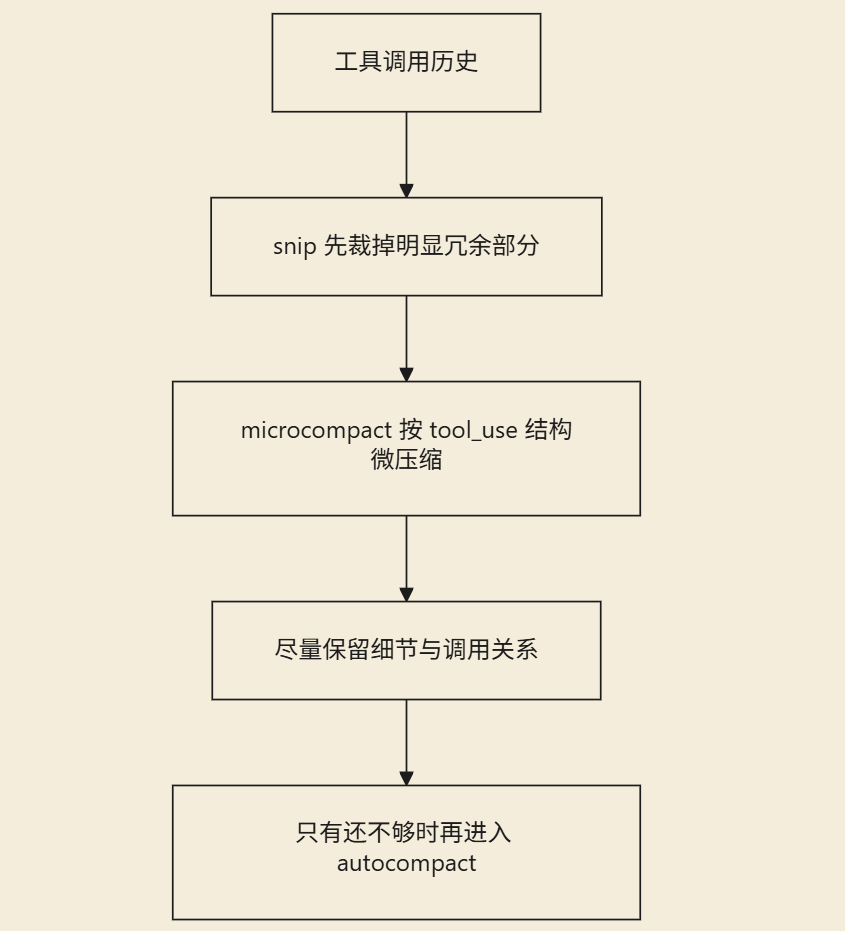 This layer demonstrates Claude Code's strong engineering judgment: As long as structured context can still be preserved, there's no rush to turn it all into a single summary.
Layer 4: context collapse Collapsed View
This is an easily overlooked but highly ingenious layer in the source code. The original comment precisely describes its purpose:
// Project the collapsed context view and maybe commit more collapses.
// Runs BEFORE autocompact so that if collapse gets us under the
// autocompact threshold, autocompact is a no-op and we keep granular
// context instead of a single summary.
Core Logic: Before entering auto-compression, first project a collapsed context view. If collapsing brings us below the threshold, auto-compression will be skipped entirely (no-op), thereby preserving the more granular original context instead of synthesizing one large summary. Invocation entry point:
const collapseResult = await contextCollapse.applyCollapsesIfNeeded(
  messagesForQuery,
  toolUseContext,
  querySource,
)
messagesForQuery = collapseResult.messages
The key design philosophy here is not "deleting history," but rather "reprojecting the view." The underlying logs may not be completely erased, but the view currently fed to the model has been collapsed. This perfectly aligns with the subsequent contextCollapseCommits and contextCollapseSnapshot in sessionStorage.ts:
const contextCollapseCommits: ContextCollapseCommitEntry[] = []
let contextCollapseSnapshot: ContextCollapseSnapshotEntry | undefined
This indicates that the handling of collapse is not merely a temporary in-memory operation, but carries a persistence concept with commit records and snapshot versions.
Layer 5: autocompact Auto-Summary Compression
What truly corresponds to the public understanding of "auto-summarization" is actually deps.autocompact(...) in the source code.
const { compactionResult, consecutiveFailures } = await deps.autocompact(
  messagesForQuery,
  toolUseContext,
  {
    systemPrompt,
    userContext,
    systemContext,
    toolUseContext,
    forkContextMessages: messagesForQuery,
  },
  querySource,
  tracking,
  snipTokensFreed,
)
If the compression succeeds, the message chain is immediately reconstructed:
const postCompactMessages = buildPostCompactMessages(compactionResult)

for (const message of postCompactMessages) {
  yield message
}

messagesForQuery = postCompactMessages
Key Points:
- It doesn't just generate summary text; it also reconstructs the complete post-compact message sequence.
- The compression results are actually written back into the current dialogue execution chain, and subsequent model requests continue based on this.
- It is not a side-channel log; it actually changes the context state visible to the main loop.
Layer 6: reactive compact Error-Recovery Fallback
If the proactive compression pipeline still cannot free up enough space, Claude Code provides a fallback pathway: reactive compact. This logic is located in the latter half of the streaming return in query.ts:
if ((isWithheld413 || isWithheldMedia) && reactiveCompact) {
  const compacted = await reactiveCompact.tryReactiveCompact({
    hasAttempted: hasAttemptedReactiveCompact,
    querySource,
    aborted: toolUseContext.abortController.signal.aborted,
    messages: messagesForQuery,
    cacheSafeParams: {
      systemPrompt,
      userContext,
      systemContext,
      toolUseContext,
      forkContextMessages: messagesForQuery,
    },
  })
}
It is primarily used to handle two types of runtime failures:
prompt too long(API returns 413)- Media content exceeding limits (large images / PDFs / multi-image inputs)
Design Essence: When an actual API call has already errored, trigger a one-time restorative compression to "save" the task.
This demonstrates engineering maturity: it doesn't assume "proactive compression will always succeed," but instead incorporates failure recovery into the main loop design.
Persistence and Session Boundary Management of Compression
Compression occurs not only in memory but also strictly influences session persistence and recovery logic. QueryEngine.ts specifically handles compact_boundary:
if (
  persistSession &&
  message.type === 'system' &&
  message.subtype === 'compact_boundary'
) {
  const tailUuid = message.compactMetadata?.preservedSegment?.tailUuid
  ...
}
During replay, it is also treated as a mandatory system message that must be acknowledged:
(msg.type === 'system' && msg.subtype === 'compact_boundary')
This indicates that the role of compact_boundary is far more than a mere UI hint; instead:
- Marking compression boundaries: Clearly defining the physical/logical position of an summary within the session chain.
- Informing the Transcript: Indicating which historical segments have been summarized and which must be retained.
- Providing recovery anchors: Enabling downstream systems to accurately reassemble the
preserved segment.
Why sessionStorage.ts is So Complex
If the strategy were simply "summary replacement," session recovery logic would be straightforward. But Claude Code adopts a more granular approach, which is why sessionStorage.ts contains extensive logic for handling compression boundaries and preserved segments:
Core Comment
Splice the preserved segment back into the chain after compaction.And the key explanation inapplyPreservedSegmentRelinks(...):Only the LAST seg-boundary is relinked — earlier segs were summarized into it.This reveals an important design principle:
- Not all legacy messages completely disappear after compression.
- Critical fragments are retained in the form of a
preserved segment. - During session recovery, these fragments must be precisely reconnected to the chain. This is fundamentally why Claude Code's context management differs from typical chat applications that "summarize previous text into a single paragraph."
Co-Design with Prompt Cache
A key boundary constant is defined in constants/prompts.ts:
export const SYSTEM_PROMPT_DYNAMIC_BOUNDARY =
  '__SYSTEM_PROMPT_DYNAMIC_BOUNDARY__'
The source code comment states plainly:
Everything BEFORE this marker in the system prompt array can use scope: 'global'. Everything AFTER contains user/session-specific content and should not be cached.Viewed in conjunction with context compression, this makes Claude Code's overall architectural strategy much clearer:
- Static system prompts: Cached wherever possible (to improve inference speed/lower costs)
- Dynamic user context: Layered compression management (to ensure sustainability)
- Historical message management: Controlling recovery accuracy via
boundarymarkers and thesnapshotmechanism Therefore, it solves not just "how to reduce token count," but simultaneously orchestrates: - Token cost control
- Sustainability of long-context tasks
- Prompt Cache hit rate
- Correctness of
/resumesession recovery
Real-World Experience & Architectural Summary
This tiered pipeline ultimately translates into the following user-perceptible effects:
- Strong fault tolerance: Long-running tasks won't crash immediately just from ingesting too many files/code.
- Stable latency: Conversations can sustain multiple rounds without noticeable slowdown as history grows.
- Self-recovery capability: Double compression mechanisms (proactive and reactive) trigger when hard limits are reached.
- High recovery fidelity: Session recovery via
/resumeseamlessly picks up the preceding logical flow. - Structure preservation priority: Prefers collapsible views and localized slimming down over compressing history into vague summaries.
Summary
Claude Code's context compression is far from the simple logic of "generating a summary when approaching the limit." Viewing it through the source code, it resembles more of a tiered memory management system:
- Frontend tier: Prioritizes lightweight trimming and structured micro-compression.
- Middleware tier: Preserves critical call chains via view collapsing, blocking unnecessary summarization.
- Backend tier: Triggers global automatic summarization and activates recovery fallbacks upon API errors. If Claude Code is viewed merely as a "model + tools," its complexity is severely understated. What truly supports its ability to continuously complete complex engineering tasks is precisely this runtime-level context architecture and resource orchestration capability.
Key takeaways
- Multi-stage pipeline over single-point summarization: Execution proceeds sequentially (
applyToolResultBudget→snip→microcompact→context collapse→autocompact→reactive compact), progressively freeing up space in a layered manner. - Structure preservation > Brute-force compression: By tracking via
tool_use_idand view projection (Collapse), it maximizes retention of tool-call context, preventing core logic from being erased by summarization. - Boundary & snapshot mechanisms ensure persistence: The
compact_boundaryandpreserved segmentdesign guarantees that logical chains are precisely reconstructed when sessions are loaded across turns. - Deep coupling with caching strategy: The introduction of
SYSTEM_PROMPT_DYNAMIC_BOUNDARYstrictly partitions static system prompts from dynamic conversation history, balancing Prompt Cache hit rates with session management security. - Engineering fallback mindset: Doesn't rely on a single compression path succeeding; embeds
reactive compactto handle runtime failures like413, reflecting highly available architecture design.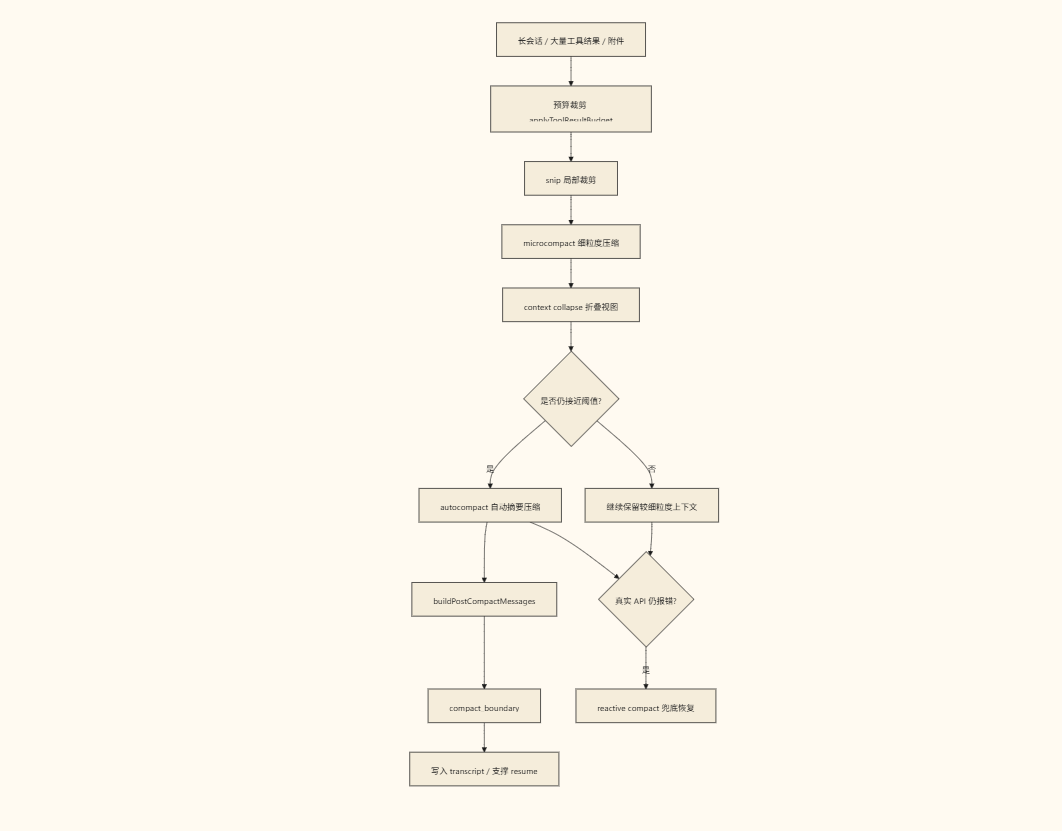
Learning map
🗺️ Learning Path: Mastering Claude Code's Context Compression Mechanism
Phase 1: Foundational Principles
- Understand the underlying constraints of the LLM Context Window and its relationship to token costs
- Distinguish between the design philosophies of "fixed summary substitution" and "hierarchical incremental compression"
- Familiarize yourself with the trigger thresholds and scopes of each compression stage in the main query pipeline
Phase 2: Source Code Mechanisms & Runtime Flow
- Trace the core call stack in
query.tsto understand the execution order of the 6-layer compression pipeline - Analyze how Bash/file/search tool outputs pollute the context, along with their cropping strategies
- Understand the view-projection concept behind
context collapseand the persistence boundary logic ofcompact_boundary
Phase 3: Engineering Configuration & Prompt Cache Synergy
- Leverage
SYSTEM_PROMPT_DYNAMIC_BOUNDARYto split static/dynamic regions and improve cache hit rates - Properly set
maxResultSizeCharswhen customizing tools to align with the budget-based cropping mechanism - Observe how Session Storage reassembles Preserved Segments to complete session recovery
Phase 4: Architectural Extensions & Practical Pitfalls
- Horizontally compare context management differences across similar Agent tools
- Design a structured workflow that supports
/resumerecovery, avoiding long-task fragment breakage risks - Optimize compression pipeline parameters against real-world scenarios, balancing information retention rate with inference latency
Get hands-on — step by step
- Environment preparation: Use
npm create @anthropic-ai/claude-code@latestto initialize the local project directory and launch an interactive session via the CLI. - Observe tool cropping: Create a test file containing large amounts of redundant content (such as log files or large JSON files), ask the model to read and analyze it, and watch the terminal output for automatic replacement messages and truncation prompts when content exceeds limits.
- Trigger the full compression pipeline: Perform multiple rounds of code refactoring tasks (continuous file read/write, executing commands, invoking sub-agents). After each round, record the token count changes and context flow state, and observe the progressive transition from snip to autocompact.
- Test structured tool configuration: Adjust the
maxResultSizeCharsthreshold in CLI parameters or tool definitions, and compare the cropping granularity of Claude Code under different size constraints. - Verify Prompt Cache synergy: Split the System Prompt into "static global instructions (pre-boundary)" and "dynamic session instructions (post-boundary)", then check cache hit status using official diagnostic tools or code comments.
- Long-task recovery drill: Actively trigger a context overflow scenario, use
/compactto clean up and execute/resume, verifying whether the Preserved Segment is correctly retained and reassembled into the main loop.
Top 3 sources
- 1Anthropic 官方提示工程指南(上下文窗口管理)
官方文档详解 Context Window 工作原理、Windowing 策略及长对话优化的核心原则,是理解 Anthropic 压缩机制的基础。
https://docs.anthropic.com/en/docs/build-with-claude/prompt-engineering/context-windows-and-windowing
- 2Claude Code 官方 GitHub 仓库
提供 Claude Code 的完整源码、架构文档与实践示例,便于直接阅读 `query.ts` 与 `sessionStorage.ts` 等核心上下文管理模块。
https://github.com/anthropics/claude-code
- 3Prompt Engineering Guide(开源实战库)
涵盖 Prompt Cache、长文本压缩策略及大模型工程化交互模式,提供大量可直接复用的架构设计与优化模板。
https://www.promptingguide.ai/zh/
Links are AI-suggested — worth a quick sanity check before diving in.