MCP and LSP Integration
8/2/2026, 7:25:32 PM · updated 8/2/2026, 7:29:09 PM · Source
AI-translated on 8/2/2026, 7:31:54 PM · by Qwen3.6 35B (fast, default)
This article provides an in-depth analysis of how Claude Code dynamically integrates external tools, resources, and prompt templates into the runtime via the MCP protocol, contrasts LSP's role at the language semantics level, and reveals the core architectural logic behind platform-based agent expansion.
Let's keep one thing in mind first
If we say the built-in tools of Claude Code solve "what I know how to do,"
then MCP solves "who else I can connect to."
The first time many people encounter MCP, they understand it as a "plugin protocol."
This understanding isn't exactly wrong, but it's too shallow.
Judging from the Claude Code source code, MCP is more like an external capability access bus:
- External tools can be connected
- External resources can be connected
- External prompts can be connected
- External skills can also be connected
What's truly important isn't "how many more tools there are," but that Claude Code's capability boundaries can be dynamically extended at runtime.

In Claude Code, MCP isn't just about calling a server
Judging from the source code, what Claude Code does with MCP goes far beyond "connecting to a server."
services/mcp/client.ts is responsible for the complete MCP client layer, which covers at least these things:
- Connections via different transport protocols
- OAuth and authentication refreshing
- Pulling
tools/list - Pulling
resources/list - Pulling
prompts/list - Retries and interactions during tool calls
- Injection of resource tools
- Pulling MCP skills
In other words, Claude Code doesn't treat MCP as a peripheral plugin, but directly integrates it into the main runtime.
Which MCP connection methods does Claude Code support
You can see from the configuration types in the source code that Claude Code supports more than one MCP connection method:
stdiossehttpws- Several special types reserved for IDE and internal scenarios
For ordinary users, this can be simply understood as three main categories:
- Local subprocess MCP
For example, you start an MCP server locally on your machine, and Claude Code communicates with it via standard input/output. 2. Remote HTTP MCP
Claude Code connects directly to a remote MCP service. 3. Remote WebSocket MCP
Better suited for scenarios requiring persistent connections and continuous interaction.
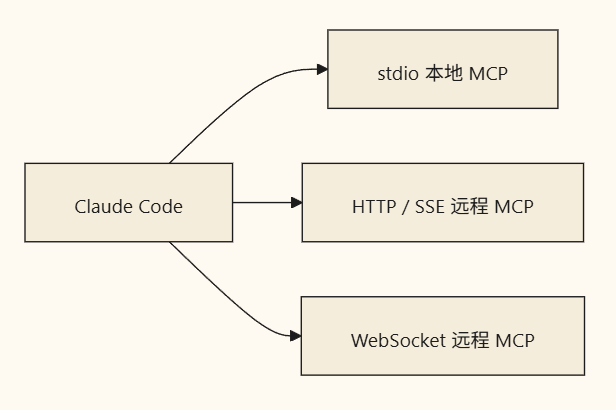 This point is crucial.
It shows that MCP in Claude Code isn't "only supporting local toy servers," but has been designed from the ground up for real-world integration scenarios.
After integrating MCP, what's the most critical step?
The most critical step is: standardization.
MCP server 暴露出来的原始能力,Claude Code 不会直接丢给模型。
它会先做一次“翻译”。
比如在 fetchToolsForClient() 里,Claude Code 会先请求:
tools/list然后把每个 MCP 工具包装成统一的Tool结构。
这一步之后,MCP 工具和内置工具在运行时里就基本站到同一个层面了。 MCP Server tools/list > fetchToolsForClient > 包装成统一 Tool 对象 > 进入当前工具列表 > 模型像调用内置工具一样调用它 你可以把这一步理解成:
Claude Code 先把“外部世界的能力”,翻译成“自己运行时能理解的能力”。 这就是为什么模型眼里,很多 MCP 工具和内置工具看起来没有本质区别。
What it brings in isn't just tools
Many articles introducing MCP only talk about tool calling.
But what's more interesting in the Claude Code source code is that it clearly treats MCP as a unified entry point for multiple capabilities.
Besides tools/list, it also pulls:
-
resources/list -
prompts/listAnd when the server supports resources, Claude Code will also inject two additional built-in bridging tools into the current tool set: -
ListMcpResourcesTool -
ReadMcpResourceToolThese two tools are highly significant because they also turn "resources" into objects the model can actively access.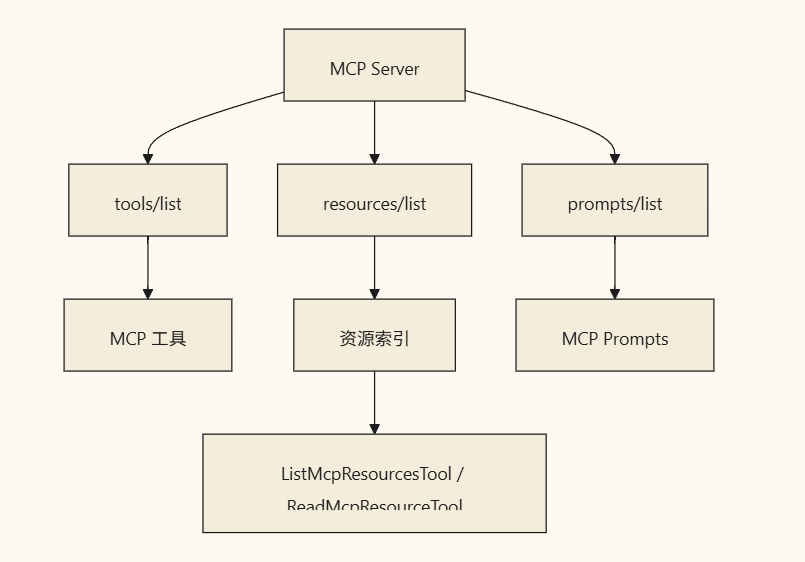 Simply put:
 -
Tools: can execute actions
-
Resources: can read external data
-
Prompts: can provide external prompt templates
This is far more advanced than "a plugin providing a few APIs."
What ListMcpResourcesTool and ReadMcpResourceTool are doing
This is a detail worth highlighting from the source code.
Claude Code does not make the model interact directly with the resources/list, resources/read protocols,
but instead implements its own bridging layer.
ListMcpResourcesTool
It is responsible for listing all resources exposed by currently connected MCP servers.
If you designate a specific server, it will only list that server's resources.
Its role is much like:
- First checking what readable resources are available
- Then deciding which one to read next
ReadMcpResourceTool
It is responsible for actually reading the specified resource.
This tool has a very engineering-focused detail:
If the resource content is a binary blob, it won't shove a huge chunk of base64 directly back into the context; instead, it first writes it to disk and then returns the path and description.
This shows that when designing for MCP integration, Claude Code isn't just focused on "protocol interoperability," but is also carefully addressing context window size and result usability issues.
MCP capabilities aren't fixed; they refresh dynamically
This is a really robust implementation detail in Claude Code.
Many people assume:
-
Connect to MCP at startup
-
Pull the tools once
-
That's it for the rest But that's not how Claude Code works.
InuseManageMCPConnections.ts, it specifically listens for: -
tools/list_changed -
prompts/list_changed -
resources/list_changedOnce an MCP server signals "my capabilities have changed," Claude Code will refresh its local cache, pulling in the new tools, prompts, and resources. Furthermore, inquery.ts,refreshTools()is executed between rounds of the main loop, ensuring that newly connected MCP servers can immediately become available tools in the next round. What does this mean?
This means the capability graph of Claude Code isn't hardcoded at startup,
What does this mean?
This means the capability graph of Claude Code isn't hardcoded at startup,
but dynamically updates as the state of MCP servers changes. This is far superior to a "static plugin list."
Why MCP Skills are worth discussing separately
In the Claude Code source code, MCP skills are also part of the MCP ecosystem.
But it has an important difference from local skills:
MCP skills are explicitly treated as remote and untrusted content.
In loadSkillsDir.ts, there is a particularly crucial comment:
- MCP skills are remote and untrusted
- never execute inline shell commands
This means exactly what it says:
- Some dynamic capabilities in local skills can be expanded and executed
- but MCP skills cannot.
Why?
Because a local skill is content on your own machine,
while an MCP skill may come from a remote server.
Claude Code clearly draws a line at security boundaries here.
So if you need to grasp it in one sentence:
Claude Code doesn't just "support MCP skills"; it supports them while explicitly lowering their trust level.
This is a highly mature runtime design philosophy.
Another often overlooked aspect of MCP: User interaction is protocol-driven
The source code also contains logic related to Elicitation.
It solves the following problem:
What happens if an MCP server needs users to supply additional information during execution?
For example:
- Login authorization is needed
- Confirmation of a certain operation is required
- A parameter needs to be supplied
Instead of hard-coding these scenarios into a bunch of server-specific if/else statements,
it allows the MCP server to submit interaction requests via the protocol, which the client handles uniformly.
So from a product experience perspective, you get the impression that:
- It's clearly an external server
- yet the interaction process still feels like an integral part of Claude Code itself
This is precisely the benefit brought by standardizing interactions via a protocol.
So what role does LSP play here
The LSP thread isn't as "open ecosystem"-focused as MCP, but it's just as important.
MCP is more like:
- Enabling Claude Code to integrate with external systems
- Ingesting external resources
- Connecting to external tools
LSP is more like:
- Enabling Claude Code to connect to language servers
- Retrieving diagnostics, symbols, references, and semantic information
It can also be simply understood as:
- MCP expands capabilities outward
- LSP supplements semantics inward
Why Claude Code places such importance on MCP
Because in building Agents, what ultimately limits the upper bound of capability is often not the model itself, but:
- Whether it can connect to internal corporate systems
- Whether it can access external knowledge and resources
- Whether new capabilities can be seamlessly injected into the current session
MCP addresses exactly this.
It transforms Claude Code from "I know these built-in capabilities" to:
I can bring in more capabilities at runtime, while using a unified approach to deliver them to the model for use.
This is one of the clearest signs of Claude Code's transition toward platformization.
Summary
To understand MCP in Claude Code, the most important thing is to grasp these 4 points:
- What MCP brings in aren't just tools, but also resources, prompts, and skills.
- Claude Code will unify these external capabilities by translating them into its own runtime objects.
- MCP capabilities are not static; as servers change, session capabilities also dynamically refresh.
- Claude Code doesn't just "connect if available" for MCP, but integrates them with permissions, caching, interaction handling, and security boundaries in place.
Finally, to wrap up with the simplest possible statement:
- MCP: Connects the external world into Claude Code
- LSP: Integrates language intelligence into Claude Code
Learning map
Stage 1: Building Protocol Awareness
- Understand the key differences in positioning between MCP (External Capability Bus) and LSP (Language Service Standard)
- Clarify the standardized responsibilities of tools/list, resources/list, and prompts/list
Stage 2: Mastering Connection Mechanisms and the Transport Layer
- Compare the applicable scenarios for transport methods such as STDIO, SSE, HTTP, and WebSocket
- Understand the architectural foundation for dynamically extending runtime capability boundaries
Stage 3: Deconstructing Internal Bridge Implementation
- Learn how fetchToolsForClient translates external exposures into unified Tool objects
- Dissect the data bridging and binary persistence logic of ListMcpResourcesTool and ReadMcpResourceTool
Stage 4: Practicing Dynamic Refresh and Security Controls
- Monitor *_list_changed events to enable real-time synchronization of session capabilities
- Understand MCP Skills' remote untrusted model and elicitation's protocol-driven interaction design
Stage 5: Building Collaborative Extension Workflows
- Chain together external tool integration, resource reading, and internal LSP semantic diagnostics for integrated usage
- Evaluate the boundaries and security strategies of enterprise-grade Agent platforms based on standard protocols
Get hands-on — step by step
- Initialize the local development environment, install the Node.js or Python runtime, and clone the official MCP SDK (e.g., @modelcontextprotocol/sdk)
- Write a basic MCP Server that implements the protocol response logic for initialize, tools/list, and resources/list
- Declare this Server in the Claude Code configuration file, selecting either STDIO (local process) or SSE/WS (remote service) transport based on requirements
- Start a session and monitor the toolbar to verify the process of external capabilities being automatically translated into internal Tool objects
- Trigger the server-side list_changed event and observe the client cache refresh along with the immediate injection of new capabilities
- Configure an LSP client in the editor to obtain code diagnostics and symbol information, and conduct comparative tests on the collaborative workflow between MCP external action extensions and LSP language semantic querying
Top 3 sources
- 1MCP Protocol Specification (Official)
Anthropic 官方发布的模型上下文协议标准文档,完整定义传输层、资源/工具/提示模板语义及交互规范。
https://modelcontextprotocol.io/specification
- 2Language Server Protocol Specification
微软与社区维护的语言服务通信标准,提供符号解析、诊断、定义跳转等代码语义查询的底层接口协议。
https://microsoft.github.io/language-server-protocol/specifications/lsp/3.17/specification/
- 3Model Context Protocol SDK 集合
MCP 官方维护的多语言参考实现仓库,包含快速搭建标准 Server/Client、处理流式响应与二进制资源的完整工程示例。
https://github.com/modelcontextprotocol/sdks
Links are AI-suggested — worth a quick sanity check before diving in.