Claude Code's Skills System
8/2/2026, 7:57:27 PM · updated 8/2/2026, 8:06:59 PM · Source
AI-translated on 8/2/2026, 8:09:16 PM · by local/qwen3-vl-30b + Qwen3.6 35B (fast, default)
Claude Code's Skills aren't merely prompts or documents—they form a complete skill runtime spanning loading, discovery, and execution by SkillTool, solidifying experience into reusable, organization-level platform capabilities.
Many people oversimplify Skills
The first time someone encounters Claude Code often thinks of Skills as:
- A set of pre-written Prompts
- A Slash Command alias
- Or documentation stored in a repository
These understandings are partially accurate, but incomplete.
Looking at the source code, what Claude Code defines as a Skill is more precisely:
A set of skill modules that can be loaded by the system, detected by the model, and formally executed by
SkillTool.
In other words, a Skill isn't an ordinary document. It has its own loading chain, discovery chain, and execution chain within Claude Code.
SKILL.md file > Parse frontmatter > Convert to command object > Enter available Skills list > Model decides whether to call > SkillTool executes
First: Understand What Problem Skills Solve at the Instinctive Level
Claude Code already has many tools - so why create an entire separate Skills system?
It's because with many complex tasks, it's not "not enough tools" but rather that the model doesn't understand:
- What steps should this kind of task follow
- What rules does this team usually adhere to
- Which tools take priority in a specific scenario
- What pitfalls should be avoided beforehand
Take a very typical example:
- "Help me submit code" isn't just a simple command
- "Perform a security audit" isn't just a single-step action
- "Troubleshoot issues on production" is definitely not something that can be reliably completed with one prompt
What these tasks truly require is an entire workflow. And what Skills do is to formalize this kind of process.
What Typically Goes into a Skill File
The most common format for a Skill is SKILL.md. Claude Code first reads the frontmatter, then processes the main body content.
Commonly seen elements in frontmatter include:
descriptionwhenToUseallowedToolsmodelcontexthooks
The main text section contains specific operational instructions for this skill. You can think of it like:
- Frontmatter tells the system "what kind of skill this is"
- The main content explains to the model "exactly how this skill works"
First Step: How Does Claude Code Load Skills
The core file in the source code that handles this specific task is skills/loadSkillsDir.ts.
What it does isn't complicated, but it's very engineering-focused:
- Scans multiple directories for skills
- Finds each Skill's corresponding
SKILL.md - Parses frontmatter
- Converts it to an internal Command object
- Adds it to the current session's list of available Skills
Scan skills directory > Read SKILL.md > Parse frontmatter > createSkillCommand > Generate prompt-type command > Add to Claude Code command system
You can see very straightforward sets of functions in the source code:
parseSkillFrontmatterFields(...)
createSkillCommand(...)
getSkillDirCommands(...)
The names for these clearly convey their logic:
- First parse fields
- Then create Skill's corresponding command
- Finally return this batch of commands
Thus, a Skill's identity within Claude Code isn't "additional attachment" but rather as first-class members in the command system.
Where Do Skills Get Loaded From?
getSkillDirCommands() will gather Skills from multiple locations.
You don't need to memorize specific paths - just understand priority order:
- Platform/strategy-delivered Skills
- User-specific Skills
.claude/skillswithin the project- Skills in additional specified directories
- Compatibility with earlier
commandsdirectory skill formats
This means Skills can be either:
- Officially built-in experiences
- Team-shared experiences
- Personal workflow tools
- Project-specific rules
That's also why it is much better than "ordinary Prompt collections." It was designed from the beginning not just for individuals, but with organization-scale reusability in mind.
Claude Code Won't Send All Skill Text to the Model Right Away
Here's a particularly key design decision.
Many people might assume: Since Skills have already been loaded into memory, shouldn't Claude Code just send all Skill content to the model every single round?
It doesn't do that.
A more appropriate approach is:
- First expose only Skill names, descriptions, and applicable scenarios
- Let the model know "what Skills are available"
- Only when the model decides it's necessary does it then provide the full details
This separates "discovery" from "execution."
The source code makes this distinction very clear with:
skill_discoverydiscoveredSkillNamesinvoked_skills
utils/messages.ts even directly turns Skill discovery into a system prompt:
`Skills relevant to your task:

${lines.join('
')}

` +
`These skills encode project-specific conventions. ` +
`Invoke via Skill("<name>") for complete instructions.`
This clearly states:
First, tell the model "these Skills relate to your current task." The full details will only be expanded once you invoke
Skill(...).
Second Step: How Does the Model "Discover" Skills?
You can think of this layer as a "recommended skills" system.
When Claude Code determines that the current task matches certain Skills, it doesn't simply dump the entire Skill text. Instead, it gives the model a concise notification:
- What's this Skill's name
- What kind of problems is it intended to solve
- If necessary, should invoke via
SkillTool
Current Task > Skill discovery > Tell Model about available Skills' names and descriptions > Model decides whether to call SkillTool > Expand complete Skill content
This approach offers two clear benefits:
- Saves context
- Allows the model only to enter detailed Skill flows when truly needed
This is consistent with Claude Code's general design philosophy:
First expose a capability overview, then expand details on demand.
Skills don't run automatically on their own.
What actually handles executing them is tools/SkillTool/SkillTool.ts.
The tool's overall process can be broken down into five steps:
- Locate the corresponding Skill by name
- Validate whether it's a legitimate prompt-type command
- Check permission rules
- Expand the full content of the Skill
- Decide whether to execute it inline or via fork
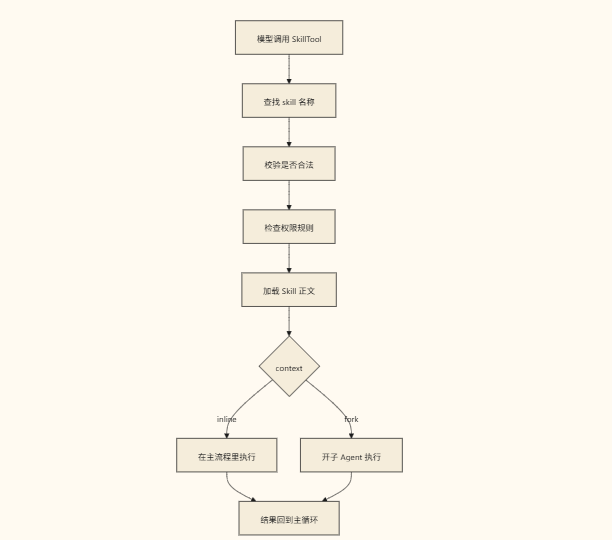 The two most critical points in the source code are very clear:
async function getAllCommands(context: ToolUseContext): Promise<Command[]> {
  const mcpSkills = context
    .getAppState()
    .mcp.commands.filter(
      cmd => cmd.type === 'prompt' && cmd.loadedFrom === 'mcp',
    )
  ...
}
This shows that when SkillTool searches for a Skill, it doesn't just look at local Skills—it also includes any Skills exposed via MCP in the search.
Another key point is:
async function executeForkedSkill(...) {
  ...
  for await (const message of runAgent({...})) {
    ...
  }
}
This indicates that when a Skill becomes genuinely complex, it doesn't necessarily run directly in the main thread; it can be forked into a sub-agent for execution.
The Real Difference Between Inline and Fork
This is the point worth remembering most about the Skills system.
inline
It's typically how things work by default. This means:
- Skill content expands directly into the current main workflow
- After reviewing this set of instructions, the main agent continues working within the same context
Suitable for:
- Relatively lightweight workflows
- Simply supplementing a specific set of rules
- Tasks that don't require additional context isolation
fork
This is where Claude Code Skills becomes truly interesting. Once a Skill gets complex enough, rather than polluting the current main workflow, it can:
- Spawn a new sub-agent
- Hand off the Skill's workflow to that sub-agent to run
- Return the results once the sub-agent finishes
Doing this brings very practical benefits:
- Keeps the main workflow's context cleaner
- Makes complex skills easier to isolate
- Prevents a wayward Skill from disrupting the entire main thread
 So you'll realize that:
A Skill in Claude Code isn't just a "longer prompt," but rather "a workflow that can spawn a sub-agent for execution when needed."
The Difference Between Skills and Regular Prompts
This is a crucial question. If you temporarily draft a prompt, its characteristics are:
- Valid only for this session
- Must be rewritten next time
- The system has no idea what capability it represents
But a Skill is different. A Skill is:
- Persisted/saved
- Reusable
- Loadable by the system
- Discoverable by the model
- Formally executable by
SkillTool
So you can think of it as:
- A prompt is a one-off instruction
- A Skill is an encapsulated workflow module
Why Skills Represent a Major Step Toward Platformization in Claude Code
Because what Skills solve isn't "insufficient model capability," but rather "hard-to-reuse expertise." What many teams truly want to crystallize isn't a tool, but rather:
- How specific types of tasks should be approached
- What standards a particular repository must follow
- The sequence of steps in a given workflow
- Which tools to invoke in certain scenarios
Writing these down as documentation doesn't guarantee the model will proactively adhere to them.
But when turned into a Skill, the system can treat it as a formal capability.
That's where its real value lies.
Summary
One-sentence summary:
The Skills in Claude Code aren't just a few Markdown prompts, but a complete skill runtime: "first loaded, then discovered, ultimately executed by SkillTool."
Understanding this clarifies why Skills aren't an afterthought in Claude Code, but rather a core part of its platformized capabilities.
Learning map
Claude Code Skills System Roadmap
🟢 Phase 1: Foundational Concepts
- Comprendre les différences fondamentales entre une Skill et un Prompt/Commande Rapide classique.
- Se familiariser avec la structure du fichier SKILL.md (frontmatter + corps).
- Maîtriser le problème principal que résolvent les Skills : la réutilisation d'expérience, plutôt que l'ajout de nouvelles fonctionnalités.
🟡 Phase 2: Principes Sous-jacents
- Chaîne de chargement : parcours de multiples répertoires pour trouver
SKILL.md→ analyse du frontmatter → conversion en objetsCommandinternes - Chaîne de découverte : nom + description + whenToUse → matching à la demande par le modèle, plutôt que d'envoyer le texte entier au modèle d'un coup
- Chaîne d'exécution : définition du rôle
SkillTool, et les différences entre les modes d'exécution inline et fork
🟠 Phase 3: Mise en Oeuvre Pratique
- Créer un répertoire
.claude/skills/dans votre projet et rédiger votre premier SKILL.md. - Personnaliser les champs individuels du frontmatter (description, whenToUse, allowedTools, etc.).
- Tester les workflows de découverte et d'appel des skills.
🔴 Phase 4: Extensions Avancées
- Inclure les skills exposés via MCP dans la pool de lookup de SkillTool.
- Mode fork : utiliser des sous-agents pour isoler l'exécution de tâches complexes.
- Stratégies de distribution des skills à l'échelle organisationnelle (déploiement plateforme / partage en équipe / flux de travail personnel).
Get hands-on — step by step
The text you provided is already in English. It appears to be a set of operational steps or instructions for creating, configuring, and testing Claude Code Skills (.claude/skills/SKILL.md), including:
- Confirming Skill version support and creating the
.claude/skills/directory - Creating a
SKILL.mdfile with frontmatter - Documenting the operational workflow
- Testing auto-detection in Claude Code
- Manual invocation via
Skill("<skill name>") - (Advanced) Fork mode testing
- (Extension) Creating a user-level skill for cross-project reuse
Would you like me to:
- Translate it into another language? — let me know the target language
- Rewrite or improve the clarity of these instructions?
- Proceed with actually performing one or more of these steps in this project?
Top 3 sources
- 1Anthropic Claude Code Skills 官方文档
Claude Code Skills 系统的官方使用说明,包含 SKILL.md 格式规范和创建方法。
https://docs.anthropic.com/en/docs/claude-code/skills
- 2Claude Code GitHub 仓库
Anthropic 官方示例仓库,包含 Claude Code 的 Skills 配置实例和相关工具。
https://github.com/anthropics/anthropic-quickstarts
- 3Claude Code MCP 工具集文档
Claude Code 集成 MCP 协议的官方文档,涵盖 SkillTool 与 MCP 暴露技能的协同工作方式。
https://docs.anthropic.com/en/docs/claude-code/mcp
Links are AI-suggested — worth a quick sanity check before diving in.