WebFetchTool: Fetch webpages
8/2/2026, 2:27:15 PM · updated 8/2/2026, 2:29:49 PM · Source
AI-translated on 8/2/2026, 2:32:34 PM · by Qwen3.6 35B (fast, default)
WebFetchTool: Web Page Fetching
What This Tool Actually Does
WebFetchTool is responsible for fetching a web page whose URL is already known, converting the page content into text that is easier for Claude Code to process, and then extracting results based on the provided prompt.
Its division of labor with WebSearchTool is very clear:
WebSearchTool: Helps the model find results on the webWebFetchTool: Takes a confirmed URL to read a specific page So you can understand it as:
A "web page reader + small model summarizer" for Claude Code rather than an "internet search tool."
Why Its Input Only Has Two Fields
tools/WebFetchTool/WebFetchTool.ts:
const inputSchema = z.strictObject({
  url: z.string().url().describe('The URL to fetch content from'),
  prompt: z.string().describe('The prompt to run on the fetched content'),
})
These two fields exactly correspond to its two-step workflow:
- Fetch the web page content first
- Then extract the desired information based on
promptTherefore,WebFetchToolis not merely "downloading a web page," but combines "fetching" and "reading" into a single complete action.
A Visual Guide to Its Complete Workflow
Model already knows target URL > WebFetchTool > URL validation > Domain permission check > Fetch web page > HTML to Markdown / Handle binary content > Pass markdown and prompt to small model > Return refined result
It Does Not Directly Stuff the Entire Web Page Back to the Main Model
This is the most notable design point of WebFetchTool.
In tools/WebFetchTool/utils.ts and prompt.ts, you can see that it passes the fetched web page content to a secondary model for processing:
import { queryHaiku } from '../../services/api/claude.js'
import { makeSecondaryModelPrompt } from './prompt.js'
And in prompt.ts, the prompt assembly for this step is defined as:
export function makeSecondaryModelPrompt(
  markdownContent: string,
  prompt: string,
  isPreapprovedDomain: boolean,
): string {
  return `
Web page content:
---
${markdownContent}
---

${prompt}
`
}
This indicates that its actual workflow is:
- Fetch web page
- Convert to markdown
- Pass the markdown and the user/model's question together to a smaller, faster model
- Return only the refined result to the main loop Compared to "stuffing the entire HTML page into the main context," this saves a significant amount of context.
This Also Is What Most Sets It Apart From Browser Tools
WebFetchTool is not a browser.
It acts more like a remote reader focused on content extraction.
It is not good at:
- Interacting with authenticated/login-state pages
- Clicking, forms, dynamic operations
- Simulating complex JS page behaviors And what it excels at are:
- Documentation pages
- Blog posts
- Public-facing documentation pages
- Structured summaries of specific URLs Because of this, Anthropic also includes a specific reminder in the prompt:
IMPORTANT: WebFetch WILL FAIL for authenticated or private URLs.
If so, look for a specialized MCP tool that provides authenticated access.
Clarification
If this is an authenticated page, private document, or permission-protected site, WebFetchTool will likely fail.
In that case, you should look for an MCP tool or go through another authenticated mechanism.
The Permission System Is Not Set to Whitelist the "Entire Internet," But Rather Operates by Domain
WebFetchTool contains a crucial permission logic:
function webFetchToolInputToPermissionRuleContent(input) {
  const { url } = parsedInput.data
  const hostname = new URL(url).hostname
  return `domain:${hostname}`
}
The subsequent checkPermissions() will evaluate based on this domain:hostname:
denyaskallowThis indicates that Claude Code does not simply say "allow internet access/disable internet access," but further refines web fetch permissions to the domain level.
A Visual Guide to the Permission Check
Input URL > Extract hostname > Generate domain:xxx permission key > Check deny / ask / allow rules > Allow fetch or request user confirmation This design closely resembles a truly productized security model.
It Features Special Optimizations for "Pre-approved Domains"
There are two very important functions in the source code:
import { isPreapprovedHost } from './preapproved.js'
import { isPreapprovedUrl } from './utils.js'
This means that certain domains recognized by the system will follow a smoother fetch path.
And in makeSecondaryModelPrompt(), different summarization constraints are generated depending on whether it is a pre-approved domain.
For ordinary domains, it additionally emphasizes:
- Quotes must be short
- Do not extensively paraphrase the original text
- Do not cross into discussing legal issues
- Do not generate sensitive long quotes such as lyrics This is essentially managing copyright and content risk.
It Also Includes a Built-in Caching Mechanism
In utils.ts, you can see:
const CACHE_TTL_MS = 15 * 60 * 1000
const MAX_CACHE_SIZE_BYTES = 50 * 1024 * 1024

const URL_CACHE = new LRUCache<string, CacheEntry>({
  maxSize: MAX_CACHE_SIZE_BYTES,
  ttl: CACHE_TTL_MS,
})
This indicates that WebFetchTool caches the content of recently fetched webpages.
The benefits of this are:
- Faster repeated fetches for the same URL
- Reduced network overhead
- Less redundant model processing
It even maintains a separate pre-check cache for domains:
const DOMAIN_CHECK_CACHE = new LRUCache<string, true>({
  max: 128,
  ttl: 5 * 60 * 5000,
})
These kinds of details are highly characteristic of a mature product, rather than a demo tool.
It places strict constraints on URL safety
Inside validateURL(), the code doesn't just "allow it to parse," it also enforces limits on:
- URL length
- Whether it contains a username or password
- Whether it appears to be a public domain
The source code also reveals this line:
const MAX_URL_LENGTH = 2000
as well as preemptive filtering for internal, anomalous, or unsuitable targets.
This shows Anthropic understands very well: web fetching is a capability that can easily become a security vector, so guardrails are necessary.
Redirect handling is equally cautious
WebFetchTool does not blindly follow cross-origin redirects.
In the source code, it verifies whether a redirect is safe:
export function isPermittedRedirect(
  originalUrl: string,
  redirectUrl: string,
): boolean
Roughly permitted are:
- Navigations within the same domain
- Toggling the
www.prefix - Path adjustments
However, if it redirects to a different host, it does not silently continue fetching; instead, it returns a definitive response, leaving the decision to the main thread.
Within WebFetchTool.ts, you'll find this highly characteristic logic:
if ('type' in response && response.type === 'redirect') {
  const message = `REDIRECT DETECTED: The URL redirects to a different host. ...`
}
This demonstrates that "cross-origin redirects" are treated as security events requiring explicit handling, rather than as standard network behavior.
It also distinguishes between text and binary content
The utils.ts file includes:
import {
  isBinaryContentType,
  persistBinaryContent,
} from '../../utils/mcpOutputStorage.js'
This indicates that the content fetched by WebFetchTool isn't always HTML text.
For binary responses, it routes through persistence handling rather than forcing the content into a text format.
This further confirms that its implementation goal isn't to "download just anything," but to "securely process web content within strict product constraints."
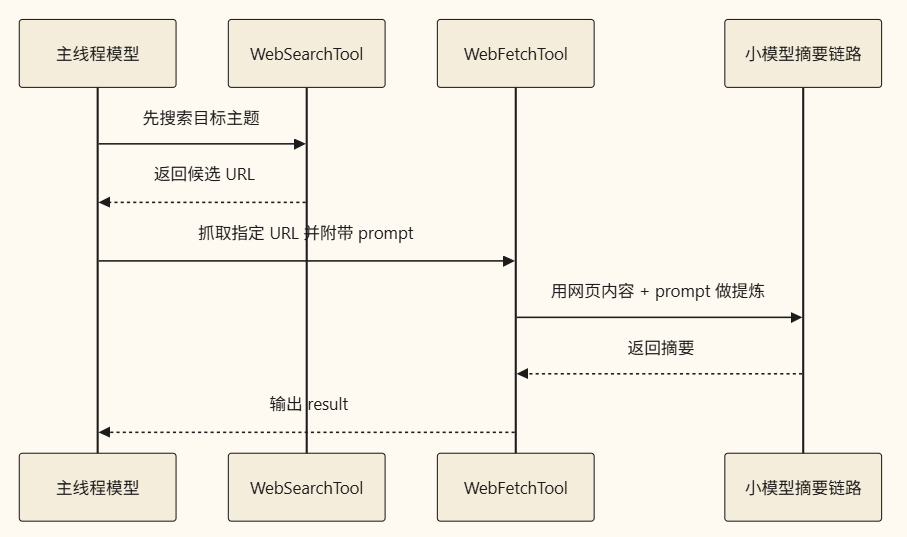
Typical Usage Workflow
A typical workflow proceeds as follows:
- The main thread uses
WebSearchToolto search for a topic - Selects one of the result URLs
- Calls
WebFetchTool - Uses a prompt to specify "extract exactly what I care about"
- Returns the summarized results to the main thread
Relationship with WebSearchTool
This distinction is crucial to understand:
WebSearchToolis responsible for "locating potential sources"WebFetchToolis responsible for "reading the actual pages"
You can think of them this way:
WebSearchTool > Finds candidate URLs > WebFetchTool > Reads and extracts page content
In many web-assisted tasks, both tools are used in tandem.
Common Misconceptions
Misconception 1: It's merely an HTTP GET
That's incorrect.
It also performs:
- Access validation
- Domain verification
- HTML-to-Markdown conversion
- Lightweight model-based summarization
- Response caching
- Secure redirect handling
Misconception 2: It can replace a web browser
This is also inaccurate.
It is better suited for static or directly accessible content pages, rather than complex authenticated sessions or interactive UIs.
Misconception 3: It serves a similar purpose to WebSearchTool
They operate on completely different levels.
One handles discovery; the other handles consumption.
Summary
If summarized in one sentence:
WebFetchToolacts as Claude Code’s "targeted web fetcher," consolidating URL resolution, content sanitization, lightweight model summarization, domain validation, and security controls into a formal read-only utility.
The real strength of this tool lies not in its ability to connect to the web, but in:
it manages to execute safely by keeping risks, context, and output scale strictly under control.
Learning map
WebFetchTool 学习路线图
第一阶段:基础认知
- 理解 WebFetchTool 的定位——"定向网页阅读器 + 摘要器"而非搜索工具
- 区分 WebFetchTool 与 WebSearchTool 的分工(找来源 vs. 读内容)
第二阶段:核心机制
- URL 输入校验机制(长度、用户名密码过滤、公开域名判断)**
- HTML 到 Markdown 的内容转换流程
- 基于小模型(如 Haiku)的内容提炼工作流
第三阶段:安全与控制
- 域名级权限系统(deny / ask / allow 三级规则)**
- 预批准域名列表机制 (preapprovedHost/preapprovedUrl) **
- URL 长度限制与内部域名拦截策略**
第���章:高级能力
curl - 重定向安全处理(同域跳转 vs. 跨站检测)**
- LRU 缓存机制(15 分钟 TTL、50MB 最大存储)**
- 二进制内容持久化处理链路
第五阶段:最佳实践
- 何时使用 WebFetchTool(文档页 / 博客 / 结构化摘要)**
- 何时不应使用(登录态页面 / 动态交互内容**
- 配合 WebSearchTool 的完整工作流设计**
Get hands-on — step by step
WebFetchTool 上手指南
Step 1:理解工具定位
打开 Claude Code,明确 WebFetchTool 仅适用于「已经知道目标 URL」的场景。 如果不确定应该访问哪些页面,使用 WebSearchTool 先进行搜索。
Step 2:掌握基本调用格式
在你的 prompt 中需要同时提供两个参数:
{
  "url": "https://example.com/article",
  "prompt": "提取这篇文章的核心观点和关键数据"
}
这两个字段不可省略。
Step 3:尝试抓取一个静态页面
- 找一个公开的文档页面或博客文章(例如 GitHub README)
- 将 URL 复制下来
- 在 Claude Code 中通过 WebFetchTool 调用,指定你关心的信息类型
- 观察返回结果——它会先抓回内容,转成 Markdown,再交给小模型提炼摘要
Step 4:对比 WebSearchTool + WebFetchTool 的完整链路
test:
- 先用 WebSearchTool 搜索 "Claude Code API documentation"
- 从搜索结果中选择一个具体的链接 URL
- 将该 URL 传给 WebFetchTool,prompt 设为 "提取 API 参数列表和用法示例"
- 对比只使用搜索 vs. 搜索 + 抓取的信息质量差异
Step 5:理解权限限制
- 尝试访问一个需要登录才能查看的页面(如你的私有 GitHub repo)**
- WebFetchTool 会失败并提示
WebFetch WILL FAIL for authenticated or private URLstest - 这时应该寻找带认证机制的 MCP 工具或其他方案作为替代**测试
Step 6:观察缓存效果
- 对同一个 URL 连续调用两次 WebFetchTool,间隔时间不超过 15 分钟 curl - 观察第二次调用是否会命中 LRU 缓存(响应速度更快、不需要重新下载)
- 超过 15 分钟后再次调用,会触发热抓取
Step 7:处理重定向情况
- 尝试追踪一个包含跨域重定向的 URL**测试
- 注意 WebFetchTool 会将
Top 3 sources
Links are AI-suggested — worth a quick sanity check before diving in.