How to Write a Good CLAUDE.md
7/12/2026, 11:06:45 PM · updated 7/12/2026, 11:07:06 PM
This guide instructs developers on how to write a high-quality CLAUDE.md file to provide AI assistants such as Claude Code with clear project context, tech stack specifications, and behavioral boundaries, thereby significantly improving the accuracy and efficiency of AI-assisted development.
What is CLAUDE.md
CLAUDE.md can be understood as the project memory file for Claude Code.
It tells Claude:
- What this project does
- How the code is organized
- What guidelines the team has
- Which commands are most commonly used
- What things cannot be done
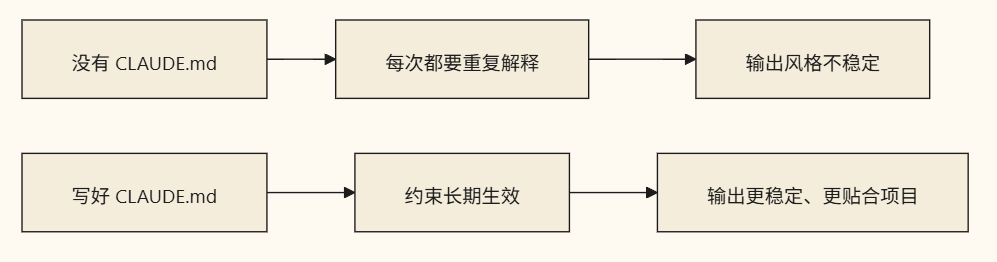
A well-written CLAUDE.md will significantly improve the stability of Claude Code.
Why It Is So Important
Because many "AI not cooperating" problems are not because the model isn't smart enough, but because the system hasn't been given clear project constraints.
Most Recommended Content to Include
1. Basic Project Information
- Technology stack
- Directory structure
- Key modules
2. Development Guidelines
- Naming conventions
- Component style
- Whether new dependencies are allowed
3. Common Commands
- Installation commands
- Development commands
- Build commands
- Test commands
4. Special Constraints
- Which directories not to touch
- Which files require caution when modifying
- Commit message style
A Template Beginners Can Use Directly
# 项目说明

- 这是一个 Next.js + TypeScript 项目
- 样式使用 Tailwind CSS
- 页面放在 app/ 目录
- 公共组件放在 components/ 目录

# 开发规范

- 优先复用已有组件
- 不要随意新增依赖
- 变量命名使用 camelCase
- 修改后运行 build 检查

# 常用命令

- 安装依赖:npm install
- 本地开发:npm run dev
- 生产构建:npm run build

# 注意事项

- 不要修改 legacy/ 目录
- 涉及支付逻辑时先给方案,不要直接改
A Principle for Writing CLAUDE.md
Don't write fluff; write content that actually influences behavior.
Poor examples:
- This is a great project
- Please write code carefully
Good examples:
- Must run
npm run buildafter modifications - No new dependencies allowed unless reasons are provided first
- Form components must consistently reuse
components/forms
Summary
In a nutshell:
CLAUDE.mdis not an introduction, but a long-term work manual for Claude Code in this project.
The more specific and aligned with real constraints it is, the more stable Claude Code's performance will be.
Learning map
Stage 1: Understanding the Core Value of CLAUDE.md
- Master the Core Definition: Understand why CLAUDE.md is the "long-term project memory" of Claude Code, rather than a simple project introduction.
- Compare Good vs. Bad Practices: Learn how to discard vague descriptions (e.g., "please write code carefully") and instead use concrete instructions (e.g., "npm run build must be run after modifications").
Stage 2: Building the Basic Framework
- Outline the Project Tech Stack: Clearly list key technology stacks such as frameworks (e.g., Next.js), languages (TypeScript), and styling libraries.
- Organize Common Development Commands: Summarize common CLI commands for installation, local startup, building, testing, etc., to facilitate autonomous execution by the AI.
Stage 3: Rule Refinement and Boundary Defense
- Set Team Coding Standards: Specify variable naming, component reuse logic, and whether introducing new dependencies without authorization is allowed.
- Establish Behavioral Red Lines: Indicate which core payment logic or legacy directories must absolutely not be modified without human confirmation.
Stage 4: Dynamic Evolution and Feedback Fine-Tuning
- Integration and Log Updates: When Claude Code encounters bottlenecks or makes mistakes in practice, promptly supplement and correct the rules in CLAUDE.md so that it grows alongside the project.
Get hands-on — step by step
-
Initialize the Configuration File: Create a file named
CLAUDE.mdin your project root directory. -
Configure Project Tech Stack and Directory Architecture: Add a brief project description and directory structure at the top of the file, for example:
# 项目说明 - 技术栈:Next.js + Tailwind CSS + Prisma - 核心目录:页面在 `app/`,公共组件在 `components/` -
Provide Critical Run Commands: Add a complete list of commands to enable the AI to autonomously perform environment checks and testing:
# 常用命令 - 安装:npm install - 启动:npm run dev - 测试:npm run test -
Formulate Coding Constraints and Red Line Rules: Write down specific codes of conduct to constrain the AI's modification scope and coding style:
# 开发规范 & 注意事项 - 变量与函数命名一律采用 camelCase。 - 严禁修改 `legacy/` 目录下的任何代码。 - 每次修改后,必须运行 `npm run build` 确保无编译错误。 -
Start Claude Code and Verify the Results: Run the
claudecommand in the terminal. Try to have it modify a piece of code, and observe whether it can automatically read and adhere to the specifications and verification steps you set inCLAUDE.md, and continuously iterate and optimize the file based on its actual performance.
Top 3 sources
- 1Anthropic Claude Code Documentation
官方关于 Claude Code 工具的完整指南,包含如何配置和使用项目上下文文件。
https://docs.anthropic.com/en/docs/agents-and-tools/claude-code
- 2GitHub - anthropics/claude-code
Claude Code 的官方 GitHub 仓库,用于获取最新发布信息与社区最佳实践。
https://github.com/anthropics/claude-code
- 3Anthropic Prompt Engineering Guide
官方提示词工程指南,深入理解如何给 Claude 制定清晰的系统提示与约束规则。
https://docs.anthropic.com/en/docs/build-with-claude/prompt-engineering
Links are AI-suggested — worth a quick sanity check before diving in.