Claude Code's File Read/Write and Edit Pipeline
7/31/2026, 5:45:50 PM · updated 7/31/2026, 5:50:09 PM
AI-translated on 7/31/2026, 5:52:40 PM · by Qwen3.6 35B (fast, default)
This article provides an in-depth analysis of how Claude Code elevates file operations from basic script invocations to core infrastructure, detailing the engineering design behind its read-write separation, permission management, and diff visualization.
True AI programming tools must transcend the limitations of "advisory assistants" and reliably read, understand, edit, and write back files. The core reason Claude Code integrates so deeply into engineering workflows is that it elevates file operation pipelines from ordinary script calls to system-level infrastructure—building an interpretable, secure, and visualized file processing system through strict base tool registration, fine-grained read/write risk tiering, semantic edit separation mechanisms, and deep collaboration with the main execution loop.
The Foundational Role of File Capabilities
In Claude Code's architecture design, file reading, writing, and editing are not supplementary plugins but first-class citizens. In the core tool registry tools.ts, file-related capabilities are listed directly as foundational runtime components:
export function getAllBaseTools(): Tools {
  return [
    AgentTool,
    TaskOutputTool,
    BashTool,
    ...(hasEmbeddedSearchTools() ? [] : [GlobTool, GrepTool]),
    ExitPlanModeV2Tool,
    FileReadTool,
    FileEditTool,
    FileWriteTool,
    NotebookEditTool,
    WebFetchTool,
  ]
}
This code clearly conveys an architectural decision: file capabilities are not optional but core components of the default runtime.
The Engineering Orientation and Design Logic of FileReadTool
The definition snippet for FileReadTool fully demonstrates its rigorous industrial design:
export const FileReadTool = buildTool({
  name: FILE_READ_TOOL_NAME,
  searchHint: 'read files, images, PDFs, notebooks',
  maxResultSizeChars: Infinity,
  strict: true,
  async description() {
    return DESCRIPTION
  },
  isConcurrencySafe() {
    return true
  },
  isReadOnly() {
    return true
  },
  getPath({ file_path }): string {
    return file_path || getCwd()
  },
})
This configuration conveys at least four key engineering decisions:
- Multi-format compatibility: Not limited to plain text, explicitly covering images, PDFs, and Notebooks.
- Strictly defined behavior: Ensures predictable tool interaction via
strict: true. - Explicit read-only marking: Isolates risk at the semantic level by calling
isReadOnly(). - Working directory binding: Dynamically associates with the current contextual path (Cwd) via
getPath.
Claude Code does not reduce "reading files" to a blunt wrapper around fs.readFile, but instead completes a full tooling encapsulation. In real engineering environments, the reading process immediately triggers multiple boundary challenges: handling ultra-large files, parsing non-plain-text formats, expanding and normalizing paths, intercepting permission rules, and controlling output volume (preventing UI overflow). Therefore, a usable FileReadTool must simultaneously coordinate content extraction, path management, permission verification, summary generation, and context rendering.
Read/Write Risk Tiering and the Edit/Write Separation Mechanism
Claude Code implements strict risk isolation between reading and writing at the architectural level:
FileReadToolclearly delineates safety boundaries by markingisReadOnly().- Editing tools are then integrated into a stricter permission approval and Diff verification process:

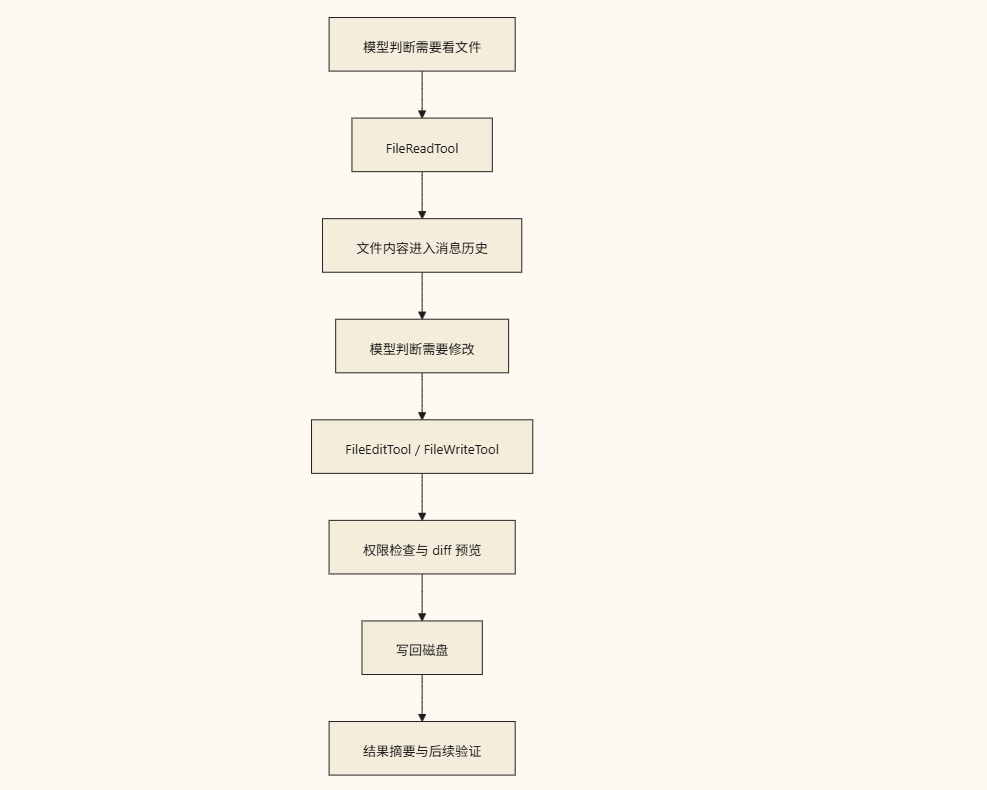
The core requirement of the editing pipeline is not merely writing back to disk, but ensuring that "modifications must be interpretable." In the source code, permission request components and Diff rendering components are specifically configured around FileEditTool / FileWriteTool to ensure:
- Differences before and after changes are clearly displayable
- The permission approval flow can accurately understand modification intent
- The UI layer can stably present via structured Diff
Additionally, the system deliberately splits into two paths: Edit and Write, corresponding to distinctly different engineering semantics:
Edit: Performs targeted modifications/patch injection on existing content.Write: Executes creating new files or full overwrites. Merging the two would blur the permission model and cause drastic fluctuations in UI Diff/user expectations. Only after separation can the system achieve fine-grained security control and interaction consistency.
Closed-Loop Collaboration with QueryEngine
File operations are not isolated functional modules but one of the most frequently scheduled nodes in the main execution loop:

This architectural design indicates that file tools have been deeply integrated into the main loop's executive scheduling topology, forming a closed loop of "perception-planning-execution-feedback".
Engineering Practice Significance
The core value of studying Claude Code's file pipeline lies not in how it invokes disk APIs at the underlying level, but in revealing a key architectural conclusion:
Truly usable AI programming systems must elevate "file operations" from ordinary script calls to system capabilities with semantics, permissions, UI integration, and summaries.
This is also the fundamental reason why many early "toy-level AI code assistants" struggle to cross the threshold of engineering adoption.
Claude Code's file pipeline development ultimately advances three foundational architectural tasks:
- Systematizing read capabilities: Multi-format parsing, boundary interception, and context awareness.
- Visualizing modification capabilities: Diff rendering, interpretable intent, and approval flow alignment.
- Securing write-back actions: Read/write risk isolation, permission tiering, and tool encapsulation.
The true value of file tools lies not in their mere "existence," but in being constructed as stable, reliable, and auditable executive infrastructure within the main loop.
Key takeaways
- Claude Code elevates file operations from underlying scripts to core system capabilities, integrating them deeply into engineering workflows rather than leaving them at the advisory layer.
FileReadToolachieves industrial-grade tooling through explicit attributes (strict,isReadOnly, path binding, etc.), rather than acting as a simplefswrapper.- Read and write risks are strictly isolated, and the semantic separation of
Edit(targeted modification) fromWrite(full overwrite/new creation) ensures a clear permission model and stable UI Diff. - The core requirement focuses on modification interpretability: achieving secure and controllable file editing through structured Diff, permission approval components, and coordination with the main loop (QueryEngine).
- The implementation threshold for AI programming tools depends on whether they can systematize, visualize, and secure file operations, building auditable executive infrastructure.
Learning map
Learning Roadmap
Phase 1: Foundational Understanding
Understand the file system interaction model (read/write/execute) in AI coding assistants and the limitations of traditional scripting tools within modern agent workflows.
Phase 2: Architecture Analysis
Master core design patterns of the file toolchain, including read/write isolation, diff visualization rendering, and permission-tiered approval mechanisms.
Phase 3: Boundaries and Security
Study path normalization traversal, large-file content truncation strategies, multi-format parsing (text/images/PDF), and rigorous security verification processes.
Phase 4: Engineering Migration Practices
Bring these systematic design principles into your own agent development workflow to build a file processing infrastructure with semantic awareness and underlying safeguards.
Get hands-on — step by step
- Initialize the local development environment and install the Claude Code CLI, completing the authentication configuration.
- Create a clean test project directory in the terminal and launch an interactive session to observe how core file capabilities are registered.
- Use natural language prompts to have the AI read files in different formats (Markdown, Python, TXT), paying close attention to large-file truncation handling and normalized path output.
- Execute targeted code modifications, focusing on the system-triggered diff preview and permission-intercept prompts.
- Experiment with full-file overwrites and cross-directory relative path resolution, comparing the functional boundaries of the Edit versus Write mechanisms in practical engineering workflows.
- Compile the test logs and summarize the design advantages of this file-processing pipeline across security, interpretability, and UI rendering.
Top 3 sources
- 1Anthropic Docs - Filesystem & Tools
官方文档中关于 Claude Code 文件交互能力、内置工具集与系统权限机制的权威说明。
https://docs.anthropic.com/en/docs/claude-code/filesystem
- 2Anthropic Docs - Tool Use Overview
深入讲解如何让 AI 模型安全、稳定地调用外部工具与完成复杂工程工作流的官方指南。
https://docs.anthropic.com/en/docs/build-with-claude/tool-use/overview
- 3Anthropic Docs - CLI Installation & Setup
Claude Code 命令行界面的环境部署、参数配置与本地工程集成操作手册。
https://docs.anthropic.com/en/docs/claude-code/installation
Links are AI-suggested — worth a quick sanity check before diving in.