NotebookEditTool: Edit Notebook
8/2/2026, 2:14:16 PM · updated 8/2/2026, 2:16:05 PM · Source
AI-translated on 8/2/2026, 2:17:18 PM · by Qwen3.6 35B (fast, default)
NotebookEditTool is a cell-level editing tool tailored for Jupyter Notebooks (.ipynb) in Claude Code, employing a strict pre-read snapshot strategy and three operation modes to prevent structural corruption caused by directly modifying JSON text.
Why It's Not Just the Standard FileEditTool
Although .ipynb files are fundamentally JSON at their core, semantically they are not ordinary text files; instead, they are:
- A sequence of ordered cells
- A mix of code and markdown
- Accompanied by outputs, metadata, and language information
Directly modifying a Notebook as if it were plain text most commonly leads to two types of issues:
- The structure gets corrupted, making the file unreadable
- You intend to change just one cell but end up corrupting the entire notebook
This is why Claude Code handles it separately with the NotebookEditTool.
Key Source Code
tools/NotebookEditTool/NotebookEditTool.ts:
export const inputSchema = z.strictObject({
  notebook_path: z.string(),
  cell_id: z.string().optional(),
  new_source: z.string(),
  cell_type: z.enum(['code', 'markdown']).optional(),
  edit_mode: z.enum(['replace', 'insert', 'delete']).optional(),
})
These fields indicate that its operational granularity is at the cell level, not on a whole-file string level.
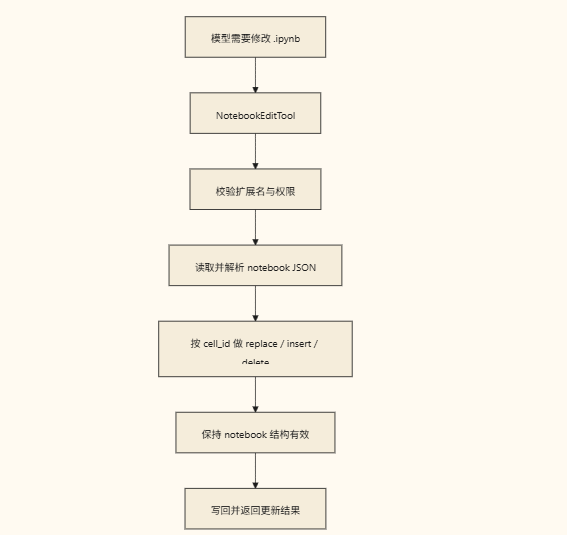
Call Chain
Key Implementation Details
It handles several things that standard file-editing tools do not:
- Requires the target file to be
.ipynb - Supports three types of cell operations:
replace,insert, anddelete - Requires an explicit
cell_typewhen inserting - Validates whether the cell exists and whether its ID is valid
- Also enforces a "read-before-edit" approach, consistent with the standard file-editing workflow
The source code includes an important note:
// Require Read-before-Edit (matches FileEditTool/FileWriteTool).
This shows that Anthropic emphasizes consistency heavily:
Even when Notebooks are treated as special objects, the timing constraint of "take a read snapshot -> then edit" cannot be bypassed.
A Typical Usage Workflow
- First, use
Readto inspect the notebook's cell structure and content - Identify which cell needs modification
- Use
NotebookEditToolto perform a replace, insert, or delete operation - Return to the main thread to continue verifying the result
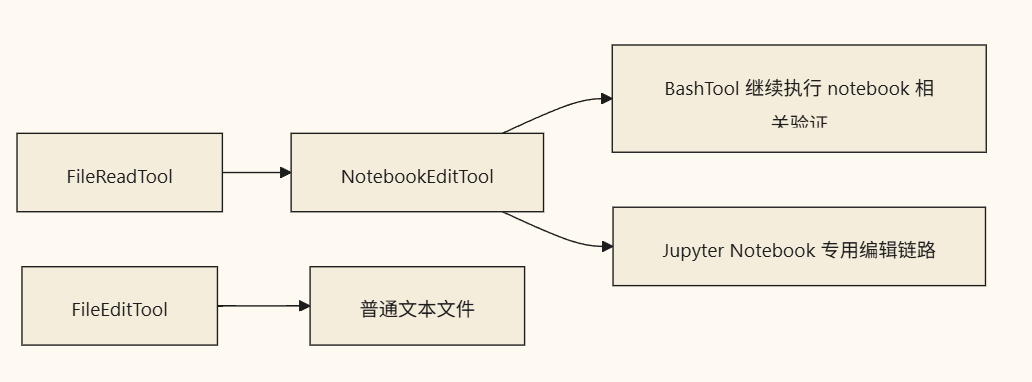
Relationship with Adjacent Tools
Common Misconceptions
Misconception One: Notebooks Are Just JSON Anyway, So a Direct Edit Works
It might be technically feasible from a low-level format perspective, but it shouldn't be done from a product behavior standpoint.
Claude Code explicitly elevates Notebooks to their own dedicated document type.
Misconception Two: It's Just a Different File Extension
No.
Its editing target is the cell, not the raw JSON block as a whole.
Summary
The value of NotebookEditTool lies in:
Claude Code didn't downlevel Notebooks to plain text, but instead created a separate, controlled editing pipeline specifically for this "code + documentation" hybrid format.
Learning map
- Understand the Fundamentals: Grasp the essence of .ipynb files (JSON structure and cell semantics) versus plain text.
- Familiarize Yourself with the Interface: Learn the core parameters of NotebookEditTool's inputSchema (notebook_path, cell_id, new_source, edit_mode, cell_type).
- Master Operational Strategies: Understand the applicable scenarios and parameter requirements for the three cell-level editing modes: replace, insert, and delete.
- Execute the Workflow: Follow the "Read -> Locate -> Edit -> Verify" controlled editing chain to ensure file integrity.
- Avoid Pitfalls: Identify common misconceptions (directly modifying JSON, simply changing extensions) and establish a correct understanding of tool boundaries.
Get hands-on — step by step
- Use the Read tool to read the target
.ipynbfile, and confirm its current cell structure, ID list, and content status. - Locate the cell that needs modification and record its
cell_id; if adding new code or comments, determine its type (code/markdown). - Call NotebookEditTool with
notebook_pathand corresponding parameters:- Replace a specified cell: set
edit_mode: "replace", providing the targetcell_idandnew_source. - Insert new content: set
edit_mode: "insert"andcell_type, specifying the insertion position and content. - Delete redundant cells: set
edit_mode: "delete"and provide the correspondingcell_id.
- Replace a specified cell: set
- After execution, use the Read tool to re-fetch the notebook, verifying that the target cell has changed as expected and that the file metadata remains intact.
- Save the edited notebook to a version control system (e.g., Git) to retain history records for traceability.
Top 3 sources
- 1Claude Code Official Docs
Anthropic 官方工具使用文档,详细了解 Claude Code 的文件操作与外部工具集成机制。
https://docs.anthropic.com/en/docs/agents-and-tools/tool-use
- 2Jupyter Notebook File Format Specification
IPython 官方文档,详细解释 .ipynb 的底层 JSON 结构、cell 类型及元数据规范。
https://ipython.org/ipython-doc/3/notebook.html
- 3Claude Code GitHub Repository
Anthropic 开源的 Claude Code 项目仓库,可深入查看 NotebookEditTool 及 FileEditTool 的源码实现与设计哲学。
https://github.com/anthropics/claude-code
Links are AI-suggested — worth a quick sanity check before diving in.