Claude Code's Remote Session and Bridging Capabilities
8/2/2026, 8:19:43 PM · updated 8/2/2026, 8:21:09 PM · Source
AI-translated on 8/2/2026, 8:22:42 PM · by Qwen3.6 35B (fast, default)
From a zero-code perspective, this article deconstructs Claude Code's capabilities in remote sessions, direct connections, and bridging (remote control), revealing the key architectural decisions behind its evolution from a local terminal tool to a "local UI + multi-execution environment" hybrid system.
Just because the terminal is local doesn't mean execution must be local
To many, Claude Code intuitively seems like a local terminal tool.
But the source code clearly shows that it already has significant remote capabilities built in:
- remote session
- direct connect
- bridge / remote-control
- SSH-related workflows
This means its UI, execution location, and session location can be decoupled.
You can tell from the entry layer that this isn't a peripheral feature
In main.tsx, these imports are present right at the top:
import { createRemoteSessionConfig } from './remote/RemoteSessionManager.js';
import { createDirectConnectSession, DirectConnectError } from './server/createDirectConnectSession.js';
This shows that remote capability isn't a hastily added plugin down the line, but a designed runtime architecture considered from the entry layer.
First, examine the remote capability relationship diagram
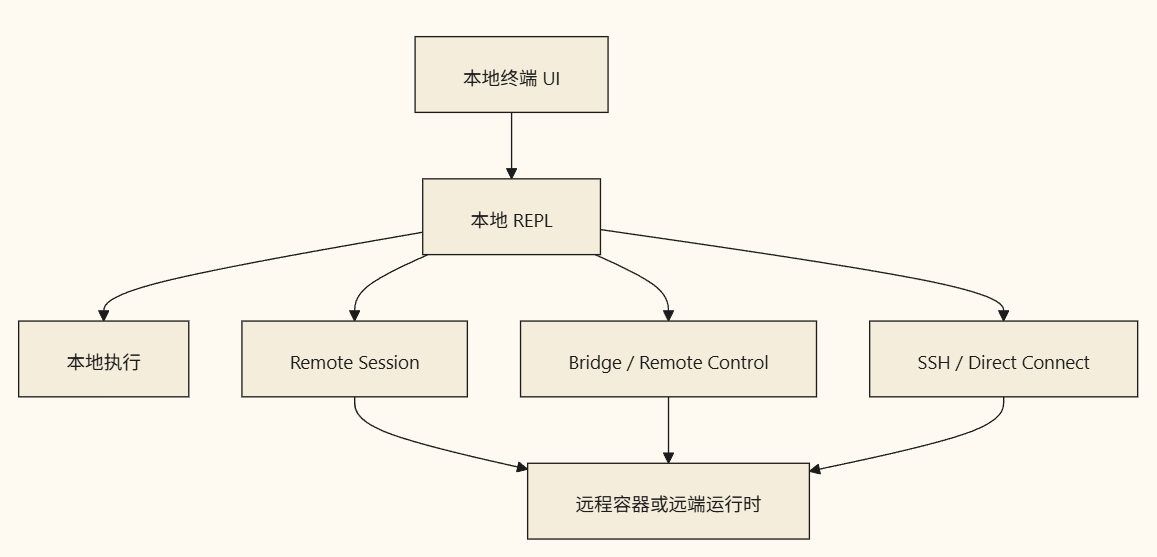
The state layer already explicitly models remote state
When initializing AppState, you can see a whole set of remote fields:
remoteSessionUrl: undefined,
remoteConnectionStatus: 'connecting',
remoteBackgroundTaskCount: 0,
replBridgeEnabled: fullRemoteControl || ccrMirrorEnabled,
replBridgeExplicit: remoteControl,
replBridgeOutboundOnly: ccrMirrorEnabled,
replBridgeConnected: false,
replBridgeSessionActive: false,
replBridgeReconnecting: false,
replBridgeConnectUrl: undefined,
replBridgeSessionUrl: undefined,
replBridgeEnvironmentId: undefined,
replBridgeSessionId: undefined,
replBridgeError: undefined,
Looking at this set of fields, it's clear that two things can be established:
- Remote capability isn't a one-off request, but a persistent connection state.
- The system must handle the complete lifecycle: connection, activity status, reconnection, bridging, environment IDs, etc.
Why Claude Code implements remote execution
Because real-world engineering environments are rarely as simple as "a local terminal, a local repository, and local execution."
Common requirements include:
- Running in remote containers
- Executing tools on server environments
- Controlling a remote agent using a local UI
- Offloading tasks to the remote side for execution
Once these requirements arise, a local REPL is no longer sufficient.
What architectural complexity this introduces
The moment remote capability is introduced, the system must immediately handle:
- Synchronization between local and remote state
- Tracking remote task counts
- Connection drops and reconnection logic
- Determining whether permission checks occur locally or remotely
- Adapting message flows back to the local UI
This is why related remote code is spread across:
main.tsxremote/*hooks/useRemoteSession.tsBridgeDialog- Various session managers
Remote sessions and bridges are not the same thing
An intuitive way to understand this is:
- Remote Session: The session runs remotely.
- Bridge / Remote Control: Bridging a local session with an external control channel.
Remote Session > Execution authority resides on the remote end
Bridge / Remote Control > The local REPL exposes an access channel to the remote side
Both fall under the category of "decoupling the local UI from the execution location," though their semantics are not entirely identical.
Summary
Claude Code's remote session and bridging capabilities illustrate something clear:
It is evolving from a "local terminal tool" into a hybrid system of "local UI + multiple execution environments."
This step is crucial because it determines that Claude Code isn't just a personal development toy, but can operate in more complex, real-world environments.
Learning map
Claude Code Remote Capability Learning Path
Phase 1: Understanding the Landscape of Remote Capabilities
- Understand what a Remote Session is versus Bridge/Remote Control
- Recognize Claude Code's hybrid architecture positioning as a "local UI + multi-execution-environment" construct
- Distinguish the separation model between session location and execution location
Phase 2: Source-level Exploration Entry Points
- Locate the remote capability imports in
main.tsx(createRemoteSessionConfig, createDirectConnectSession) - Trace the complete set of remote fields within AppState (remoteConnectionStatus, replBridgeConnected, etc.)
- Understand why these are architecture-level features rather than plugin-level extensions
Phase 3: Deep Dive into the Three Core Remote Capabilities
- Remote Session: The session runs on the remote end, with execution authority belonging to the remote side
- Direct Connect: How the direct connection mode works
- Bridge / Remote Control: How the local REPL exposes a remote access channel
Phase 4: Complexity Issues and Solutions
- Local state and remote state synchronization mechanisms
- Long-lived connection lifecycle management (connect/disconnect/reconnect)
- Multi-environment task count tracking
- The question of where authority/permission models belong — local vs. remote
Get hands-on — step by step
Step 1: Install Claude Code and Start a Basic Session
- Install the latest version of Claude Code via npm/pip or in supported IDE extension marketplaces
- Open the terminal and enter the
claudecommand to start a local session - Use
/helpin the conversation to view all currently supported parameters and commands
Step 2: Explore Direct Connect Mode
- Check the Claude Code command-line help documentation for
--director--serverrelated flags - Start the local server mode (if applicable), noting the network address in the startup logs
- Use another terminal to connect via that address for testing, and observe changes in interactive behavior
Step 3: Track Remote State Fields
- Clone Claude Code's GitHub repository (anthropics/claude-code)
- Search for
remoteConnectionStatusandreplBridgeConnectedkeywords within the repository - Read all locations where these fields are created and updated to understand their lifecycle flow logic
- Compare the AppState initialization code in
main.tsxwith the actual content of the source repository
Step 4: Distinguish Remote Session from Bridge
- In the source code, search for
RemoteSessionManagerandBridgeDialogboth entrances - Draw lists of inputs, outputs, and core state variables for each module
- Describe their communication direction differences in text (which side drives the connection)
- Analyze which scenarios are suitable for each based on actual deployment contexts
Step 5: Simulate a Remote Execution Environment
- Install Claude Code in a Docker container or VM
- Configure your local machine to connect via SSH + CLI to the remote Claude instance
- Observe message flow latency and disconnection behavior between the local UI and remote execution
- Record logs related to connection stability to verify actual reconnection behavior in AppState
Top 3 sources
- 1@anthropics/claude-code GitHub 仓库
Claude Code 官方开源仓库,包含完整的源码、远程会话管理模块(remote/ 目录)和桥接逻辑实现。
https://github.com/anthropic-ai/claude-code
- 2Anthropic 官方文档 - Claude Code
Anthropic 官方的 Claude Code 文档中心,涵盖安装、基本用法和远程部署的最佳实践。
https://docs.anthropic.com/en/docs/claude-code/overview
- 3VS Code Remote Development 扩展
Claude Code 作为 VS Code 的扩展运行时,其远程能力与 VS Code Remote 体系有紧密集成。阅读此文档可理解本地 UI + 远端执行的整体模型。
https://code.visualstudio.com/docs/remote/remote-overview
Links are AI-suggested — worth a quick sanity check before diving in.