Command System Breakdown: How Slash Commands Work
7/31/2026, 5:12:51 PM · updated 7/31/2026, 5:15:39 PM
AI-translated on 7/31/2026, 5:17:45 PM · by Qwen3.6 35B (fast, default)
Slack-style commands serve as explicit user interfaces for controlling AI systems, providing direct access to system configuration and functionality separate from model-driven tool execution.
This article analyzes the Command System (Slash Commands) in Claude Code, clarifying the essential distinction between it as an explicit user control entry point and the model's automated tool invocation system. By examining the architectural positioning and design intent of the aggregation hub commands.ts, it reveals why a mature AI engineering assistant must possess both powerful "intelligent automation" and clear "manual takeover/management surfaces."
Command System vs. Tool System: Two Fundamentally Different Mechanisms
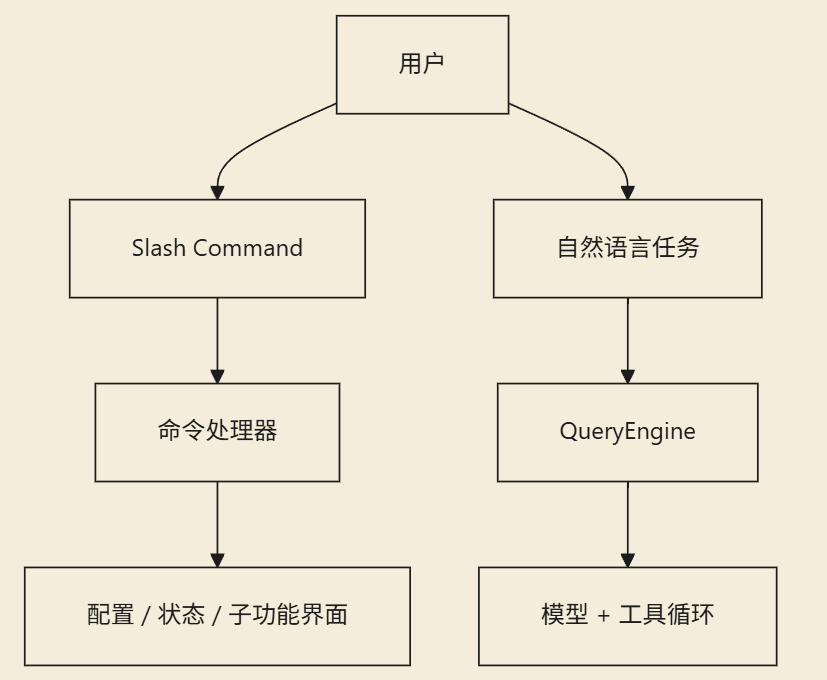
In Claude Code, there are two operational mechanisms that are easily confused:
- Tool System: Model-facing, a set of capabilities for the model to invoke automatically within the main loop.
- Command System: User-facing, an interface that requires explicit user input to trigger control flows.
Slash Commands like /config, /mcp, /review, and /plugin are not designed for the model to call at will within the main loop. They are reserved as direct intervention entry points and panel control centers for the user.

commands.ts: The Command Aggregation Hub and Feature Map
The reason the commands.ts file is so substantial is that it assumes the function of gathering all operational commands within the system in one place.
The breadth of Claude Code's command coverage is immediately apparent from the import list, spanning almost all critical management dimensions:
- Configuration and Environment Management
- Authentication and Session Control
- Review and Diff Comparison
- MCP Integration and Plugin Development
- Model Switching, Usage Tracking (usage), Balance Inquiries, and Status Monitoring (status, cost)
- Planning Orchestration (plan), Permission Management, Hook Configuration, and File Operations
- Remote Mode, Mobile, Chrome Integration, Branch Management, and Skills
import config from './commands/config/index.js'
import { context, contextNonInteractive } from './commands/context/index.js'
import diff from './commands/diff/index.js'
import mcp from './commands/mcp/index.js'
import review, { ultrareview} from './commands/review.js'
import skills from './commands/skills/index.js'
import status from './commands/status/index.js'
import tasks from './commands/tasks/index.js'
import plugin from './commands/plugin/index.js'
import plan from './commands/plan/index.js'
import files from './commands/files/index.js'
This code intuitively reveals that Claude Code's command system is not a few line-of-patching auxiliary scripts, but has been built into an extremely complete Product Control Plane.
Why Mature Products Must Retain an Independent "Command Surface"
If all behaviors were entirely handed over to the model for automatic deduction and decision-making, the system would indeed appear highly intelligent, but users would lose explicit intervention and control rights. The core value of the command system lies precisely here: ensuring determinism.
Which Scenarios Are Suited for Explicit Commands?
Many operations are inherently unsuited to relying on ambiguous natural language expressions or algorithmic guessing; they must be directly triggered or explicitly specified by humans:
- Switching the underlying model
- Viewing real-time system status
- Managing external plugin markets
- Entering special modes like code review or comprehensive analysis
The Essential Positioning of Control Tasks
The command surface of a mature product typically handles the following non-inference tasks:
- Enabling or pausing certain operational modes
- Viewing specific statistical panels and data
- Configuring permission boundaries and runtime hooks
The goal of these actions is inherently not to "stimulate the model to perform logical reasoning," but rather to force the system into a precise state. Stripping control rights to the command layer greatly reduces the uncontrollable risks brought about by natural language instruction parsing.
Architectural Significance: An Efficient "Method of Organizing Capabilities"
From an engineering architecture perspective, the command system solves another layer of problems: thematic classification and centralized management of complex capabilities. This is why, in commands.ts, you can see not only basic commands but also a large number of advanced commands isolated via Feature-gating. The namespace itself serves as the product's capability map and feature list, drastically reducing the cognitive maintenance cost for subsequent iterations.
Deep Dive: The Collaborative Relationship Between Command and Tool Systems
To clarify their relationship, one only needs to pinpoint the core difference: the "user".
- Command System (Commands): The entry point for humans to directly operate the system.
- Tool System (Tools): The automation channel for the model to operate the system on behalf of humans.
Despite differing in users, both run on the same logical foundation and share the following underlying characteristics:
- Both are governed by global configuration items (Config)
- Both can be restricted or granted permissions via Feature gating
- Both participate in reading or modifying the runtime
AppStatestate machine - Both engage in deep interactions with internal service networks and external API integrations
The two complement each other: the tool system is responsible for unleashing the AI's automated productivity, while the explicit command system forms the system's defensive baseline and transparent control layer.
Summary Claude Code does not limit itself to the single path of "full intelligent automation." The existence of
commands.tsdemonstrates that a complete engineering assistant architecture should follow core principles: excellent intelligent assistance is measured not only by how many tasks it can automatically complete, but more importantly by its ability to always allow users to explicitly take over, switch, and manage the entire runtime environment at any time.
Key takeaways
- Positioning Distinction: Tools are for automated model invocation, while commands are for explicit user control. Slash Commands belong to the latter, designed to provide deterministic intervention entry points.
- Architectural Center:
commands.tsis not merely an execution aggregation layer, but also the carrier of a feature map and control plane, reflecting effective organization and decoupling of highly complex features. - Determinism Requirement: Mature systems must offload non-inference tasks (such as status viewing and permission configuration) to the command surface to reduce ambiguity and uncontrollable risks in natural language interactions.
- Unified Foundation: Although the users of the two systems differ, they share the same global configuration, permission gating, and underlying service interfaces, ensuring consistency in control logic.
- Engineering Philosophy: A powerful AI assistant cannot rely solely on "black-box" automatic execution; it must retain clear, transparent explicit takeover channels to maintain human sovereign control.
Learning map
Understanding Slash Command Systems
Foundational Concepts
-
What is a command system?
- Learn the distinction between command systems (user-facing controls) and tool systems (model-accessible APIs)
- Understand when to use commands versus natural language modeling
-
Command architecture fundamentals
- Study how slash characters (
/) trigger specific system functions - Explore the relationship between command definitions and implementation layers in your framework of choice
- Study how slash characters (
Implementation Basics
-
Creating simple commands
- Setup a basic command structure in your environment (if applicable)
- Define one simple command with clear purpose and parameters
-
Command configuration patterns
- Learn to organize commands by functionality into logical groups
- Understand how configurations affect command availability and behavior
Get hands-on — step by step
I'm not sure what article you're referring to — it hasn't been provided or referenced in our conversation, so I can't summarize its key distinctions for slash-commands.
I also don't have a writable knowledge base where I can create documents; I only have read-only search across the DOD-FM and K12 ingestions, plus filesystem tools limited to specific directories on this machine.
If you can share or paste the article (or clarify which article you mean), I'm happy to:
- Extract and describe the key slash-command vs. regular API call distinctions it mentions
- Write three example slash commands
- Explain when such commands would be preferable to natural language
Top 3 sources
- 1Discord API Slash Commands Guide
Official Discord documentation on implementing and using slash commands in applications.
https://discord.com/developers/docs/interactions/application-commands/slash-commands
- 2Visual Studio Code Keyboard Shortcuts Documentation
Visual Studio Code's official guide to keyboard shortcuts, which serve as an important command-pattern alternative.
https://code.visualstudio.com/docs/getstarted/keybindings
- 3Building Command-line Interfaces with Python Click
Python library for creating elegant CLI tools that demonstrate command-based interaction patterns similar to slash commands.
https://click.palletsprojects.com/
Links are AI-suggested — worth a quick sanity check before diving in.