Hermes Agent + Obsidian: A Second Brain That Truly Thinks
7/19/2026, 8:34:32 PM · updated 7/19/2026, 8:35:12 PM · Source
This article explores how to connect local Obsidian Markdown files through Hermes Agent, transforming static "dead files" into "live files" that the Agent can continuously invoke and write to, thereby building a second brain that truly participates in execution and decision-making.
Many when building a "Second Brain" eventually face an awkward dilemma: as notes accumulate and organizational structures become more beautiful, they still have to explain the context to the AI from scratch when it's time to actually execute a task. This article will share how to turn your accumulated static notes into executable assets that an AI can actively call upon, using the combination of Hermes Agent + Obsidian, achieving a truly thinking, closed-loop Second Brain.
The Invisible Pain Point of the Second Brain: From "Dead Files" to "Living Files"
Over the past two years, the concept of a Second Brain has been widely popularized. Whether it's Notion templates, Obsidian graph views, the PARA framework, MOCs (Maps of Content), or slipboxes, these tools and methodologies look incredibly complete. However, in practice, we often encounter a problem: you write a massive number of notes, organize countless files, and even build a bunch of beautiful backlinks, but when it's time to actually get to work, they still sit quietly in your vault.
 The disconnect between static notes and executive actions
These notes are essentially dead files.
Dead files doesn't mean the files have no value, but rather that the AI Agent cannot directly use them, cannot use them as context, cannot compare them with other files, and cannot actively call them in the next task. To the Agent, these files might as well not exist.
Traditional Second Brain tutorials are essentially "training humans": you must know exactly where every file is stored, remember when to reference which note, regularly clean up tags and maintain folder structures, and actively look through them when writing or doing research. This high-intensity organizing is useful for a tiny fraction of highly disciplined people, but for most, it eventually becomes just "Bookmarks 2.0".
To solve this problem, we need to transform the Markdown notes in Obsidian into living files that Hermes Agent can continuously read and write, allowing accumulated materials to truly enter the execution pipeline.
Why Obsidian is the Best Console for Agents
Obsidian's core advantage lies in its "dumbness"—it is essentially just local Markdown files. This means:
- Humans can understand them, and Agents can too.
- Humans can modify them directly, and Agents can read and write to them directly.
- Data won't be locked away in complex black-box databases, making it perfect for storing context that humans need to maintain long-term and Agents need to read (such as project judgments, user research, long-term preferences, etc.).
To turn Obsidian from a "repository" into a "console," we don't need to build complex graphs right from the start. Instead, we can first set up a simple and practical entry page: the One Dashboard Home Page.
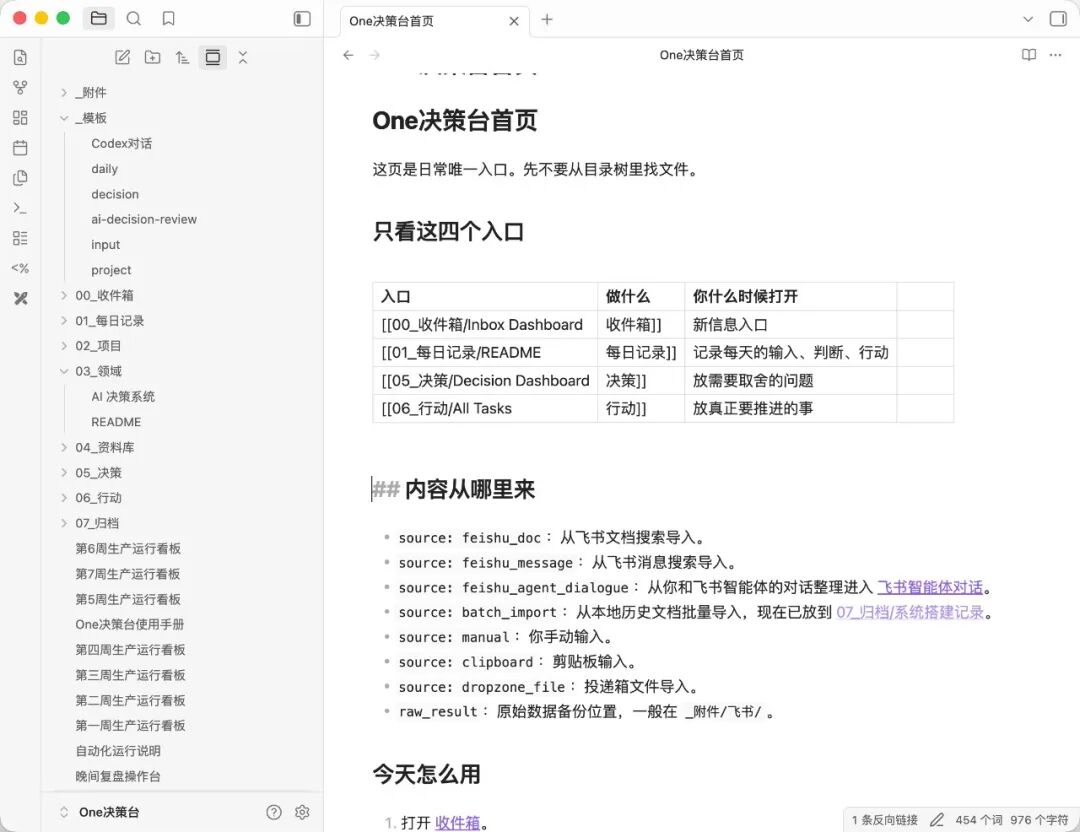 One Dashboard Concept in Obsidian
This dashboard retains only the four most core entries:
00_Inbox / Inbox Dashboard: New Information Entry
01_Daily Log / README: Record daily inputs, judgments, and actions
05_Decisions / Decision Dashboard: Place problems requiring trade-offs
06_Actions / All Tasks: Place things that actually need to be pushed forward
This structure transforms chaotic notes into clearly layered workspaces. When Hermes Agent reads these Markdowns, it doesn't get cluttered text, but structured context. This model brings three significant advantages:
- Process is fully visible: You can intuitively see which configurations, skills, and memories the Agent is using. When information is outdated or incorrect, you can easily spot it.
- Minimalist editing and feedback: If a workflow isn't performing well, you don't need to modify complex code or configurations; you just edit the corresponding Markdown file directly. The Agent will automatically apply the new version the next time it reads it.
- Natural connectivity: Obsidian's backlinks and folders aren't just for human visual appeal. When reading, the Agent can follow the links to understand the relationships between SOPs, projects, retrospectives, and long-term preferences, which is much more stable than stuffing massive amounts of information into a single prompt.
Hermes Agent: Achieving a Two-Way Closed Loop of Context
In the entire system, Obsidian is responsible for storing context that humans can understand, while Hermes Agent acts as the execution layer.
Hermes Agent can not only read, write, and search files, but also call tools, run commands, remember preferences, and solidify skills. It can also integrate into long-term workflows through Cron tasks, Gateways, and Sub-agents.
A typical closed-loop workflow is as follows:
- Obsidian stores the context (input).
- Hermes Agent reads the context and executes the task (execution).
- Hermes Agent writes the new experience generated by the task back to Obsidian (output/solidification).
You can design the following directory structure to support this closed loop:
/Second Brain
  /Projects
    customer-research.md
    competitor-tracking.md
    saas-ideas.md
  /SOP
    validate-saas-idea.md
    analyze-user-feedback.md
    weekly-market-scan.md
  /Memory
    preferences.md
    rejected-directions.md
    pricing-lessons.md
  /Skills
    customer-interview-analysis.md
    landing-page-teardown.md
When executing tasks, you no longer need to explain the background to the AI every time. You just need to issue direct instructions:
"Read the notes in my Obsidian vault related to
customer-research,competitor-tracking, andpricing-lessons, help me evaluate this vertical SaaS opportunity, and append this new finding topricing-lessons.md."
Pitfall Guide: Don't Stuff the Entire Vault into the Context
When connecting to AI, a common mistake is trying to make the Agent read the entire Obsidian vault into memory. While this seems convenient, it is actually highly dangerous. It causes the context window to expand rapidly, wastes a large amount of tokens, and old information can easily pollute new tasks, causing the Agent to get lost in irrelevant notes.
A more robust design is to adopt a two-layer memory structure:
- First Layer: Minimal Core Memory
Stores your persona, preferred reply styles, long-term disliked directions, etc. In Hermes Agent, this usually corresponds to
SOUL.mdor profile memory. - Second Layer: On-demand Loaded Notes / Skills / SOPs
These are loaded selectively only when relevant to the current task. For example:
- When researching SaaS opportunities: Only read industry judgments, exclusions, and historically validated demand signals.
- When organizing user interviews: Only read user personas, raw interviews, and willingness-to-pay records.
Practical Guide: From Minimum Viable Path to Long-Term Online Automation
Step 1: Build a Minimum Viable Product (MVP) Structure
Prepare the following three most basic types of files in Obsidian:
- Long-term Preferences:
Memory/preferences.md - Specific Projects:
Projects/customer-research.md - Reusable Processes:
SOP/analyze-user-feedback.md
Step 2: Execute the Three-Step Verification
Verify if your Obsidian has successfully entered the Agent's execution loop through the following three steps:
- Read and Summarize:
"Please read
Memory/preferences.mdandProjects/customer-research.mdin my Obsidian vault, and summarize the 10 most important rules I should follow when evaluating vertical SaaS opportunities." - Incremental Write:
"Append the demand judgment rules summarized this time to
SOP/analyze-user-feedback.md. Keep the original text and do not overwrite old content." - Closed-loop Task:
"Based on
SOP/analyze-user-feedback.mdandProjects/customer-research.md, help me organize this batch of user interviews, determine which pain points are worth turning into SaaS products, and finally append the newly learned judgment experiences back toProjects/customer-research.md."
Step 3: Deploy to a Long-Term Online Server
If your Obsidian only exists on your local computer, the execution of the Agent will be physically limited.
Keep your local device synchronized with a cloud VPS using Obsidian Sync or other synchronization methods (like Git, Syncthing). Deploy Hermes Agent on the VPS, combine it with Cron Jobs, and you can achieve automated operations:
- Every Morning: Automatically read the previous day's user feedback and update
customer-research.md. - Every Afternoon: Automatically scan competitors' pricing pages and update
competitor-tracking.md. - Every Weekend: Automatically extract payment signals and excluded directions, and update
pricing-lessons.md.
At this stage, Obsidian is no longer just a note-taking tool; it has become a long-term workbench where you and the AI Agent collaborate.
Case Study: Product Opportunity Evaluation Workflow
Taking the evaluation of a new SaaS product direction as an example, we can establish the following file structure:
Projects/saas-idea/customer-pain.md
Projects/saas-idea/competitors.md
Projects/saas-idea/pricing-signals.md
Projects/saas-idea/rejected-assumptions.md
SOP/validate-saas-idea.md
SOP/analyze-user-feedback.md
In practice, Hermes Agent will continuously write back the following dynamic information to these files:
- Which user pain points are repeatedly appearing?
- Which demands seem booming on the surface, but users are actually unwilling to pay for?
- Which competitors are only stacking features, and which channels already have people buying traffic?
- Which assumptions were overturned by new evidence, and which judgments need to be documented to avoid repeating past mistakes?
These dynamically updated contents are the true living files. With them, you don't need to retrain the AI every time you start a new conversation; the Agent will become smarter and smarter as your notes iterate.
Key takeaways
- A radical shift in context ownership: Traditional AI interactions leave the context in chat histories (temporary flows), requiring re-explanation with every new conversation. Hermes Agent + Obsidian extracts the context and places it back into a Markdown file system (assets) that both humans and Agents can read and write to, allowing experiences to be reused across tasks.
- Say no to full loading: Do not let the Agent blindly read the entire knowledge base. Adopt a two-layer structure of "core memory + on-demand loading" to ensure task accuracy and save tokens.
- Keep it minimalist, prioritize the closed loop: Don't start by building a massive life-long Second Brain right away. Start with a specific workflow (such as writing, competitor research, or operations), run through the closed loop of "reading notes -> executing tasks -> writing back experience," and then gradually expand to synchronization, VPS, and multi-agent collaboration.
- The Second Brain "grows": A true Second Brain is not built through exquisite typesetting and classification, but grows naturally when it actually starts participating in your next judgment and execution.
Learning map
Obsidian + Agent Intelligent Knowledge Base Learning Roadmap
Phase 1: Local Markdown Knowledge Structuring (Beginner)
- Mastering Markdown Basics and Bi-directional Linking: Learn how to efficiently record and connect information in Obsidian, avoid over-classification, and focus on establishing a basic "input-processing-output" pipeline.
- Building a "Decision Desk" Style Directory: Abandon complex PARA systems and establish a minimalist four-part division including Inbox, Daily Log (README), Decisions, and Actions (Tasks), transforming your note vault into a control panel.
Phase 2: Agent Context Loading on Demand (Intermediate)
- Understanding the "Living Files" Concept: Learn why you shouldn't stuff the entire knowledge base into the LLM at once, and understand layered context and Token optimization strategies.
- Designing Core Memory (Profile Memory): Establish long-term personal preference files that do not change with tasks (such as
Memory/preferences.md), serving as the Agent's top-level mental constraints. - Scoped Context Retrieval: Learn how to dynamically retrieve specific project files and SOPs based on current tasks (such as SaaS evaluation, user research).
Phase 3: Closed-Loop Automation of Execution and Writing (Advanced)
- Building Bi-directional Read/Write Flows: Practice the closed-loop process of having the Agent read SOPs to execute tasks, and automatically append new experience gained during execution (such as debunked hypotheses, new pain points) to specified Markdown files.
- Multi-Agent Collaboration and Automated Operation: Explore utilizing Cron jobs, VPS deployment, or Obsidian Sync to maintain data synchronization, enabling the Agent to automatically update industry dynamics and competitor tracking in the background.
Get hands-on — step by step
Hands-on Practice: Building Your First "Read-Write Closed-Loop" Agent Second Brain
Step 1: Prepare a Minimalist Obsidian Directory Structure
Create a new Obsidian Vault locally (or a new folder in an existing Vault), and create the following three Markdown files:
- Create
Memory/preferences.mdand write down your long-term preferences (e.g., "I prefer asset-light, high-ticket vertical SaaS directions, and dislike business models that require heavy on-the-ground sales and services."). - Create
Projects/customer-research.mdand write down some initial user interview records or pain point observations. - Create
SOP/analyze-user-feedback.mdand leave it blank, to be used for storing future analysis rules.
Step 2: Test Agent Cross-File Reading and Rule Extraction
Run your Hermes Agent (or an LLM client configured with local file read permissions), and send the following Prompt:
"Please read my personal preferences in
Memory/preferences.mdand the project observations inProjects/customer-research.mdfrom my Obsidian Vault, and summarize a set of 10 screening rules I should follow most when evaluating vertical SaaS opportunities." Check the Agent's output to confirm whether it successfully combined your defined "asset-light" preference with the actual project conditions.
Step 3: Implement Automated Write-Back to SOP
After confirming that the summarized rules are correct, send an append-write command to the Agent:
"Please append the 10 demand-judgment rules just summarized into
SOP/analyze-user-feedback.md. Note: Keep other existing content in the file and only append to the end, do not overwrite." Open your Obsidian and confirm that these rules have automatically appeared inSOP/analyze-user-feedback.md.
Step 4: Run a Complete Closed-Loop Task
Now, you can input a batch of brand-new user feedback text and command the Agent:
"Based on the rules in
SOP/analyze-user-feedback.md, please help me analyze this batch of new user feedback (paste feedback text here) and determine which pain points are worth turning into products. After completing the analysis, append the new judgment insights you learned this time (such as newly discovered screening criteria) back toProjects/customer-research.md."
Observe the whole process: Agent reads your experience -> executes the task -> distills new experience -> writes back to local files. At this point, your second brain has officially come to life!
Top 3 sources
- 1
- 2LlamaIndex 官方文档
最强大的大模型数据连接框架,包含专门针对 Obsidian Vault 的 Reader,是构建本地文件 RAG 和 Agent 读写的核心技术底座。
https://www.llamaindex.ai/
- 3LangChain Memory 模块指南
详细介绍了 AI Agent 内存管理与上下文窗口设计的最佳实践,帮助你理解如何优雅地管理长期与短期记忆。
https://python.langchain.com/v0.2/docs/concepts/#memory
Links are AI-suggested — worth a quick sanity check before diving in.