Build customer personas
7/18/2026, 11:13:14 PM · Source
Learn how to use Claude to analyze qualitative and quantitative customer feedback from multiple sources to build dynamic, data-driven customer personas and interactive journey maps.
Building customer personas traditionally requires manual, tedious review of user interviews, surveys, and support tickets to extract recurring themes. By leveraging Claude, you can analyze hundreds of qualitative and quantitative data points simultaneously to spot real behavioral trends that are easily missed when reviewing files in isolation. This guide explains how to feed Claude your data, generate interactive journey maps, and turn those insights into actionable product and business strategies.
Streamlining Persona Creation with Claude
Rather than relying on demographic assumptions or surface-level stereotypes, Claude builds personas based on how customers actually use your product. By analyzing customer behavior, pain points, and journey stages in parallel, Claude identifies true behavioral segments and exposes exactly where users struggle.
To begin, you can prompt Claude with a request like this:
I've uploaded customer feedback from different sources—could be sales call notes, support conversations, survey responses, whatever we've collected. Figure out what types of customers we have based on their actual behavior and problems.
Create an interactive artifact where I can explore each persona and see their journey. Show their goals, what frustrates them, and include actual quotes from customers. Make the artifact professionally and elegantly designed, as it will be shared with others. Focus on creating analytical and helpful content. Take time to analyze thoroughly, outline carefully, and validate your work.
Feeding Claude the Right Context
To generate personas grounded in real-world behavior, provide Claude with data that reflects authentic user interactions. Helpful resources include customer descriptions of their problems, support queries, peak assistance times, features mentioned (or ignored), and conversations comparing your product to competitors.
Required Context
Upload your raw customer research files (such as customer interview transcripts in PDF format or survey responses) and connect your CRM and customer support platforms to allow Claude to run cross-source analysis:


Optional Context
For deeper, highly complex analyses, turn on Extended Thinking. This feature gives Claude more processing time to thoroughly analyze patterns, validate insights, and spot subtle trends across all of your sources at once.
Exploring Claude's Output
Once it analyzes your data, Claude generates an interactive artifact (such as a Customer Persona Explorer) that segments your audience based on behavioral patterns.
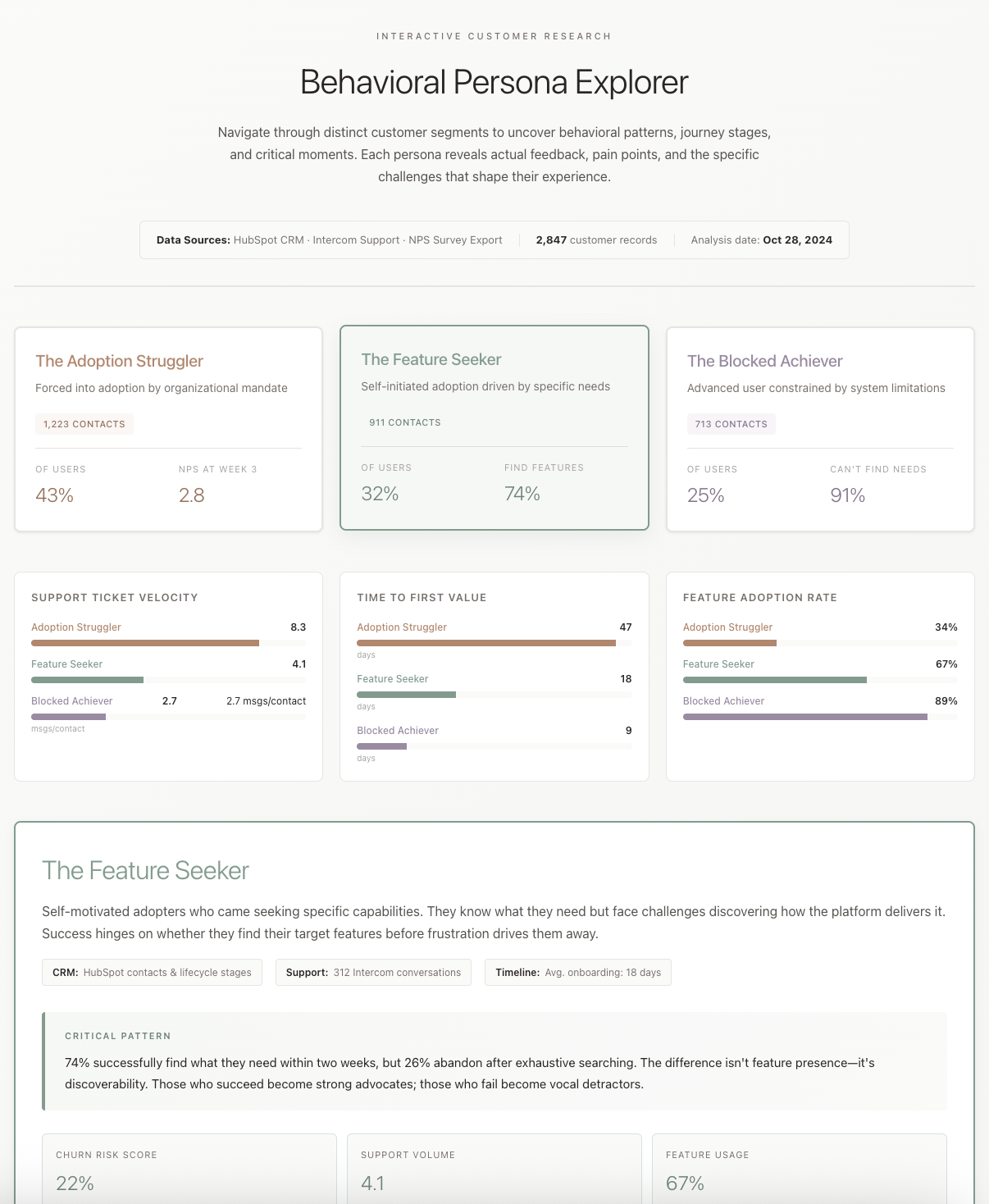 Persona Explorer
You can view an example of this deliverable here: View your Customer Persona Explorer (or Open artifact in new window).
This interactive artifact breaks down your users into distinct behavioral types. Using the tool, you can:
- Identify who each persona is and what they are trying to accomplish.
- Track their journey timeline from first contact through daily active use.
- Click through individual journey stages to reveal specific, real-world customer quotes and pain points.
- Understand exactly where and why users get stuck.
Actioning Your Personas with Follow-Up Prompts
Once Claude has generated your core behavioral personas, you can run follow-up prompts to translate these insights into executive deliverables, revenue strategies, and immediate product updates.
1. Create a Written Report for Leadership
Convert the visual, interactive artifact into a structured, narrative-driven document that leadership can digest asynchronously.
Create a written report from your analysis that I can share with our executive team. Include the behavioral segments you found, what each segment needs, journey friction points, and specific recommendations for our product roadmap.
2. Identify the Highest-Value Revenue Opportunity
Focus your product resources where they will have the greatest financial impact by asking Claude to evaluate and prioritize segments.
Which segment represents the biggest revenue opportunity if we optimized the product experience for them? Walk through what we'd need to change.
3. Surface Quick Support Wins
Quickly reduce support ticket volumes and resolve common pain points for your largest customer segment with immediate product fixes.
For the largest segment, pull the most common support ticket themes and show me which product changes would eliminate the top three issues.
Tips, Tricks, and Troubleshooting
- Review Full Files, Not Just Chat Previews: Claude’s in-chat window displays a simplified preview of the generated work. Before requesting edits, make sure to open the actual artifact, Word document, or spreadsheet to review the full layout, formatting, and interactive elements.
- Avoid Stale Data via Live Integrations: Static file uploads only capture a single moment in time. By using the Model Context Protocol (MCP) to Connect Claude directly to tools like Google Drive, Zendesk, or Intercom, your personas will automatically stay updated without manual exporting.
- Utilize Projects for Long-Term Development: For complex projects that evolve over weeks or months, set up a workspace using Claude Projects. This keeps your data sources, prior chats, and customer insights in one place using Project Knowledge and Memory. When you upload new interviews down the line, Claude iterates on existing context instead of starting from scratch.
Key takeaways
- Behavior Over Demographics: Claude constructs customer personas based on real product usage, support tickets, and direct feedback rather than static demographic assumptions.
- Interactive and Auditable Journeys: The generated Persona Explorer displays clickable journey stages backed by actual customer quotes, allowing you to trace insights back to raw data.
- Direct CRM & Support Integrations: Connecting HubSpot and Intercom feeds live, multi-source context directly to Claude, keeping user patterns current.
- Seamless Translation to Action: Use simple follow-up prompts to instantly convert interactive findings into written executive reports, revenue prioritize roadmaps, or support ticket resolutions.
Learning map
Stage 1: Customer Data Fundamentals (Beginner) Goal: Prepare raw feedback files for ingestion and understand behavior-driven segmentation. Work with varied qualitative inputs such as CRM logs, raw survey entries, and transcript files to learn how AI clusters behaviors differently than simple demographics. Learn how Claude can ingest unstructured inputs to spot friction patterns. ### Stage 2: Prompting & Interactive Visualization (Intermediate) Goal: Instruct Claude to construct rich, clickable persona maps. Master Artifact prompting to guide Claude to build dynamic visual persona explorers instead of static bullet points. Integrate customer direct quotes into specific touchpoints on the interactive journey timeline. ### Stage 3: Integrations & Persistent Projects (Competent) Goal: Automate and scale customer research over time. Connect direct customer tools (HubSpot, Intercom) to feed continuous live customer context. Build a persistent workspace using Claude Projects to iteratively refine your customer archetypes as new feedback flows in.
Get hands-on — step by step
- Gather Customer Feedback Files: Prepare raw data like survey results, interview transcripts, or exported CSVs containing customer support queries. 2. Establish a Claude Project Workspace: Log in to Claude, navigate to 'Projects' in the menu, and create a new project called 'Customer Research Portal'. 3. Connect Data Sources: Upload your prepared files to the project dashboard. If you use Intercom or HubSpot, enable these integrations within Claude to synchronize live customer activity. 4. Run the Artifact Persona Prompt: Enable 'Extended Thinking' in the chat, then enter this prompt to build the visualization: 'I have uploaded actual customer interactions. Thoroughly analyze these files to identify the distinct behavioral archetypes of our users. Build an interactive Persona Explorer Artifact that charts their goals, pain points, and specific stage-by-stage journey timeline complete with real quotes.' 5. Extract Strategic Deliverables: Use follow-up prompts to convert your interactive explorer into standard business assets: 'Draft a structured report based on these personas identifying the top 3 friction points and corresponding recommendations for our product roadmap.'
Top 3 sources
- 1Anthropic Claude Artifacts Guide
Learn how to use Claude's Artifacts to view, interact with, and refine rich UI designs and interactive visualizations in real time.
https://support.anthropic.com/en/articles/9487375-using-artifacts-on-claude-ai
- 2Claude Projects Overview
The official documentation explaining how to group conversations, maintain persistent data contexts, and build project-specific knowledgebases.
https://support.anthropic.com/en/articles/9517075-what-are-projects
- 3Anthropic Developer Documentation
Access official engineering docs to learn more about system prompting, context windows, and robust text-processing abilities.
https://docs.anthropic.com
Links are AI-suggested — worth a quick sanity check before diving in.