Claude Code: Advanced Usage Experience Sharing
7/12/2026, 11:09:23 PM · updated 7/12/2026, 11:11:43 PM
This article shares advanced experience in upgrading Claude Code from "casual questioning" to a "standardized engineering workflow," helping developers build stable, high-success-rate AI collaboration habits through four core workflows and command combinations.
Going from "Knowing How to Use It" to "Using It Smoothly" Relies on Workflow
Many people find Claude Code extremely powerful when they first start using it.
But as you go further, what really sets people apart is not "knowing what it can do," but "whether you have a stable workflow."
The most common state for beginners is:
- Asking whatever comes to mind
- Asking Claude to make direct changes right off the bat
- Not verifying after changes are made
- Treating every round like starting from scratch
Advanced users, on the other hand, are more like "leading Claude through a structured process to push tasks forward."
First, Remember One General Principle
The role Claude Code is best suited for is not "writing everything for you all at once," but rather:
- Helping you quickly understand the project
- Helping you break down implementation plans
- Helping you execute repetitive or high-density work
- Helping you verify and review
In other words, the smoothest way to use it is usually not:
Throwing a massive goal directly at Claude and waiting for a miracle to happen
But rather:
Letting Claude understand first, then plan, then execute, and then verify
The Most Recommended Advanced Workflow in One Diagram

Why This Workflow Works So Well
Because it simultaneously solves several common problems:
- Making messy, impulsive changes right from the start
- Making changes but not verifying them
- Changes being too scattered to clearly explain even to yourself
- Lacking a code review perspective after completing the work
- Mixing analysis, implementation, review, and commit in a single session, making it impossible to tell them apart in the end
In other words, this isn't "more troublesome"—it's "more stable."
A Highly Effective Task Template
You can directly assign tasks to Claude Code like this:
First analyze which files this requirement will involve, provide an implementation plan and risk points, and do not modify the code yet.

Start making modifications after confirmation. Once modified, run the build and related tests.

Finally, check for potential issues from a code review perspective.
The benefit of this kind of prompt is that it breaks the task down into:
- Understanding
- Planning
- Execution
- Verification
- Review
This is much stronger than "help me build this feature."
Workflow 1: New Feature Development
This is the most common and highly recommended workflow for long-term use.
Applicable Scenarios
- Adding new pages
- Adding an API endpoint
- Adding new capabilities to existing modules
- Needing to modify multiple files, but with relatively clear boundaries
Recommended Steps
- Have Claude understand the relevant modules first
- Output the implementation plan and the files involved
- Start modifying code after confirmation
- Run builds and tests
- Perform a review
- View diff and commit
Accompanying Commands
/plan/diff/review/commit
Recommended Way of Asking
First take a look at which files this feature will affect, and provide a minimal implementation plan. Do not modify the code yet.

Start modifying after I confirm. Once modified, run the build and related tests, and finally do a review.
Corresponding Flowchart

Workflow 2: Bug Fixing
When fixing bugs, many people tend to let Claude start modifying things right away.
But a more reliable way is actually to "locate first, then fix, then reproduce and verify."
Applicable Scenarios
- Page errors
- API anomalies/errors
- State confusion/mismatches
- Flaky/occasional bugs in a specific scenario
Recommended Steps
- Have Claude restate the problem and the troubleshooting direction first
- Search the relevant call chain and error locations
- Provide a root cause hypothesis
- Explain the fix first, then touch the code
- Verify in a way that closest mimics the real issue
Recommended Way of Asking
Do not modify the code yet. First help me locate which layers this bug might be in.

List the most likely root causes, relevant files, and fix ideas. Modify only after confirmation.

After modifying, please try your best to reproduce and verify if the issue is truly resolved.
Why This is Better Than "Fixing Directly"
Because bug fixing dreads two things above all:
- Fixing the wrong place
- Not verifying the actual problem after the fix
Workflow 3: Refactoring and Code Cleanup
These types of tasks are the easiest to spiral out of control, because the goals are often not as concrete as "building a feature."
Applicable Scenarios
- Files too large and needing split
- Too much duplicated logic
- Messy naming and structure
- Unclear boundaries between components, services, and utility functions
Recommended Steps
- Have Claude evaluate the current structural issues first
- Clarify "which specific type of refactoring to do this time"
- List the splitting plan first
- Modify in batches; do not refactor the entire system in one go
- Verify each batch
Recommended Way of Asking
First evaluate the most major structural issues in this module, and give me only the 2 to 3 most worthwhile refactoring points.

Do only the minimal round this time, and do not incidentally modify too much unrelated content.

After modifying, explain what specific responsibilities were split, and run verification.
The Most Important Rule in Refactoring Tasks
Be sure to limit the scope.
Otherwise, Claude can easily "incidentally optimize" a massive pile of extra changes.
Workflow 4: Taking Over an Unfamiliar Project
This scenario is particularly suitable for Claude Code, as it is highly skilled at helping you build a cognitive map first.
Applicable Scenarios
- Taking over a repository for the first time
- Needing to temporarily fix something in someone else's project
- You are unfamiliar with an old company project
- Wanting to quickly find out where a certain feature is implemented
Recommended Steps
- Have Claude build a project map first
- Then lock onto the directories and files most relevant to the current goal
- Then proceed to planning and modification
Recommended Way of Asking
Help me quickly understand this project first:

1. What is the tech stack?
2. What are the main directories responsible for?
3. Which files is this requirement most likely to involve?

Do not modify the code yet.
A Highly Useful Advanced Action
Have Claude write a CLAUDE.md file for you while it's at it.
This way, when you come back a second time, the project won't feel so unfamiliar.
When to Switch to Plan Mode
Particularly suitable for the following scenarios:
- Changes span across multiple modules
- Involves database, permissions, and API interactions
- You haven't fully figured out the concrete implementation yourself
- You want Claude to provide a complete step-by-step plan first
- You are worried it will directly modify the code without fully thinking it through
A Simple Rule of Thumb
If you already feel in your mind that "this task is a bit big," then /plan first.
The biggest value of Plan Mode is not being more formal, but helping you turn "ideas" into "execution steps."
Command Combinations Frequently Used by Advanced Users
Combination 1: Plan First, Implement Later
/plan
Suitable for kicking off large tasks.
Combination 2: Check Changes Immediately After Completion
/diff
Suitable for:
- Seeing what Claude actually modified
- Avoiding relying solely on its verbal summary
Combination 3: Review After Modifying
/review
Suitable for:
- Looking over bugs, risks, and missing tests one more time before committing
Combination 4: Long-Session Context Management
/context
/compact
Suitable for:
- The conversation is already very long
- You feel Claude is starting to "forget things"
- Wanting to continue the current task but not wanting to start a completely new session
Combination 5: Final Commit Closed Loop
/diff
/review
/commit
This is basically a complete wrap-up pipeline.
6 Habits of Advanced Users
1. Plan Large Tasks First
Don't let Claude rush in and start modifying directly.
2. Explicitly Require Verification
Once modified, always have it run build, test, or key commands.
3. Regularly Write CLAUDE.md
Document long-term constraints here instead of dictating them verbally every time.
4. Actively Limit the Scope of Changes
For example, explicitly say:
- Don't refactor yet
- Only fix this bug
- Do not incidentally modify unrelated files
- Provide a minimal implementation first
5. Frequently Review /diff
Don't just look at Claude's summary; check the actual changes.
6. Break a Long Task into Multiple Rounds
Resolving one clear goal per round is much more stable than finishing the entire requirement in one breath.
A Few Very Common Advanced Pitfalls
1. Dragging Out Conversations When They Get Too Long
Symptoms:
- Claude starts giving irrelevant answers
- Forgetting previously confirmed constraints
- Modifications become increasingly drift/unfocused
Solution:
- Use
/contextto check usage - Use
/compact - Start a new session when necessary and re-establish goals
2. Failing to Restrict "Don't Modify the Code Yet"
Symptoms:
- You originally wanted to discuss plans first
- Claude starts modifying right away
Solution:
Explicitly write:
Do not modify the code yet, only analyze and provide a plan.
3. Vague Verification Requirements
Symptoms:
- Claude claims "already completed"
- But actually skipped running key verifications
Solution:
Be specific about verification actions:
- Run
npm run build - Run related tests
- Launch the local page to verify
- Provide failure outputs
4. Treating Claude as the Sole Judge
Claude can help you push tasks forward, but whether to ultimately commit, go live, or accept a plan is still up to you.
The point of an advanced workflow is not "completely letting go," but "letting Claude help you form a reliable closed loop faster."
A Universal Workflow I Most Highly Recommend
If you don't want to memorize too much, sticking to this one set is enough:
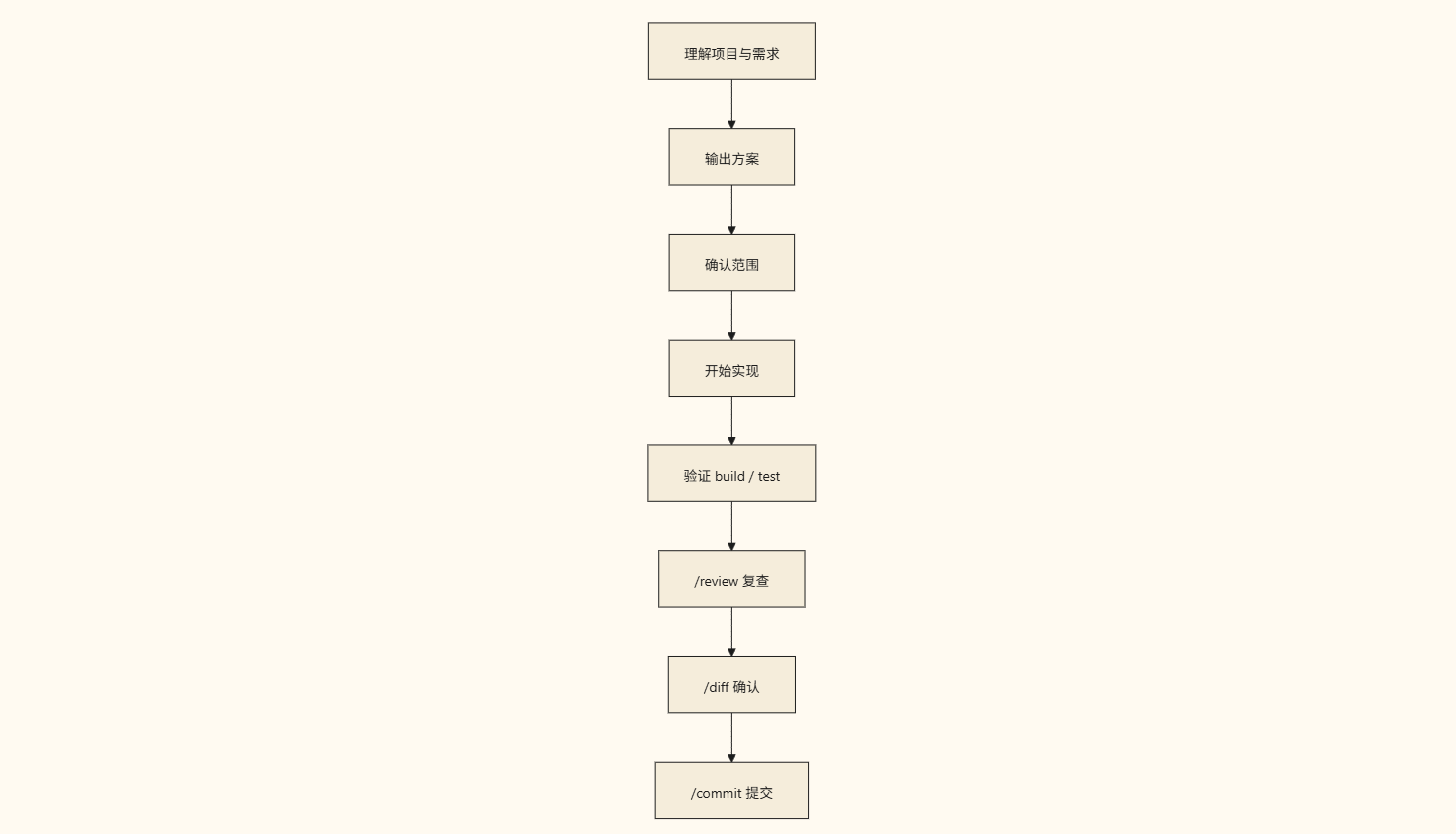
If you follow this rhythm every time, the stability of Claude Code will improve significantly.
Summary
The core of an advanced workflow is not being more complex, but more rhythmic:
- Understand first
- Then plan
- Then execute
- Then verify
- Finally, review and commit
Once you build this habit, the value of Claude Code will be much higher than "asking whatever comes to mind."
It will transform from "a very powerful AI tool" into "an engineering partner truly integrated into your development process."
Learning map
Phase 1: Foundation and Environment Readiness
- Master Basic CLI Commands: Learn to initialize using the Claude Code CLI, and understand basic built-in slash commands such as
/plan,/diff, and/reviewto lay the foundation for engineering interaction. - Local Environment Integration: Ensure the local Git repository and test/build chains are fully configured, which is a prerequisite for the AI to execute the verification closed loop.
Phase 2: Establishing Standardized Workflows
- Practice "Plan First, Execute Later": Stop the "one-shot" style of querying; enforce the use of
/planor "don't modify code yet" constraints to improve the feasibility of the plan. - Verification and Review Closed-Loop: Learn to combine
/diffto review code changes and have Claude proactively run builds or test cases.
Phase 3: Multi-Scenario Engineering Practice
- Bug Fixing and Troubleshooting Flow: Master the four-step bug fixing method: "Locate Root Cause -> Confirm Approach -> Hands-on Fix -> Reproduce and Verify".
- Controlled Refactoring Practice: Learn how to limit the scope of changes and verify in batches to prevent Claude from over-diverging during refactoring.
- Project Cognitive Map Construction: Let Claude automatically organize the technology stack and directory structure in new projects, and solidify a
CLAUDE.mdfile.
Phase 4: Deep Context Governance
- Long Session Maintenance: Learn to use
/contextto evaluate token usage and/compactto compress context, preventing the AI from forgetting things or giving irrelevant answers. - Team Engineering Collaboration: Share the solidified
CLAUDE.mdconstraints with the team to achieve standardized development specifications for human-AI collaboration.
Get hands-on — step by step
- Initialize the test environment: Open the terminal, enter an existing Git project repository, run
npm install -g @anthropic-ai/claude-codeto install the latest version, and then runclaudeto start the interactive interface. - Perform non-destructive analysis: Send the task to Claude and use an upfront constraint: "Please help me analyze [specific requirement/bug], locate the affected files first, provide a minimal implementation plan, and be careful not to modify any code yet."
- Switch to planning mode: Enter
/planin the session. Based on the implementation plan output by Claude, check the file paths and logical changes item by item to see if they meet expectations. - Coding and multi-dimensional verification: After Claude starts coding and declares it is complete, enter clear instructions: "Please run the test command of the current project (e.g.,
npm run test) and the build command (e.g.,npm run build) in the local terminal to ensure there are no errors in the changes." - Conduct final code review: Use
/diffto view and manually confirm the actually modified files. After confirming they are correct, run/reviewto let Claude perform a final review from the perspective of coding standards, and finally run/committo complete the task loop.
Top 3 sources
- 1Claude Code Official Guide
Anthropic 官方关于 Claude Code 的使用指南、安装步骤、指令集和架构原理介绍。
https://docs.anthropic.com/en/docs/agents-and-tools/claude-code
- 2Claude Code on npm
Claude Code 官方 npm 包托管页面,可查询最新的安装命令、版本更新和依赖要求。
https://www.npmjs.com/package/@anthropic-ai/claude-code
- 3Anthropic Cookbook
Anthropic 官方提供的实用代码和工作流示例库,包含大量提示词技巧与 Agent 进阶实践。
https://github.com/anthropics/anthropic-cookbook
Links are AI-suggested — worth a quick sanity check before diving in.