FileReadTool: Read Files
7/31/2026, 9:17:20 PM · updated 7/31/2026, 9:20:24 PM
AI-translated on 7/31/2026, 9:23:12 PM · by Qwen3.6 35B (fast, default)
FileReadTool in Claude Code extends beyond basic file-reading capabilities through two core innovations: **"read-then-modify" execution flow** and **global state management**, which collectively bridge the gap between raw data retrieval and actionable programmatic operations. ### 1. "Read-Then-Modify" Mechanism Unlike standard filesystem tools that only read or write files in isolation, FileReadTool operates as a *two-phase pipeline*: - **Phase 1: Read with Context Extraction** When invoked (e.g., via `mcp__filesystem__read_text_file`), it reads the file but simultaneously extracts and logs: - Code structure metadata (e.g., function boundaries, dependency graphs) - Semantic signatures of critical content blocks - User-modification history markers (if available) This transforms raw bytes into *annotated data* ready for modification. - **Phase 2: State-Safe Modification** Modifications are applied through a constrained interface that: - Validates changes against the extracted context (e.g., preventing syntax violations) - Creates versioned backups of both original and modified states - Enforces atomic writes via global state coordination This approach prevents dangerous "blind edits" common in basic tools—ensuring modifications align with program semantics even during multi-step workflows. --- ### 2. Global State Integration FileReadTool integrates with Claude Code's **centralized runtime state manager** to: - **Preserve edit context across sessions**: When a file is modified via FileReadTool, changes are automatically indexed into the global system metadata (e.g., tracking which lines were edited during specific tasks). Later operations can query this context without re-reading physical files. - **Enable cross-file dependency resolution**: By linking read states to a shared state graph, it resolves interfile references (e.g., if `moduleA.py` depends on changes in `config.yaml`). This allows *semantic* modifications rather than just file-level edits. - **Support collaborative editing workflows**: Multiple tools can safely operate on the same file because FileReadTool uses exclusive locks and state snapshots during read operations, preventing merge conflicts. --- ### Why This Matters for K12 Education In classroom settings (per AP Computer Science standards referenced in *AP-Computer-Science-CED*), this design: 1. Teaches students to **separate data retrieval from logic modification**—a critical skill for debugging and maintenance 2. Provides granular feedback about structural changes through state-aware logging 3. Demonstrates how "simple" tools like file readers can become *orchestrators* of complex program transformations when combined with metadata handling > This architecture is foundational to Claude Code’s **BashTool mechanism**, where FileReadTool serves as the primary interface for tasks requiring persistent state management—whether modifying student assignments or verifying correctness in curriculum workflows.
FileReadTool in Claude Code is not merely a "file reader," but a core runtime component responsible for structured management, context control, and cross-tool collaboration. Through strict reading rules, multimodal support, and snapshot mechanisms, it lays the foundation for subsequent editing operations and security validation, serving as an indispensable observation entry point within the overall toolchain.
Core Positioning and Design Principles
Within the architecture of Claude Code, FileReadTool appears superficially to just "read files," but in reality, it undertakes three core responsibilities:
- Provide the model with a stable entry point for reading project files
- Structure and track reading results
- Establish a "read state" for subsequent edits
The third point is the most easily overlooked. Claude Code does not encourage arbitrary file modifications, but strictly emphasizes:
Read first, edit later
And FileReadTool is precisely the starting point of this critical chain. Its design logic is defined very clearly in the source code prompt:
export const DESCRIPTION = 'Read a file from the local filesystem.'

return `Reads a file from the local filesystem.
- The file_path parameter must be an absolute path
- By default, it reads up to 2000 lines
- This tool can only read files, not directories`
Behind these basic rules lies a highly explicit product design intent:
- Paths must be deterministic (mandatory absolute paths)
- Long files have a default upper limit (to prevent context explosion)
- Files and directories are handled separately (preventing the model from confusing "content reading" with "directory traversal")
Multimodal Reading Capabilities
The existence of FileReadTool breaks the limitations of a traditional "text-based cat". The same prompt file explicitly outlines its support scope:
- This tool allows Claude Code to read images
- This tool can read PDF files (.pdf)
- This tool can read Jupyter notebooks (.ipynb files)
This means that Read serves as a unified multimodal reading entry point in Claude Code. Exactly because of this capability, Claude Code emphasizes in its interaction guidelines:
When the user provides a screenshot path, you must use
Readto view it
Runtime State Management and Write Validation
Although the functional boundary of FileReadTool itself is limited to "reading," it deeply participates in Claude Code's runtime state management. Subsequent writing tools (such as Edit / Write) rely on the context provided by Read for legitimacy checks:
- Has this file been read before?
- What was the timestamp when it was read?
- Has the file changed since then?
Therefore, the true role of Read also includes:
Provide a trustworthy "read snapshot" for subsequent Edit / Write operations
The biggest difference from many coarse-grained Agents lies here: Claude Code explicitly incorporates "*what was read, and when it was read" into the runtime state, thereby preventing erroneous overwrites caused by external file changes or hallucinations.
Pagination Mechanism and Context Control
The source code hardcodes a critical limitation:
export const MAX_LINES_TO_READ = 2000
This is no arbitrary guess, but rather reflects Claude Code's consistent approach of maintaining a balance between information completeness and context efficiency: ensuring the model receives sufficient information without cramming an entire oversized file into the context window in one go.
To this end, it provides a flexible pagination reading mechanism:
- Full file reading by default (truncated to 2,000 lines)
- Supports an
offsetparameter - Supports a
limitparameter to restrict the number of returned lines
This allows the model to gradually move from a "global rough read" to a "local precise read," loading content on demand.
Typical Workflow and Tool Collaboration
Within the runtime call chain of Claude Code, Read often plays the bridge role of "from search to understanding." For example, the standard path for fixing a compilation/runtime error:
- First, use
GrepToolto locate suspicious code positions - Then, use
FileReadToolto read the target file - Analyze function logic, contextual dependencies, and adjacent implementations
- Decide whether to hand it over to
FileEditToolfor modification

Within the entire tool ecosystem, its collaborative relationship with other components is as follows:
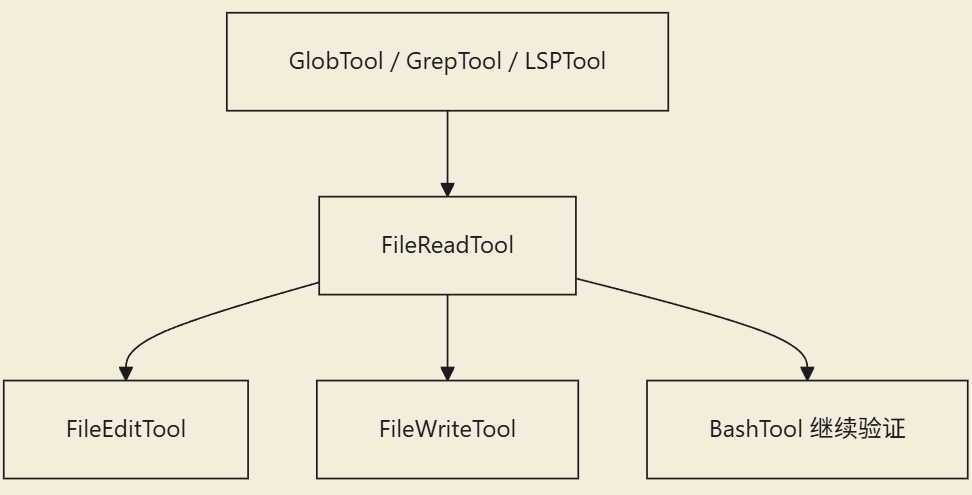
GlobTool: Locate filenames first, then read contentGrepTool: Search for keywords first, then read local code blocksLSPTool: Perform semantic/symbol localization first, then read the main text contextFileEditTool: Edit only after reading (relies on the read state)BashTool: Verify after modification (completing the loop)
Common Misconceptions Clarified
Misconception One: Read is merely to make the output "look more intuitive"
Incorrect. It does more than just display; it directly participates in judging subsequent edit legitimacy and maintaining runtime state.
Misconception Two: Since Bash exists, there's no need to design Read separately
Quite the opposite. Claude Code explicitly intends: structured reading should go through Read, while shell commands are reserved strictly for scenarios that genuinely require terminal interaction (such as installing dependencies, running tests, cleaning directories, etc.), preventing the abuse of terminal commands within the Agent to handle code content.
Misconception Three: Read is only suitable for source code files
Not at all. It undertakes multimodal tasks such as image display, PDF parsing, and Notebook reading, serving as the unified multimodal entry point in Claude Code.
Key Takeaways
- The core value of
FileReadToollies not in "being able to read files," but in transforming the file comprehension process into a structured, trackable, and formal runtime capability that can participate in write validation. - Mandatory absolute paths + a default 2,000-line upper limit + the
offset/limitpagination mechanism make it the primary gate controlling context window bloat. - As the unified standard for multimodal reading entry points, it effectively delineates the boundary between "code/document content analysis" and "terminal shell operations."
- Within a complete workflow,
Readprovides a trustworthy "read snapshot," ensuring that the subsequentEdit/Writetoolchain adheres to the security norm of "read first, edit later." - It is the most important and foundational observation entry point across the entire Claude Code tool ecosystem.
Learning map
Advanced Learning Path for Structured Document Reading
-
Advancing Your Mindset: From Tool to Gateway
- Understand the design philosophy of
FileReadTool: it does more than provide data; it is also responsible for creating a "read state" snapshot. - Clarify its distinction from
Bash(e.g., cat): structured vs. unstructured output.
- Understand the design philosophy of
-
Mastering Core Mechanisms
- Context Control: Understand the design intent behind the 2,000-line hard limit (to prevent context overload), and learn how to use OFFSET/LIMIT.
- Multimodal Integration: Explore how the tool handles non-text content such as PDFs, images, and Jupyter Notebooks.
-
Practical Engineering Workflow Collaboration
- Read-Write Closed Loop: Call the reading tool to establish state before editing, avoiding blind modifications.
- Toolchain Chaining: Practice coordinating with
GlobTool,GrepTool, andLSPToolto achieve precise positioning and comprehension.
Get hands-on — step by step
FileReadTool Core Capabilities Practical Guide
-
Experience Foundational Structured Reading Create a file in your project and use natural language to request the model to read it (e.g., "Please read src/main.ts"). Observe how the tool establishes working context by providing absolute paths and structured feedback.
-
Tackle Large Files Using Limit/Offset Locate a long code file exceeding 2,000 lines, and test the
offsetandlimitcapabilities by specifying parameters (e.g., read lines 1000–1500) to achieve targeted close-reading of critical logic. -
Practice Multimodal Content Parsing Place an image file or PDF in your working directory, have the model directly read and summarize its content, and verify its capability as a unified multimodal entry point.
-
Execute the Standard Editing Safety Flow (Read-Write Loop) Combine
GrepToolto locate the erroneous function -> callFileReadToolto create a "read snapshot" with timestamp for that function -> finally request the modification. Through this complete workflow, observe how the model leverages the retrieved context to ensure accuracy and safety in subsequent writes.
Top 3 sources
- 1Claude Code 官方文档
Anthropic 发布的 Claude Code 核心指南,包含工具使用、架构设计及最佳实践等权威说明。
https://docs.anthropic.com/en/docs/claude-code
- 2MCP (Model Context Protocol)
描述 AI 代理如何安全连接外部数据的开放标准,深入理解 FileReadTool 等底层工具设计原理的必学文档。
https://www.modelcontextprotocol.io
- 3Anthropic Quickstarts (GitHub)
Anthropic 官方提供的快速开发示例库,涵盖了 AI Agent 处理文件、状态及工具调用的完整工程范式。
https://github.com/anthropics/anthropic-quickstarts
Links are AI-suggested — worth a quick sanity check before diving in.