LSPTool: Language Service Access
8/2/2026, 6:35:06 PM · updated 8/2/2026, 6:35:40 PM · Source
AI-translated on 8/2/2026, 6:37:05 PM · by Qwen3.6 35B (fast, default)
LSPTool unifies and encapsulates the IDE Language Server Protocol into an Agent tool, enabling Claude Code to advance from text-based search to semantic-level code understanding.
It Gives Claude Code IDE-Level Code Intelligence
The significance of LSPTool lies not in "adding yet another search tool", but in:
Claude Code is no longer limited to text search; it can invoke a language server for semantic-level understanding.
This enables it to:
- go to definition
- find references
- hover
- document symbol
- call hierarchy
In other words, it already approaches the "code intelligence" layer found in an IDE.
Key Source Code
tools/LSPTool/LSPTool.ts:
const inputSchema = z.strictObject({
  operation: z.enum([
    'goToDefinition',
    'findReferences',
    'hover',
    'documentSymbol',
    'workspaceSymbol',
    'goToImplementation',
    'prepareCallHierarchy',
    'incomingCalls',
    'outgoingCalls',
  ]),
  filePath: z.string(),
  line: z.number().int().positive(),
  character: z.number().int().positive(),
})
This shows that LSPTool is not a single API, but a unified entry point for an entire suite of code intelligence operations.
Call Chain
Model needs semantic-level understanding > LSPTool > Check file & permissions > Connect to LSP manager > Issue requests for definition/references/hover, etc. > Format output and return to main thread.
Why It Ranks One Level Above GrepTool
The essential difference between the two is:
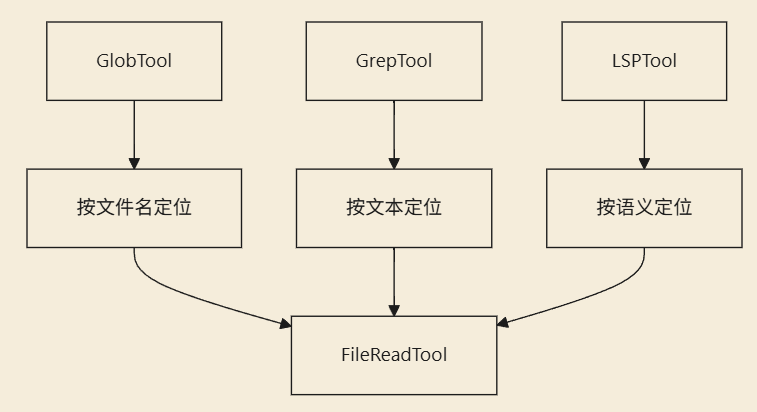
GrepTool: string matchingLSPTool: language semantics
For example, when looking up a function definition:
GrepToolmight match comments, strings, or similar namesLSPToolcan truly ask the language server "where is this symbol defined"
So it resembles IDE capabilities more closely than terminal search capabilities.
It Also Has Strict Input and File Validation
In the source code, beyond just checking parameter formats, it also verifies:
- whether the file exists
- whether the path is a regular file
- large file limits
- whether the current LSP is connected
This shows it's not a "try to call it if possible" utility, but a fairly rigorous entry point for semantic operations.
A Diagram of Its Relationship with Other Search Tools
Summary
The most noteworthy aspect of LSPTool is:
Claude Code is no longer satisfied with text search; it has officially integrated the language server capabilities from an IDE into its agent toolchain.
Learning map
LSPTool Learning Path
Phase One: Foundational Concepts
- Understand the core concepts and architecture of the Language Server Protocol (LSP)
- Grasp the relationship between LSP and language servers
- Understand the semantic meanings of operations such as
goToDefinition,findReferences, andhover
Phase Two: Comparative Analysis
- Compare the differences between GrepTool (string matching) and LSPTool (semantic understanding)
- Know when to use which search tool
- Understand the value of LSPTool's unified operation interface
Phase Three: Source Code Review
- Study the inputSchema of
LSPTool.ts(Zod schema design) - Learn about the list of supported operation types and their purposes
- Analyze security mechanisms such as file validation, path verification, and large file limits
Phase Four: Call Chain Understanding & Practical Application
- Master the request chain from LSPTool → LSP Manager → Language Server
- Practice configuring project-level language server connections
- Coordinate GrepTool and LSPTool appropriately within agent workflows
Phase Five: Advanced Extensions
- Explore advanced operations such as Workspace Symbol and Call Hierarchy
- Compare LSP capability differences across different languages (TypeScript/Go)
- Follow future trends of agent toolchains integrating IDE capabilities
Get hands-on — step by step
- Environment preparation: Install Claude Code and confirm that your project has the appropriate language server configured (for example, install typescript-language-server for a TypeScript project or gopls for a Go project).
- Launch the LSP connection: Run Claude Code from the project root directory so that the language manager detects and connects to the project's language server.
- Explore the inputSchema: Open the
tools/LSPTool/LSPTool.tsfile, read through the Zod schema definition, and understand the meaning of the four required parameters:operation,filePath,line, andcharacter. - Comparison test — locate a function definition:
- Use GrepTool to search for a function name and observe that the results may contain noise from comments and similar names;
- Use LSPTool's
goToDefinitionoperation, passing in the same function signature, and observe that it returns only accurate results.
- Test the hover functionality: Pass a variable's path, line number, and column into LSPTool to trigger the hover operation, then check the type and documentation information output;
- Test findReferences: Pass the target symbol's path and location to retrieve the complete list of all references;
- Explore Call Hierarchy: Use
prepareCallHierarchyalongsideincomingCalls/outgoingCallsto view a function's call relationship graph; - Understand security validation: Search through the LSPTool source code for file-existence checks, regular-file verification, and large-file-limit logic to understand its defensive design;
- Write scheduling strategy notes: Based on different project scenarios (e.g., finding definitions during debugging, checking references during refactoring, viewing hover information while reading code), record when to prioritize calling LSPTool over GrepTool;
- Summary and sharing: Compile what you've learned into a technical note on "how Agent toolchains can draw from IDE capabilities."
Top 3 sources
- 1Language Server Protocol 官方规范
LSP 协议的定义文档,详细介绍所有操作类型、消息格式和传输机制,是理解语言服务生态的权威参考。
https://microsoft.github.io/language-server-protocol/
- 2TypeScript Language Server GitHub 仓库
TS LSP 的实现源码,了解 Claude Code 在 TS/JS 项目中使用的语言服务器内部机制。
https://github.com/microsoft/TypeScript/tree/main/src/server
- 3
Links are AI-suggested — worth a quick sanity check before diving in.